6
EN
AMIRON 300 — True Wireless Earphones
Pairing
Before you use AMIRON 300, you mu connect it to a
mobile phone or other Bluetooth®-enabled device. The
connection procedure may dier between the various
devices.
� Please refer to the operating inructions of the
device to which you wish to connect the AMIRON 300.
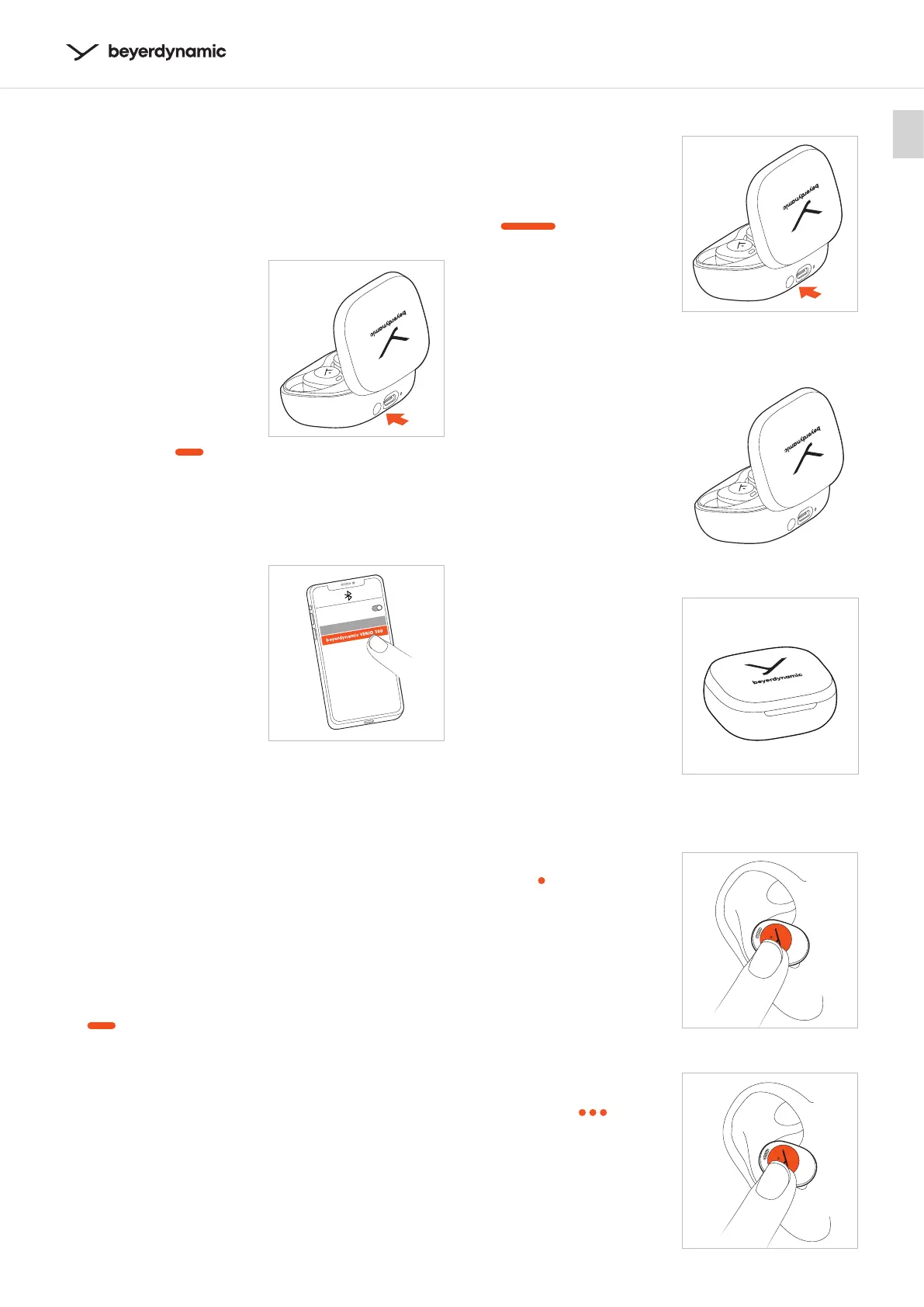
1 AMIRON 300 automatically
enters paring mode when
the charging case is open.
AMIRON 300 can also be
put into pairing mode by
the following options:
1. Put both earphones into
the charging case.
2. Press and hold the
pairing button (next to
the USB po) for
5 seconds (
) until
the LEDs of the
earphones flash red
and white alternately .
2 Select “beyerdynamic
AMIRON 300” from the
pairing li of the playback
device.
.
Notes
� When you open the charging case for the fir time,
AMIRON 300 will be automatically in pairing mode.
� When you place the earphones back into the
charging case and close the lid, they will disconnect
automatically.
� The earphones will connect to the la connected
device when you open the charging case.
� If your earphones are connecting to a device and
you want to add a new device, place the earphones
into the charging case. Keep the lid open, press and
hold the button of the charging case for 5 seconds
(
) to put the earphones into the pairing mode.
Select “beyerdynamic AMIRON 300” in the pairing li
on the new device. The earphones can connect to
two devices at the same time.
� When the earphones are beyond Bluetooth® pairing
diance, they will be disconnected. If they are back
in reach within 3 minutes, they will automatically
reore the connection, otherwise you have to
connect manually.
2
Delete pairing li
� While the earphones are
in the charging case,
press and hold the button
on the charging case for
approx. 12 seconds
(
).
The earphone LEDs are
eady red and white for
2 seconds, then eady
red for 1 second.
Turning on/o
�
AMIRON 300 will
automatically power
on, when you open
the charging case.
�
AMIRON 300 will
automatically
power o, when you place
the earphones in the case
and close the lid.
Playing media
Sta / pause playback
� Tap the touch pad
once (
) to a or op
playback.
Next track
� Tap the touch pad of
the right (R) earphone
three times (
) to play
the next track.*
L/R
R
1











 To Next Page