7
EN
AMIRON 300 — True Wireless Earphones
Previous track
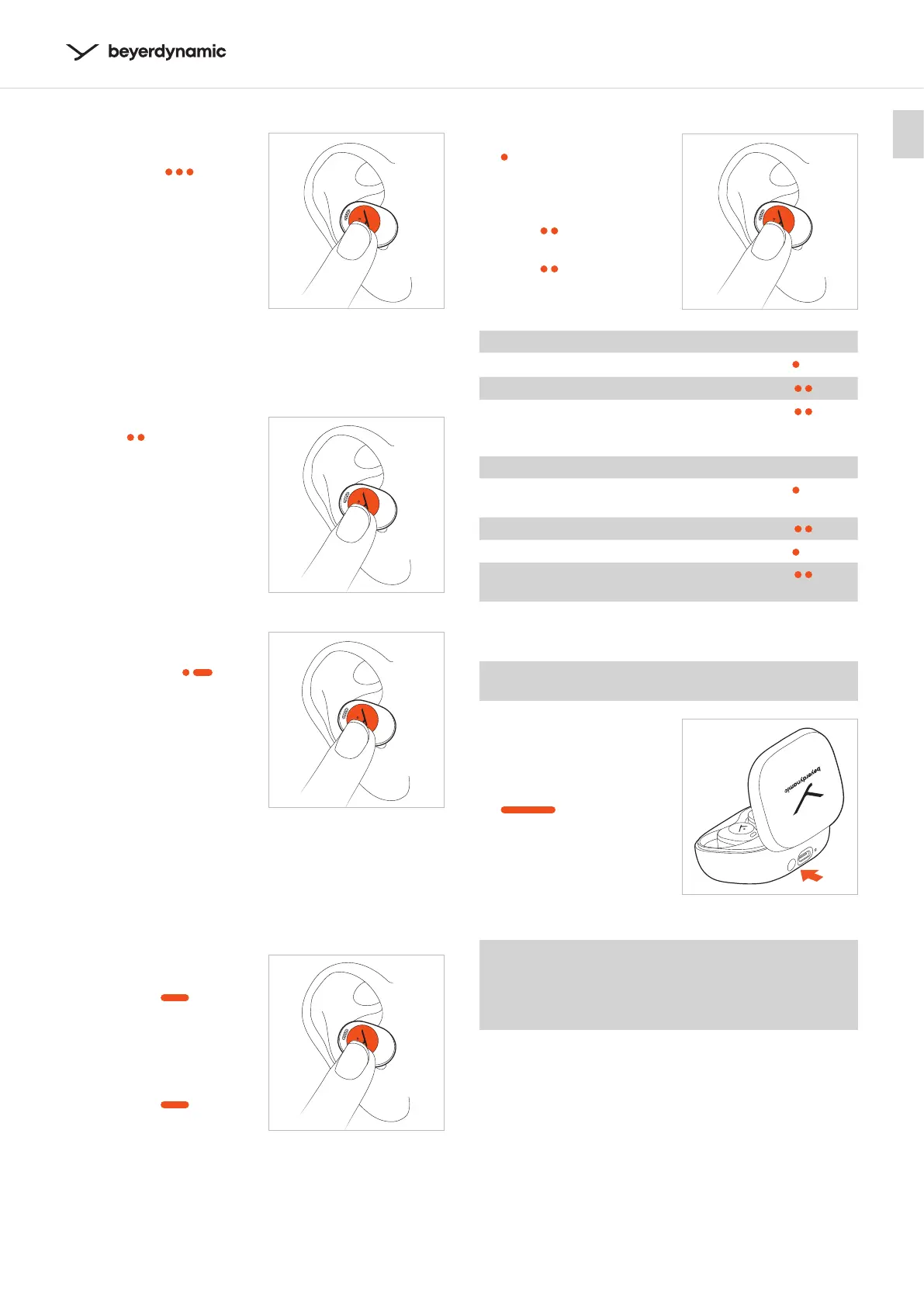
� Tap the touch pad
of the le (L) earphone
three times (
) to play
the previous track.*
*Function depends on the reaming service or media player used
Switch between noise cancellation (ANC)
and transparency mode
� Tap the touch pad
twice (
) to switch
between ANC on,
Transparency on, ANC o.
Activate voice assiant
� Tap the touch pad
twice and hold with the
second touch (
) to
activate the voice
assiant.
.
Adju the volume
Tap and hold the touch pad of the right or le earphone
until the desired volume is reached (only works if you are
using both earphones).
Increase volume
� Right earphone (R):
Press and hold the
touch pad (
) to
increase the volume.
Reduce volume
� Le earphone (L):
Press and hold the
touch pad (
) to
decrease the volume.
L/R
L/R
Making a call
� Tap the touch pad once
(
) to accept an
incoming call or to switch
between two active calls.
� Tap the touch pad
twice (
) to hang up..
� Tap the touch pad
twice (
) to reject an
incoming call.
No call active Operation
Accept incoming call
� Tap once (
)
Reject incoming call
� Tap twice (
)
End active call
� Tap twice (
)
Call already active Operation
Accept incoming call and hold
active call
� Tap once (
)
Reject second incoming call
� Tap twice (
)
Switch between two calls
� Tap once (
)
End active call and switch to
held call
� Tap twice (
)
Reset to factory settings
When resetting to factory settings, all personal data is
deleted!
� While the earphones are
in the charging case,
press and hold the button
on the charging case for
approx. 12 seconds
(
).
The earphone LEDs are
eady red and white for
2 seconds, then eady
red for 1 second.
Peer Pairing
To pair new earphones (e.g. when replacing defective
or lo earphones), place both earphones into the
charging case, and close the lid for at lea 10 seconds.
Both earphones will pair automatically.
L/R
L











 To Next Page