Lagoon ANC – Bluetooth® Headphones
7
english
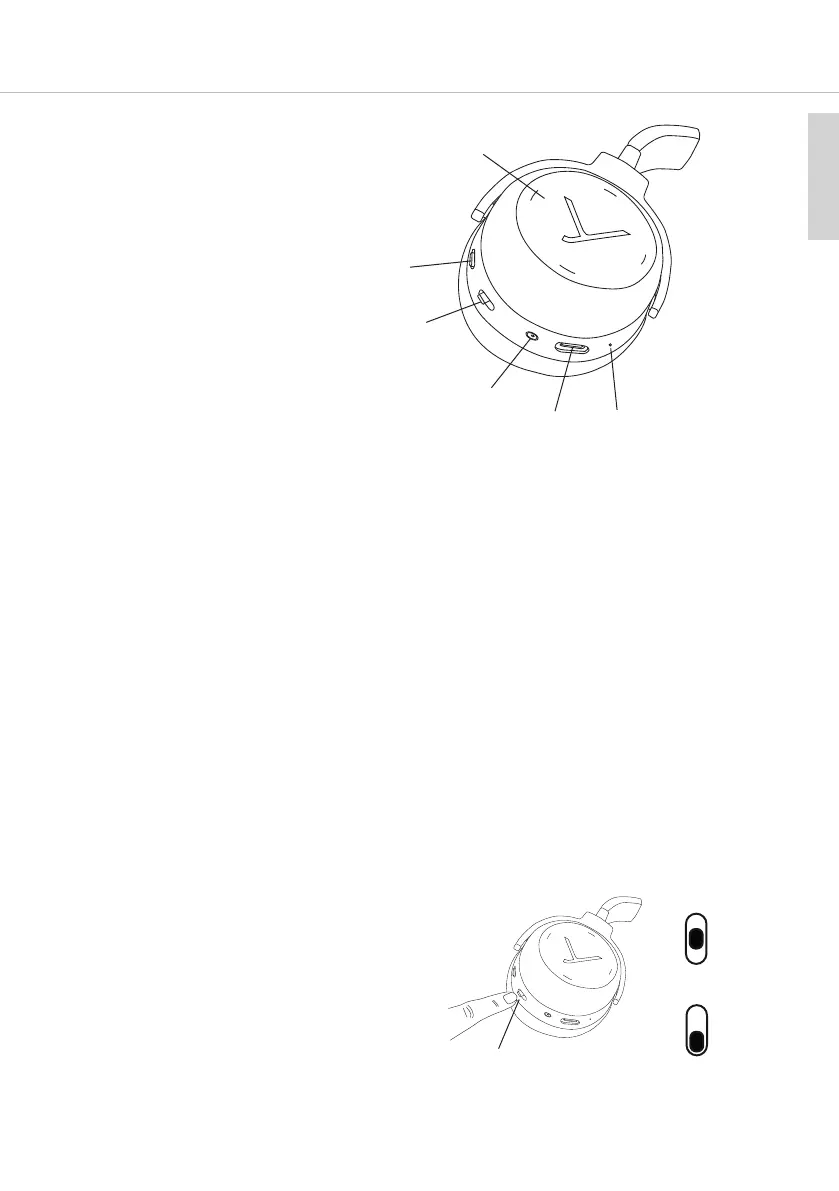
Operating elements
Touch pad
Switch ANC function
On-o switch and pairing
Mini jack connector (3.5 mm)
USB connection for charging
cable, (USB-C)
Microphone
Light-Guide-Syem (LGS)
The earcups are equipped with a Light Guide Syem (LGS) which is a visual display
indicating various operating conditions. The Light Guide Syem (LGS) is a unique feature giving
intuitive information on the headphone’s atus and prevents the diurbing visible blinking of LEDs
from neighbouring people. It is only active when the headphones are turned on.
Depending on the angle the Lagoon ANC is held or worn, the Light Guide Syem will turn on or o
automatically. For example, the LGS will turn on when putting the Lagoon ANC flat on a table with the
inner side of the earcups facing upwards. The LGS will turn o again, when the headphones are put on.
• As soon as the headphones are picked up, the inside of the right earcup will illuminate red and the
le one will illuminate white.
• If the headphones are ored e.g. on a table, the andby mode will be activated aer more than
10 seconds and the LGS will be turned o. The Bluetooth® connection ill remains.
• In the pairing mode, the right and le earcup alternately light up blue.
• A successful pairing is indicated by a blue light fading in.
For more information, please refer to the “Light Guide Syem” table.
Turning on / o
• Turning on
Set the switch to the “On” position.
• Turning o
Set the switch to the “O” position.
“On” position
“O” position














 To Next Page