Lagoon ANC – Bluetooth® Headphones
8
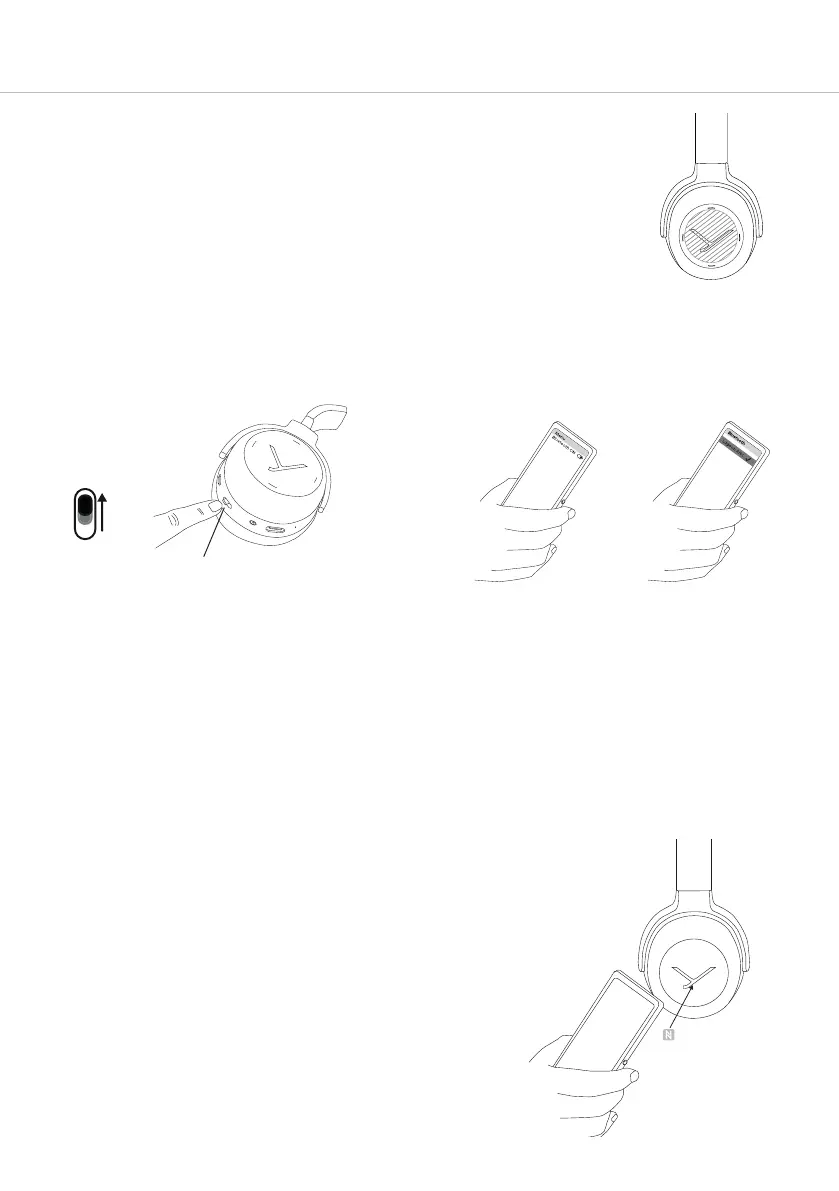
How to use the touch pad
Please make sure that your finger remains within the boundaries
of the circular-shaped touch pad as shown in the drawing.
3. Activate the Bluetooth® function on the
player and, if necessary, search for new
devices.
4. Select “Lagoon ANC” from the available
devices in the Bluetooth® menu of the
player and connect both devices.
5. The Light Guide Syem displays a successful
Bluetooth® connection by a blue light
fading in. Each time when turning on, both
devices connect automatically when in
range.
1. Set the switch to the “On” position.
2. Set the switch for three seconds to the
“Pairing” position.
The Light Guide Syem displays the pairing
mode by flashing blue alternately in the le
and right earcup.
“Pairing” position
Pairing with the player
Before you use the headphones for the fir time, you have to pair them with your mobile phone or
another Bluetooth® enabled device. The pairing process may be dierent with various players. Please
refer to the appropriate manual of the player.
Pairing with the player via NFC
Alternatively, you can connect the headphones with an NFC-
capable player through NFC. The headphones mu be
switched on. It does not matter whether the headphones are in
pairing mode or not.
1. Set the switch to the “On” position.
2. Activate the NFC function in the player.
Note: Some players have not activated their
built-in NFC chip for pairing purposes.
3. Hold the player over the le earcup so that both NFC chips
are close to each other. Sliding the player over the le
earcup may aid connectivity.














 To Next Page