5
HTE402559 9/47
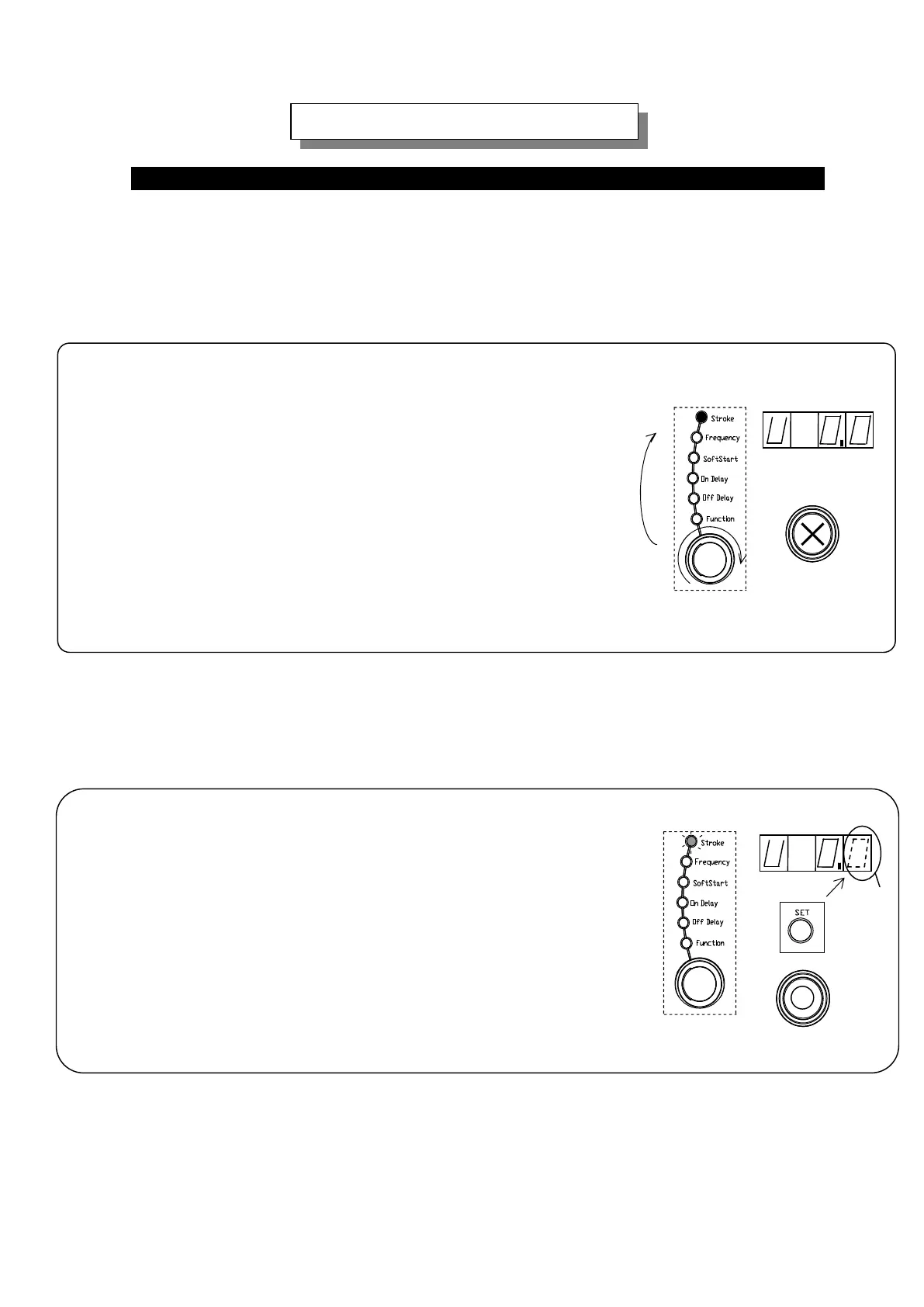
Basic setting up procedure is described here illustrating setting up of the Stroke. The
same procedure is applied for setting up of Frequency, Soft Start Ramp-up time, On-delay
and Off-delay time.
1. Select “Stroke” with the Selection Dial turning on “Stroke” lamp.
Dialing the selection dial turns on selected lamp
in the Selection Lamp and the set value of the selected
function appears on the display.
Note: “Stroke” represents percentage of the output voltage
or amplitude per the maximum.
Note: The first letter “U” of the data appeared on the display
shows “setting by output voltage” and “A” shows
“setting by amplitude”.
Basic Setting up Procedure
Setting Encoder
: Disable
-Continued-
Selection Dial
Dial
Turning on
“Stroke” data appears.
2. Push “Set” button to change the mode from “Indication”
To “Adjust”.
It enables alteration of the data appeared on the display
and the lowest digit blinks for alteration.
Setting Encoder: Enable
Blinking
Push Button
Blinking
“Stroke” data appears.



 To Next Page