5
HTE402559 7/47
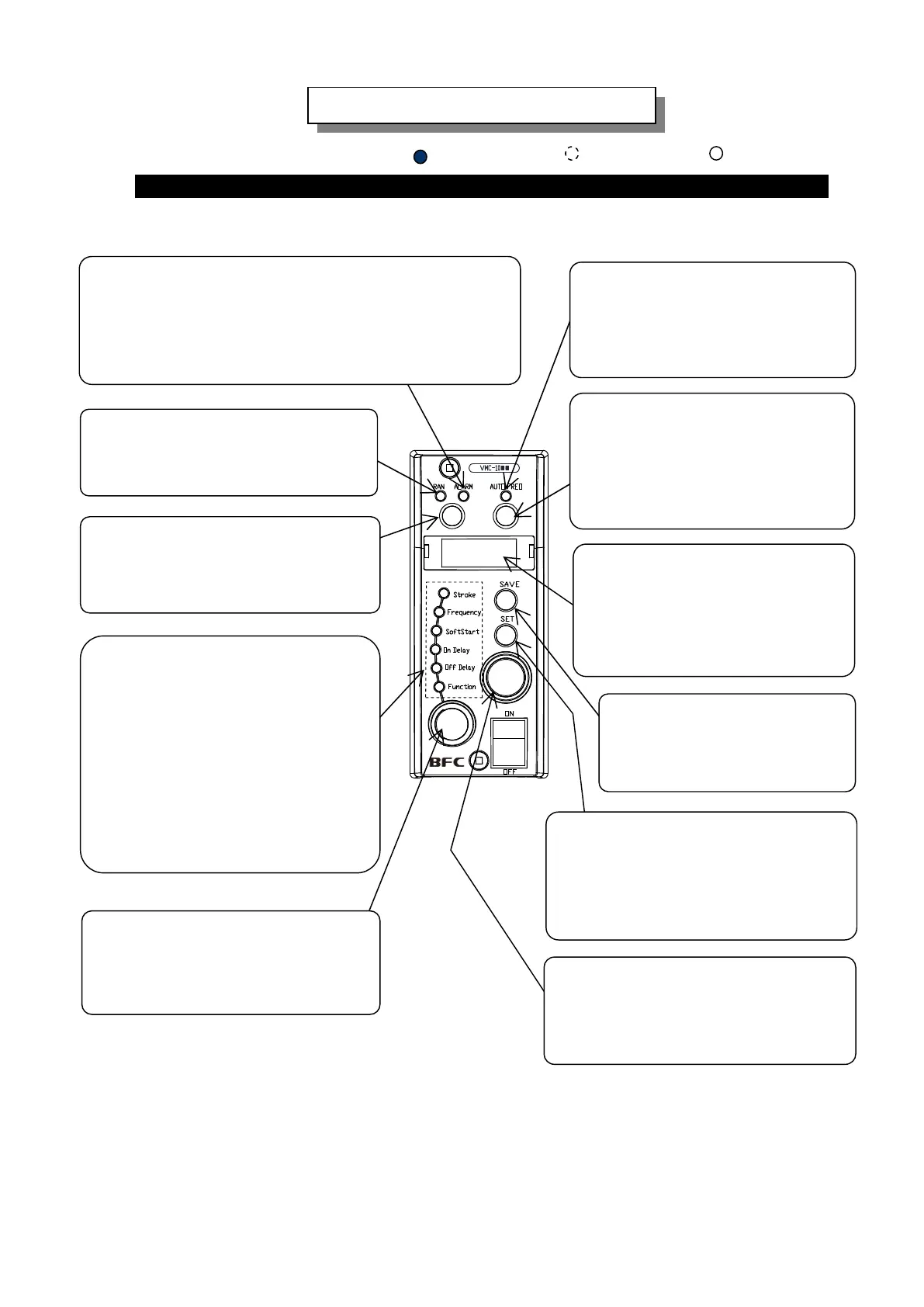
“DISPLAY”
Data such as output voltage by
percentage representing the stroke,
drive frequency, all settings and
error codes is shown on the display.
“SELECTION” Lamps
The lamp shows what kind of data is
appearing in the “DISPLAY”.
Stroke: Output voltage by percentage
Frequency: Output frequency
Soft Start: Rump-up time of soft start
On Delay: On delay time
Off Delay: Off delay time
Function: Name of Function
“AUTOFREQ” Button
This button selects the mode to
enable or disable auto-tuning by
pushing more than three seconds.
RUN/STOP” Button
Run and stop the partsfeeder manually.
“AUTO FREQ” Lamp
The lamp is turned on the
auto-tuning mode and flickers at
auto-tuning.
“RUN” Lamp
The lamp is turned on while the
partsfeeder is running.
“ALARM” Lamp
The lamp is turned on at two occasions:
a. On the “Constant Stroke” and “Auto-tuning” modes the
output voltage of VMC-controller has saturated and it can
not chase the setting point of the stroke.
b. Any error has issued a warning.
“SAVE” Button
Push to store the data having
been set.
: Turning on
: Turning off
How to operate the Control Pane
Name and Function of the Buttons, Lamps and Dials on the Control Panel
: Blinking
“SELECTION DIAL”
The dial selects what is indicated
in the Display.
“SET” Button
The button changes the mode from
“Indication” to “Adjust”. On the
“Adjust” mode of Stroke and Frequency,
it changes a digit that is adjusted.
“SETTING ENCODER”
The encoder alters a numeral in the
blinking digit on the display.



 To Next Page