ENGLISH
INSTALLATION MANUAL
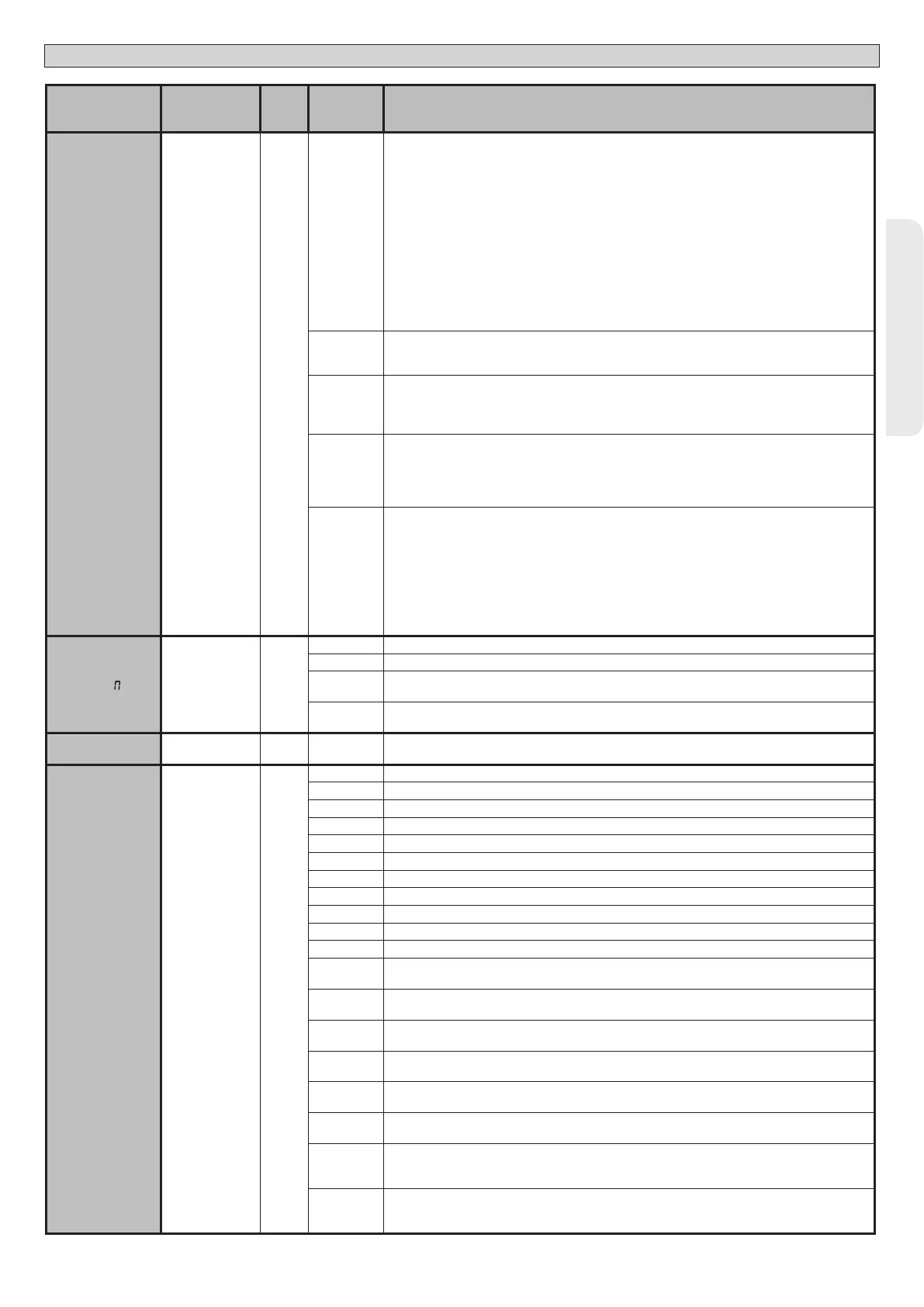
Logic Denition
De-
fault
Cross out
setting
used
Optional extras
Protection
level
Setting the
protection level
0
0
A - The password is not required to access the programming menus
B - Enables wireless memorizing of transmitters.
Operations in this mode are carried out near the control panel and do not require access:
- Press in sequence the hidden key and normal key (T1-T2-T3-T4) of a transmitter that has already been
memorized in standard mode via the radio menu.
- Press within 10 sec. the hidden key and normal key (T1-T2-T3-T4) of a transmitter to be memorized.
The receiver exits programming mode after 10 sec.: you can use this time to enter other new transmitters
by repeating the previous step.
C - Enables wireless automatic addition of clones.
Enables clones generated with the universal programmer and programmed Replays to be added to the
receiver’s memory.
D - Enables wireless automatic addition of replays.
Enables programmed Replays to be added to the receiver’s memory.
E - The board’s parameters can be edited via the U-link network
1
A - You are prompted to enter the password to access the programming menus
The default password is 1234.
No change in behaviour of functions B - C - D - E from 0 logic setting
2
A - You are prompted to enter the password to access the programming menus
The default password is 1234.
B - Wireless memorizing of transmitters is disabled.
C - Wireless automatic addition of clones is disabled. No change in behaviour of functions D - E from 0 logic setting
3
A - You are prompted to enter the password to access the programming menus
The default password is 1234.
B - Wireless memorizing of transmitters is disabled.
D - Wireless automatic addition of Replays is disabled.
No change in behaviour of functions C - E from 0 logic setting
4
A - You are prompted to enter the password to access the programming menus
The default password is 1234.
B - Wireless memorizing of transmitters is disabled.
C - Wireless automatic addition of clones is disabled.
D - Wireless automatic addition of Replays is disabled.
E - The option of editing the board’s parameters via the U-link network is disabled.
Transmitters are memorized only using the relevant Radio menu.
IMPORTANT: This high level of security stops unwanted clones from gaining access and also stops radio
interference, if any.
SERIAL ODE
Serial mode
(Identies how
board is congured
in a BFT network
connection).
0
0 Standard SLAVE: board receives and communicates commands/diagnostics/etc.
1 Standard MASTER: board sends activation commands (START, OPEN, CLOSE, PED, STOP) to other boards.
2
SLAVE opposite leaves in local network : the control unit is the slave in an opposite leaves network with no
smart module (g.P)
3
MASTER opposite leaves in local network: the control unit is the master in an opposite leaves network with
no smart module (g.P)
ADDRESS
Address 0
[ ___ ]
Identies board address from 0 to 119 in a local BFT network connection.
(see U-LINK OPTIONAL MODULES section)
EXPI1
Conguration of
EXPI1 input on
input-output ex-
pansion board.
1-2
1
0 Input congured as Start E command.
1 Input congured as Start I command.
2 Input congured as Open command.
3 Input congured as Close command.
4 Input congured as Ped command.
5 Input congured as Timer command.
6 Input congured as Timer Pedestrian command.
7 Input congured as Phot (photocell) safety.
8 Input congured as Phot op safety (photocell active during opening only).
9 Input congured as Phot cl safety (photocell active during closing only).
10 Input congured as Bar safety (safety edge).
11*
Input congured as safety Bar OP, safety edge with inversion active only while opening, if while closing the
movement stops.
12*
Input congured as safety Bar CL, safety edge with inversion active only while closing, if while opening the
movement stops.
13*
Input congured as Phot test safety, tested photocell. Input 3 (EXPI2) on input/output expansion board is
switched automatically to safety device test input, EXPFAULT1.
14*
Input congured as Phot op test safety, tested photocell active only while opening. Input 3 (EXPI2) on input/
output expansion board is switched automatically to safety device test input, EXPFAULT1
15*
Input congured as Phot cl test safety, tested photocell active only while closing. Input 3 (EXPI2) on input/
output expansion board is switched automatically to safety device test input, EXPFAULT1
16*
Input congured as Bar safety, tested safety edge. Input 3 (EXPI2) on input/output expansion board is switched
automatically to safety device test input, EXPFAULT1.
17*
Input congured as safety Bar OP test, safety edge with inversion active only while opening, if while closing
the movement stops. Input 3 (EXPI2) on input/output expansion board is switched automatically to safety
device test input, EXPFAULT1.
18*
Input congured as safety Bar CL test, safety edge with inversion active only while closing, if while opening
the movement stops. Input 3 (EXPI2) on input/output expansion board is switched automatically to safety
device test input, EXPFAULT1.
ARES ULTRA BT A 1000 - ARES ULTRA BT A 1500 - 31
D812201 00100_09


 To Next Page
 Loading...