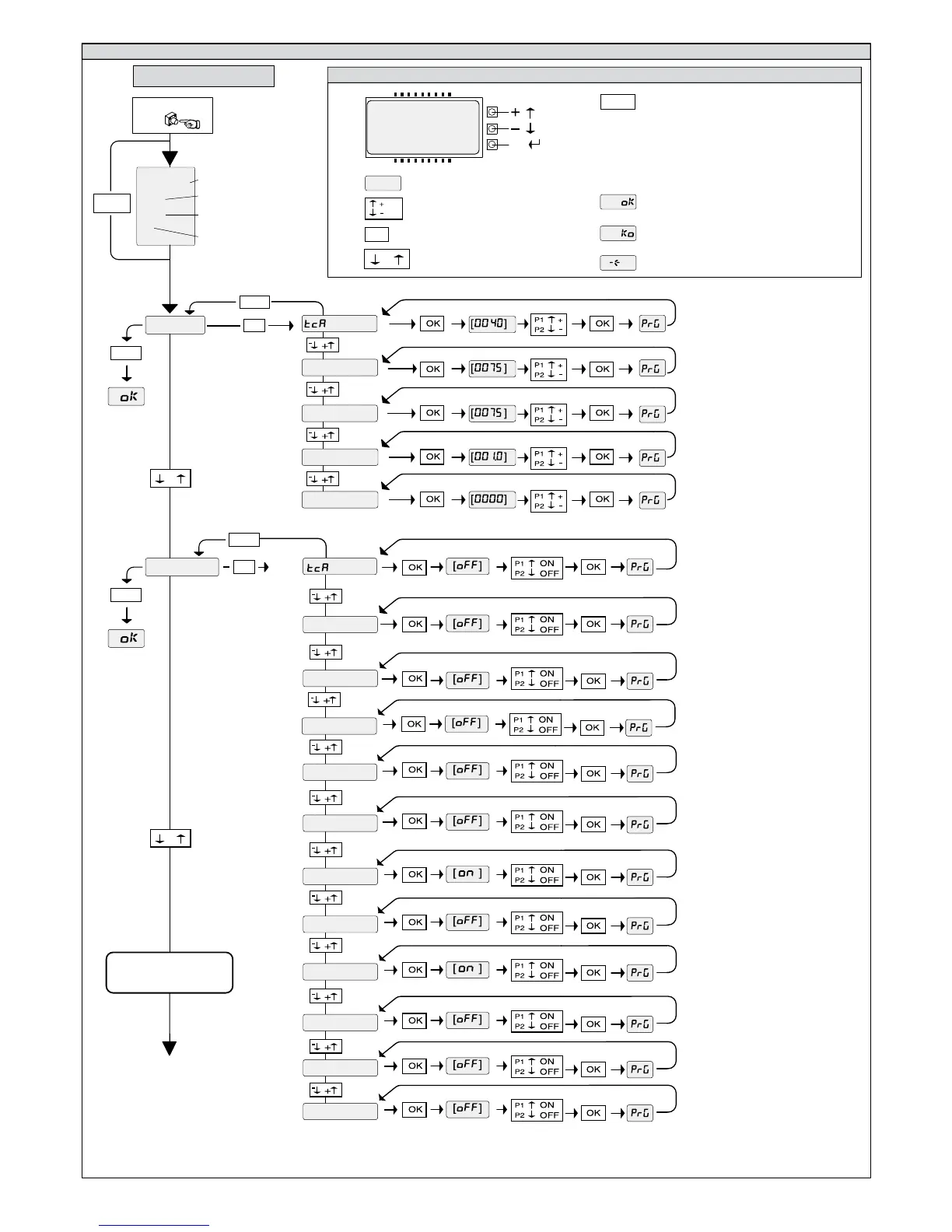
LEGENDA
Fig. A
OK
Press the OK key
$2
TCLCPCB
.0+
*-%'!
[ ]
Parameter increment/reduction
or ON/OFF commutation
Menu scrolling
(+ = preceding - = following)
Press OK key (Enter/confirm)
OK! message (confirms modification made)
.0%
OK
OK
+-
+-
+-
OK
ACCESS TO MENUS
FOLLOWING MENUS
FIG. B
-
+
/ON
/OFF
-
+
-
+
Control unit software version
No. total manoeuvres
(in thousands)
No. manoeuvres since latest
maintenance(in thousands)
No. radio control devices
memorised
KO! message (value or function error)
.0%
“Wait” message (enter value or function)
+-
Simultaneously press the + and - keys.
Simultaneous pressure of the + and – keys
allows you to exit the active menu and return to
the preceding menu; if this takes place at the
main menu level, programming is exited and
the display switched off.
The modifications made are only confirmed if
the OK key is subsequently pressed.
Preset value
+-
OK
OK
XMLC
K?QRCP
MNCLRMPOSC
AJQRMPOSC
N?PRMNCL
QRCN
G@JMNCL
NPC?J?PK
NFMRMAMNCL
RCQRNFMR
QA?AF
DGVCBAMBC
P?BGMNPME
QR?PRMNCL
NCBAJMQC






 To Next Page