Here you can
authorize new
administrator
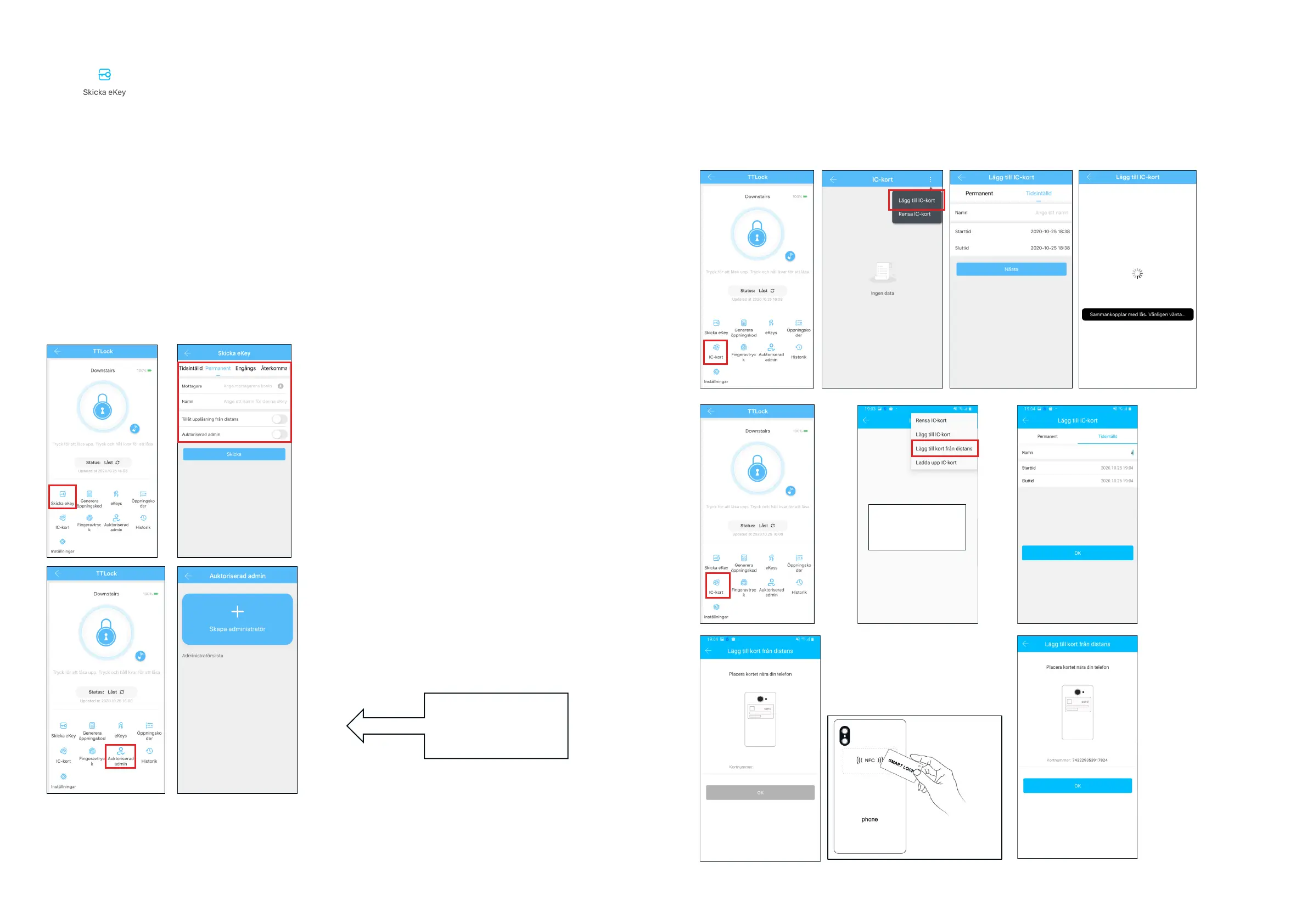
5.2.2.3 e-Key management
Click " "
Admin/owner can delete, reset, send and adjust e-keys.
→ Choose e-key format (timed, permanent, one-time or recurring)
→ Enter users TTLock account, name the e-Key and enter validity.
You can set permission to remotely open or not, authorize Administrator, as shown in the picture
→ Send
→ The receiver is now allowed to open via APP/Bluetooth.
(The lock owner can authorize the administrator through e-key, which in turn can grant permissions to
users.
However, the administrator can not authorize other administrators.)
10 11
5.2.2.4 Add tags/cards and add tags/cards remotely (remotely, Android only)
Enables opening with dierent RFID cards. Before an RFID card can be used, it must be added. Adding
must be made by phone and lock next to each other. The validity period for RFID cards can be set. It
can be permanent or limited time. You can also subsequently regulate the validity period for RFID cards.
Hold the card
against the NFC
sensor on the back
Gateway must be
added rst
Android with activated
NFC only



 To Next Page