25
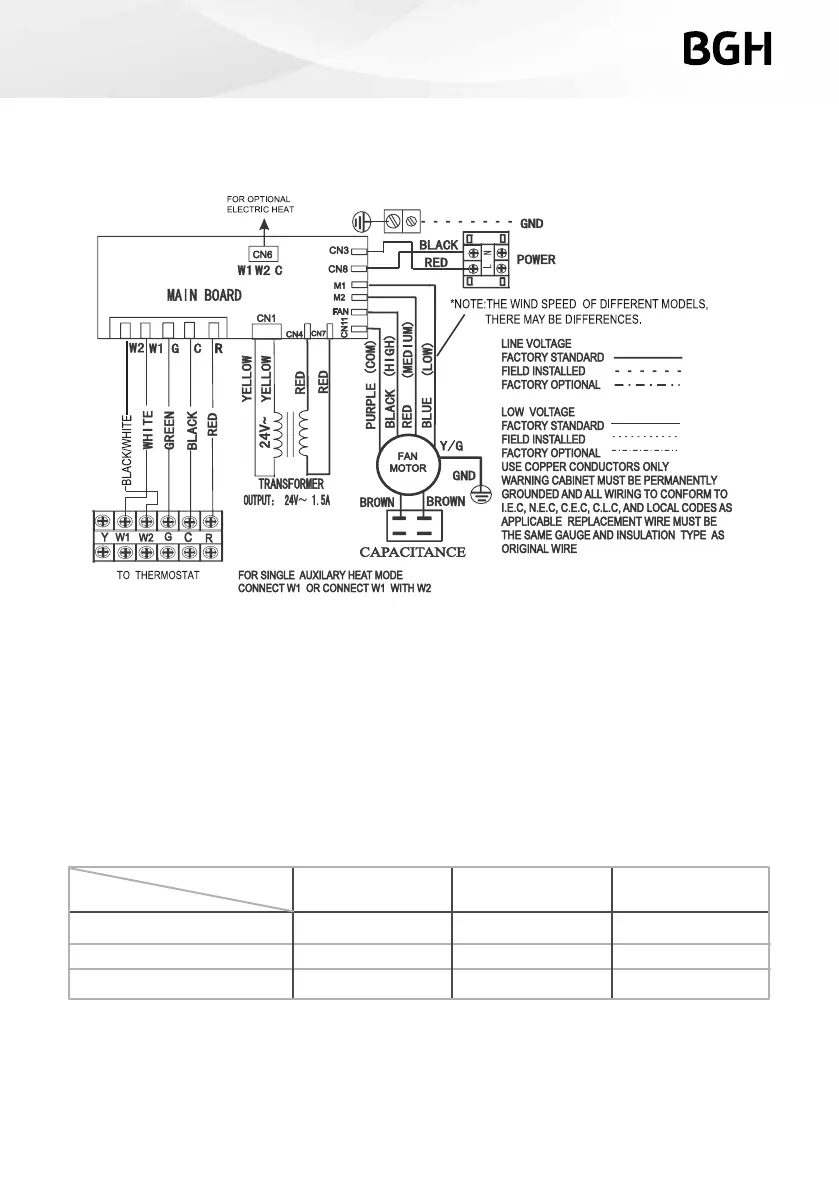
Note: Description of fan speed switch
1. Different mode with different motor fan speed. For detail please refer to nameplate or
actual model.
2. High speed wiring: Switch to high speed (black wire) and connect with FAN terminal, while
medium speed (red wire) connect with M2 terminal.
3. Low speed wiring: Switch to low speed (blue wire) and connect with FAN terminal, while
medium speed (red wire) connect with M1 terminal.
Fig 9 Indoor Unit Wiring Diagram for A/C systems and H/P systems.
Red
Black
Blue
Medium
High
Low
Blue
Blue
Red
Black
Red
Black
FAN
Fan speed
Terminal
M1 M2



 To Next Page