EasyManua.ls Logo

BGW 8000 - Audio Connections and Speaker Setup; Input and Mono Operation Details

Default Icon
41 pages
Print Icon
To Next Page IconTo Next Page
To Previous Page IconTo Previous Page
Loading...
1 ,
\J.JI.I'8
a.
02711
STEREO INPUT CONNECTIONS
Dual looping
~"
in. phone jacks
are
provided on
the
rear
of
the
amplifier
for input
connections.
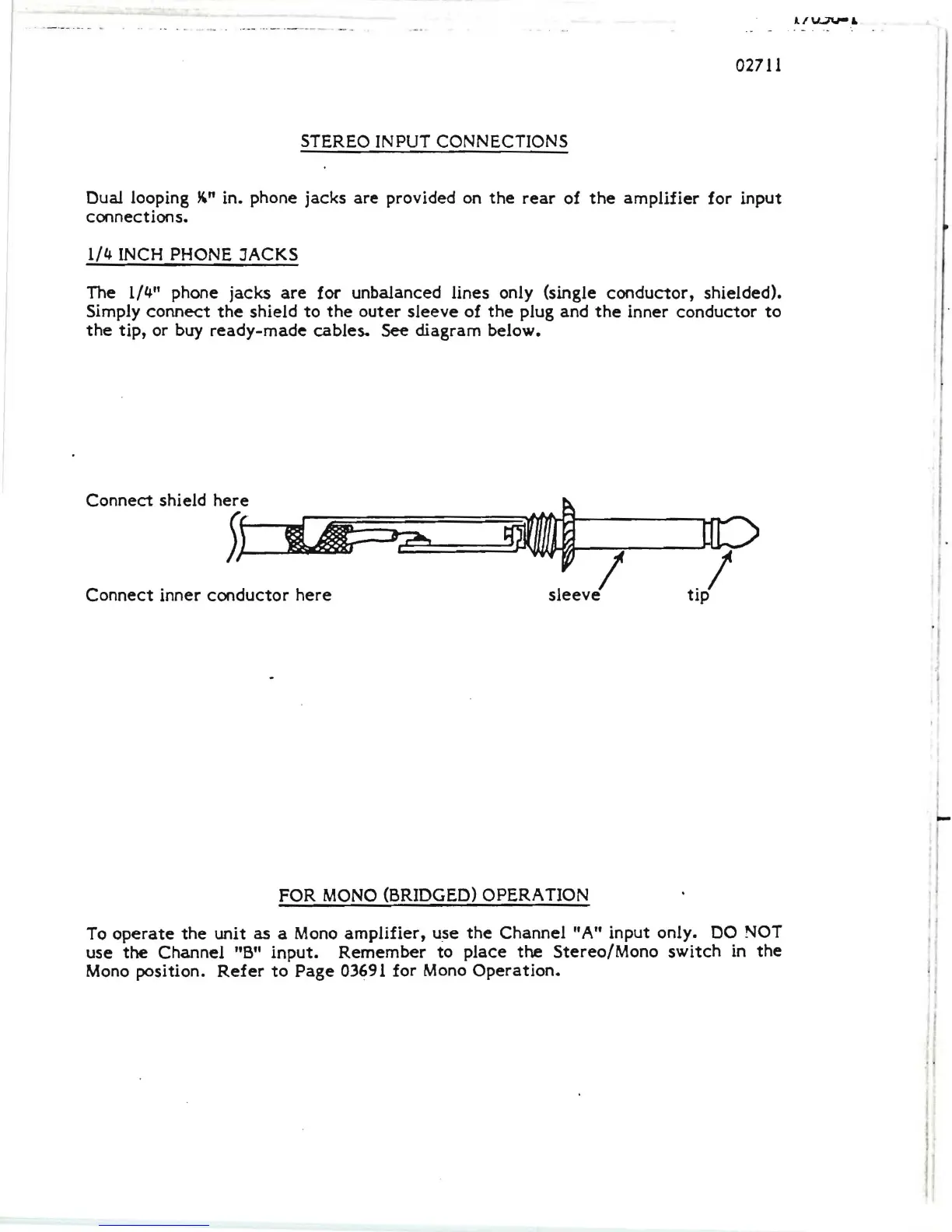
1/4 INCH PHONE JACKS
The 1/4" phone jacks
are
for unbalanced lines only (single
conductor,
shielded).
Simply
connect
the
shield
to
the
outer
sleeve
of
the
plug and
the
inner
conductor
to
the
tip,
or buy
ready-made
cables.
See
diagram below.
Connect
shield
here
~
~~f
...,.,r~~=====C:::=~::::~~/""'--~
Connect
inner
conductor
here
sleeve
tip
FOR
MONO
(BRIDGED) OPERA
nON
To
operate
the
unit as a Mono
amplifier,
use
the
Channel "A" input only. DO NOT
use
the
Channel "B"
input.
Remember
to
place
the
Stereo/Mono
switch
in
the
'I
Mono position.
Refer
to
Page
03691 for Mono
Operation.
!

Related product manuals