ATOM 2022
BH
17
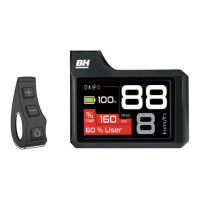
BATTERY CHARGE LEVEL INDICATOR
The battery charge level indicator shows the estimated remaining battery capacity.
In order to increase the life of the battery and prevent a full discharge which may damage it, the assistance modes
are limited based on the state of charge of the battery:
•
Battery charge above 20%: 100% of the highest assistance level is available.
•
Battery charge between 10% and 20%: assistance level limited to 50% of the highest assistance level.
•
Battery charge between 5% and 10%: assistance level limited to 25% of the highest assistance level.
•
Battery charge between 1% and 5%: assistance is not permitted. Only the lights can be turned on.
SETTINGS MENU
The user can access the settings menu by pressing and holding the (+) and (-) buttons for 3 seconds. Press the (+)
and (-) buttons to scroll through the different settings options. When you press the POWER button, you will enter
the selected menu. Additionally, the system will exit the settings menu when the user presses and holds the POWER
button for 3 seconds.
When making any adjustments, make sure that you stop the bicycle and perform them in a safe place.
Otherwise, the lack of attention to the surrounding traffic could cause a fatal accident.
Resetting the trip information.
The user can view and reset the trip information at any time.
Selecting Secondary information on the Screen.
The user can select the information that will be shown on the screen's secondary information indicator.
Start-up profile.
The user can select the system start-up settings. Every time that the user turns the control panel on and off, thesystem
will change the settings to those selected in this menu:
Secondary information.
Secondary information.
Auto power-off.
Sets the display's auto power-off
time.
Lighting system.
This operates according to the
control panel's lighting level sensor.
Smart key / Security Smart key.
Activates or deactivates the
security function.
Resetting trip information.
06 PEDAL ASSISTANCE SYSTEM OPERATION



 To Next Page