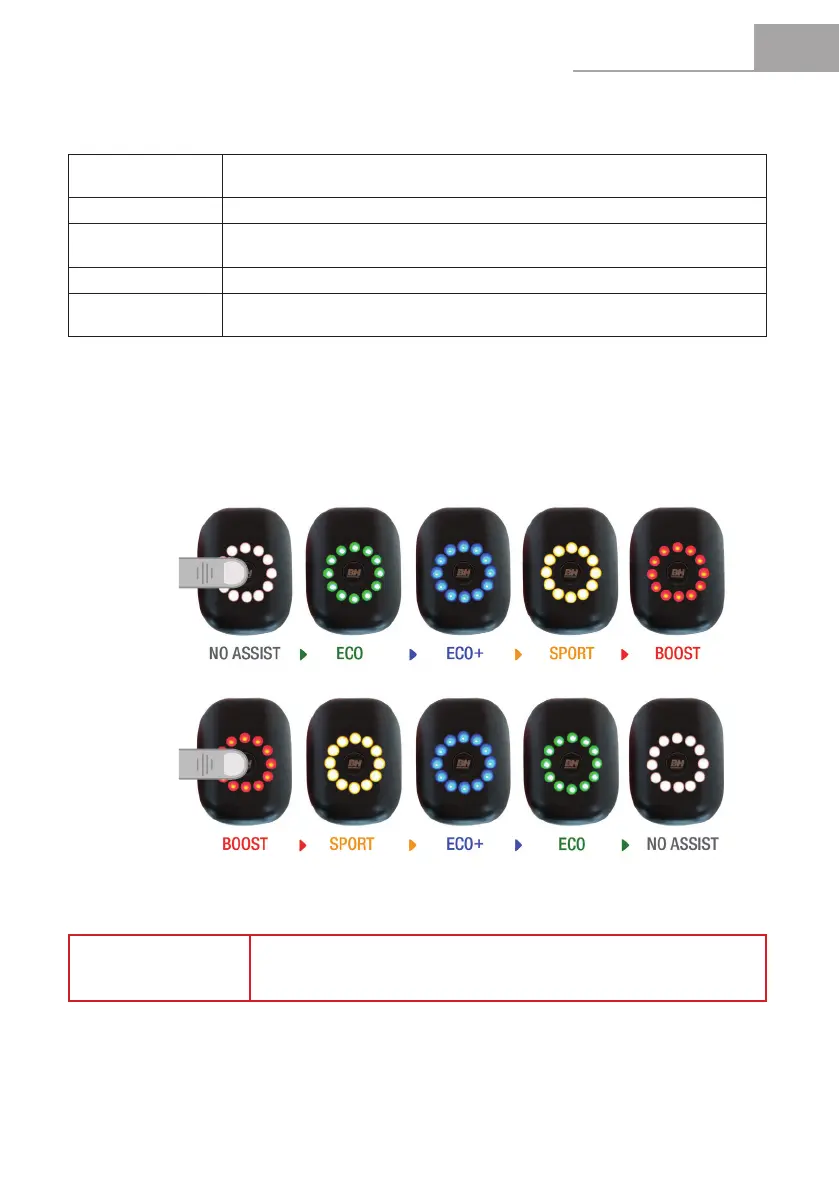
1 click
2 clicks
EN
CORE USER MANUAL
29
BOOST
IdentiedbytheRed Colour. Use when you want to get maximum power from the
system.
SPORT
IdentiedbytheOrange Colour.Usewhenclimbingdifcultterrains.
ECO +
IdentiedbytheBlue Colour. Use when you want a more comfortable ride, e.g.
when climbing a steep hill.
ECO
IdentiedbytheGreen Colour. Use when you want to travel as far as possible.
NO ASSIST
IdentiedbytheGray Colour. Use when you want to travel without assisted power.
You can continue to use the other functions of the display panel.
4.2.2 Pedal Assistance Mode Selection
The system has 5 pedal assistance modes:
To toggle through the assistance modes, the user must press the POWER button to increase the level of
assistance. To reduce the level of assistance, you should quickly press the POWER button twice.
NOTE
During a journey, selecting suitable assistance modes for the terrain and
pedalling conditions that you encounter will ensure the best balance between
battery economy and pedalling comfort.
Instant Power Options


 To Next Page