7
SETUP
GRAPHIC EQ SCREEN
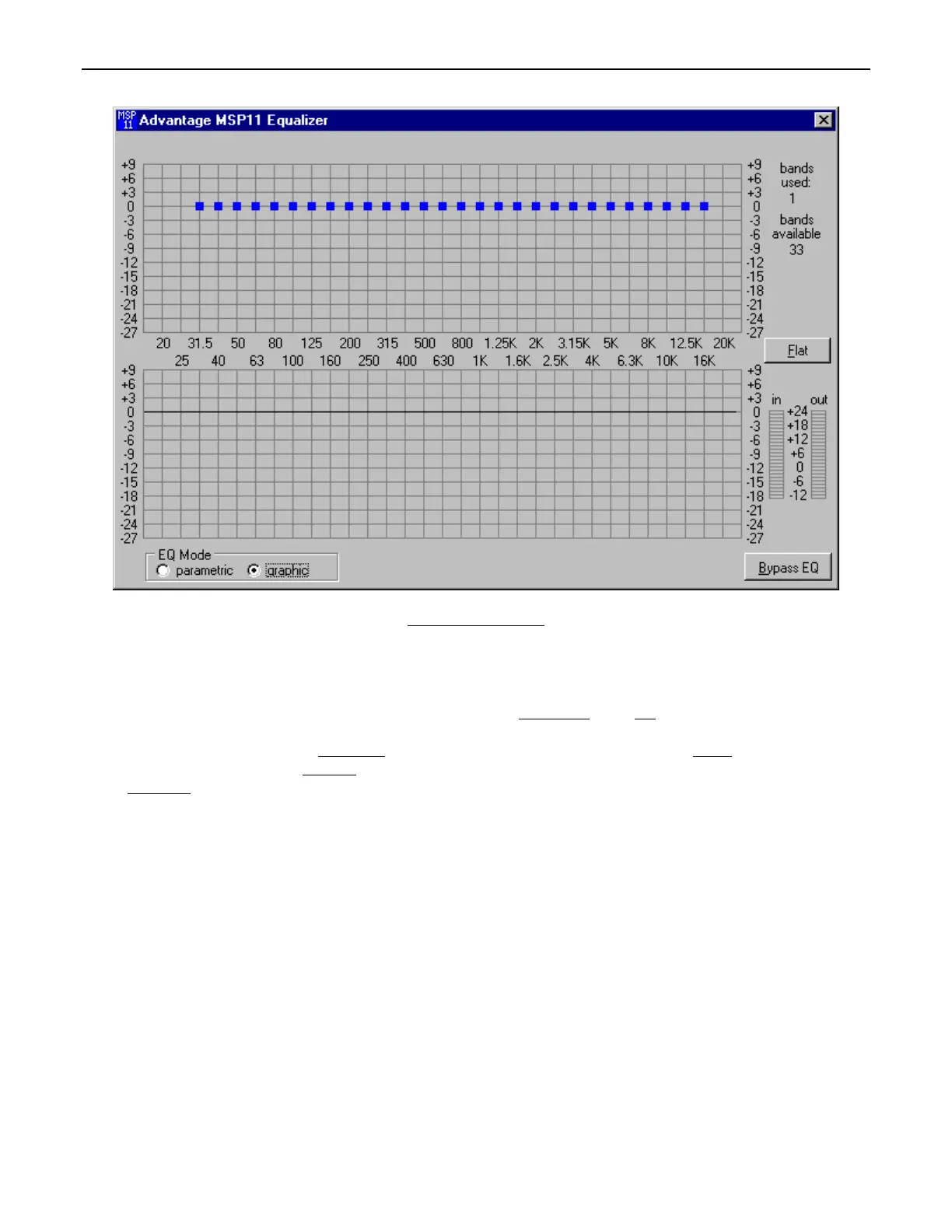
The Graphic EQ screen is used to adjust equalization. Up to 34 bands of equalization, plus high-pass & low-pass filters, are available.
NOTE: Parametric & Graphic equalization techniques may be used simultaneously, as long as the total number of bands does not exceed
34. Default operation of the Graphic EQ is 1/3-octave, 28-bands, and ISO standard center frequencies. Therefore, gain for each band can
be simply adjusted by dragging the square cursors up or down inside the upper graph
area. Flat erases all graphic bands, setting all
faders to the center line. Right-clicking provides a menu of copy/paste functions, which allows settings of the 34 bands of equalization to
be copied from one unit to another. The lower graph
area shows the cumulative effect of all equalization. ‘Meters’ are provided to display
input/output levels at the EQ section. EQ Mode
selects either Parametric or Graphic equalization (see Parametric EQ Screen on previous
page). Bypass EQ
defeats all parametric & graphic equalization filters (not HPF & LPF), without changing actual settings.



 To Next Page