9
SETUP
LOGIC INPUT DEFINITION SCREEN
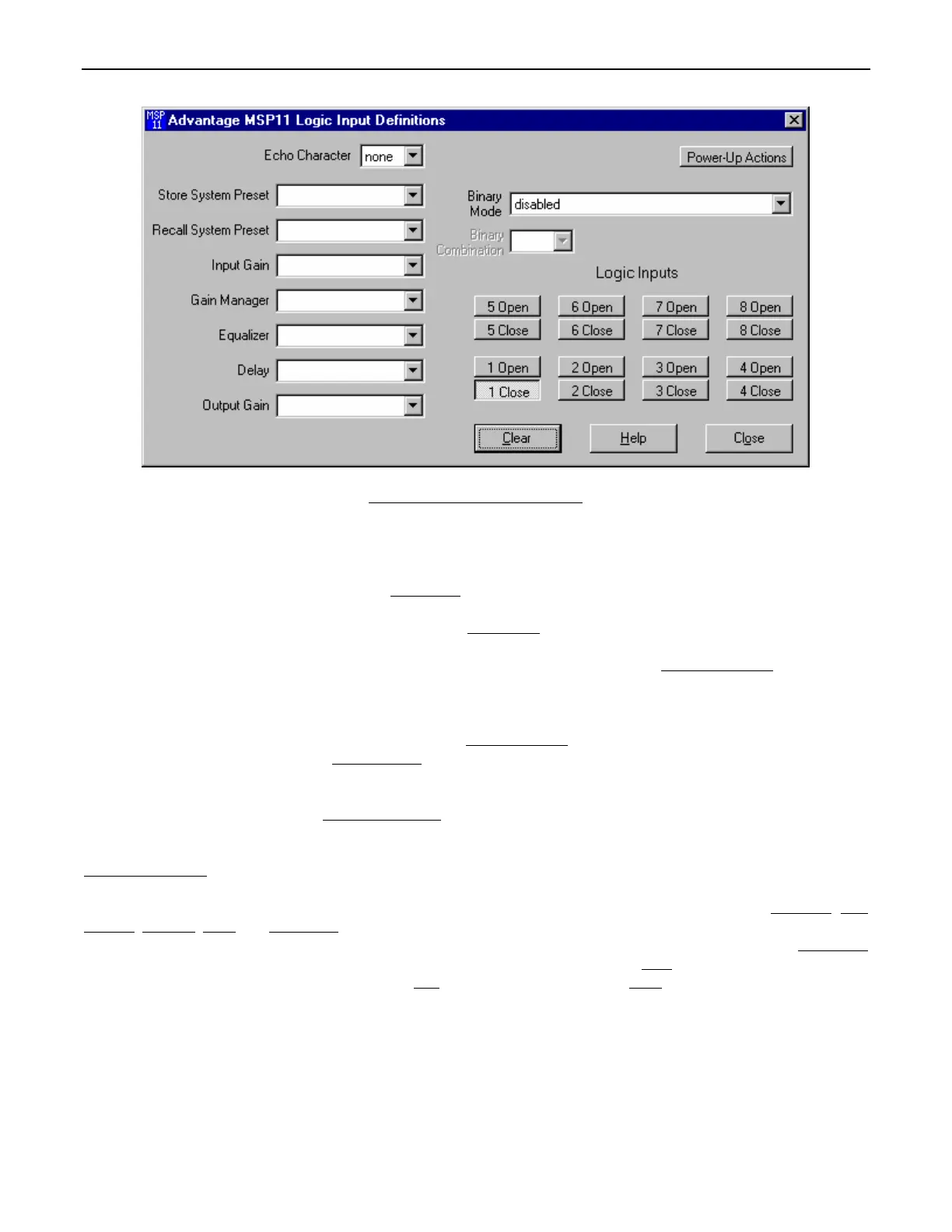
The Logic Input Definitions screen is used to assign specific ‘actions’ to the eight Logic Inputs. Logic Inputs allow remote control of the
MSP11 via external circuits, such as switches, contact-closures, active driver circuits, and/or ‘open-collector’ logic outputs (see Logic Inputs
on pg. 12). From the factory, Logic Inputs 1~8 have no pre-programmed functions. However, using the Logic Input Definitions screen,
each Logic Input may be assigned various ‘actions’. Logic Inputs
selects which Logic Input is to be defined. NOTE: Since Logic Inputs
are controlled by switches, contact-closures, etc., each Logic Input may be assigned certain actions to perform when the switch is ‘opened’,
and different actions to perform when that same switch is ‘closed’. Binary Mode
selects a special group of Logic Inputs which can also be
defined. This allows certain actions to be performed only when a specified condition of open/closed Logic Inputs exists within the group.
When a Binary Mode is selected, indicators for the chosen group of Logic Inputs will appear below. Binary Combination
then selects the
specific combination of open/closed (on/off) Logic Inputs that needs to exist (for the assigned actions to be performed). When a
combination is selected, indicators will light (red) to designate which of the Logic Inputs within the group are closed (on) for that condition.
NOTE: When a Binary Mode is selected, the chosen group of Logic Inputs can no longer be defined individually. It is not necessary to
select a Binary Mode when simply defining individual Logic Inputs. Power-Up Actions
allows specific actions to be assigned for the MSP11
to perform each time power is turned on. Echo Character
selects the RS-232 ASCII character which will be transmitted via the MSP11
Serial Port whenever the selected Logic Input is switched. NOTE: From the factory, no echo characters are assigned to the Logic Inputs.
Echo Characters are used primarily for customizing remote control commands amongst various RS-232 controlled products within a
system (see RS-232 Control on pg. 14). Store System Preset
allows store actions for Temp Presets A~D to be assigned to the selected
Logic Input. Temp Presets A~D allow current settings of the MSP11 to be temporarily stored in memory. Temp Presets are useful when
re-establishing settings which existed prior to a change. For example: recalling settings for background music, after paging has occurred.
Recall System Preset
allows recall actions for Presets 1~16, and Temp Presets A~D, to be assigned to the selected Logic Input. NOTE:
System Preset actions affect settings from all stages of the MSP11 (Input, Gain Manager, EQ, Delay, & Output). However, the settings
that Presets 1~16, and Temp Presets A~D, store for specific stages of the MSP11 may be recalled independently. Input Gain
, Gain
Manager, Equalizer, Delay, and Output Gain allow recall actions for their respective portions of Presets 1~16, and Temp Presets A~D, to
be assigned to the selected Logic Input. For example: recalling various equalizer presets, without affecting other settings. Output Gain
also allows various output volume & muting actions to be assigned to the selected Logic Input. Clear
allows all actions assigned to the
selected Logic Input (or all Logic Inputs) to be cleared. Help
provides additional instruction. Close will close the Logic Input Definition
screen.


 To Next Page
 Loading...