10
SETUP
BUTTON DEFINITION SCREEN
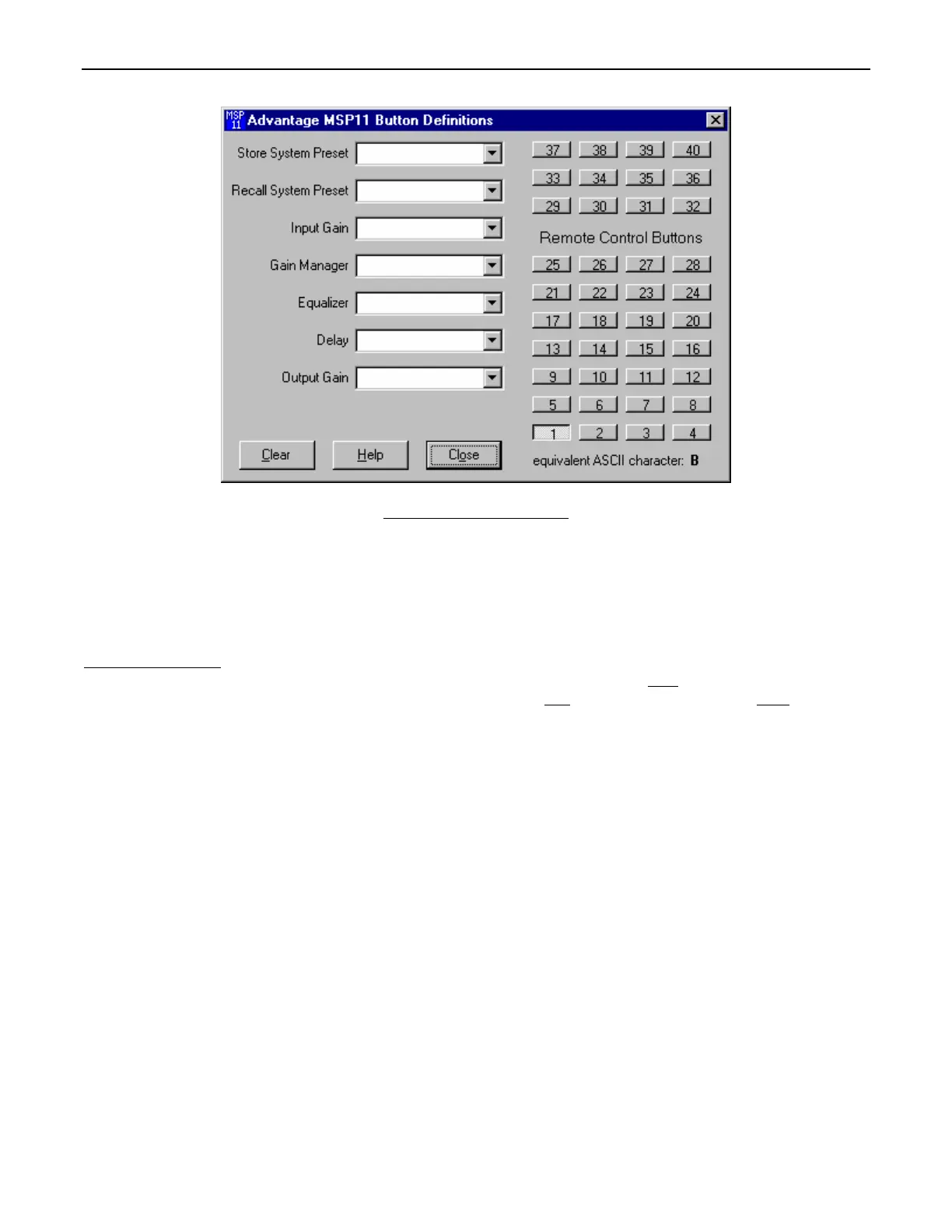
The Button Definitions screen is used to assign specific ‘actions’ to remote control buttons. Although the MSP11 does not accept
commands from push-button remote controls directly, it can receive ASCII characters (via RS-232) from other BIAMP products and/or
third-party control systems. From the factory, Remote Control Buttons have equivalent ASCII characters permanently assigned to them
(see RS-232 Control on pg. 14). Therefore, a Remote Control Button can be assigned specific ‘actions’, which the MSP11 will then
perform whenever the equivalent ASCII character for that button is received. From the factory, Remote Control Buttons have no pre-
programmed functions. However, using the Button Definitions screen, each Remote Control Button may be assigned various ‘actions’.
Remote Control Buttons
selects which button is to be defined. Actions can then be assigned to the selected Remote Control Button in the
same way they are assigned to Logic Inputs (see Logic Input Definition Screen on previous page). Clear
allows all actions assigned to the
selected Remote Control Button (or all Remote Control Buttons) to be cleared. Help
provides additional instruction. Close will close the
Button Definition screen.



 To Next Page