11
SETUP
CONFIGURATION OPTIONS SCREEN
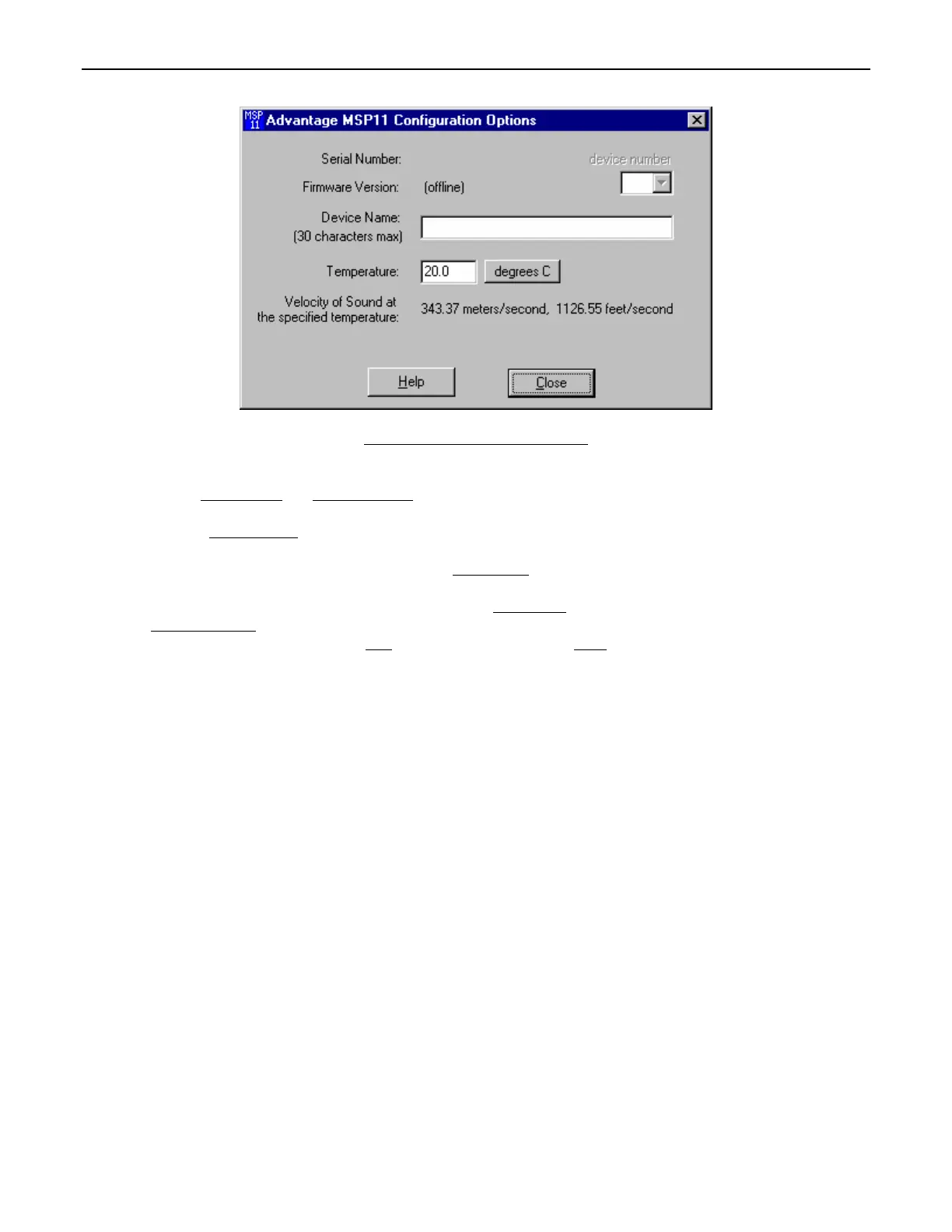
The Configuration Options screen is used to select options which customize the operation of the MSP11. At the top of the Configuration
Options screen, the Serial Number
and Firmware Version of the MSP11 will be displayed. BiampWin software can operate ‘off-line’ (with
no product connected) by opening a ‘new’ file for the desired product. The Serial Number and Firmware Version are not displayed for
‘new’ (‘off-line’) files. Device Number
allows a device number (0~63) to be assigned to the currently active MSP11. This allows multiple
MSP11 (or other BIAMP programmable products) to be individually controlled when linked together. Unique device numbers must be
assigned to each device before the devices are linked together. Device Name
allows a custom name to be given to the particular MSP11,
by entering up to 30 characters of text. The Device Name will be stored in the MSP11 memory, and will be displayed on the title bar of the
Main screen whenever that MSP11 is accessed with the software. Temperature
selects the desired air temperature to be used in
calculating Velocity of Sound
(seen below). Temperature, and the resultant Velocity of Sound, are global parameters which affect
distance/delay calculations for the Delay section. Help
provides additional instruction. Close will close the Configuration Options screen.



 To Next Page