5
SETUP
GAIN MANAGER SCREEN
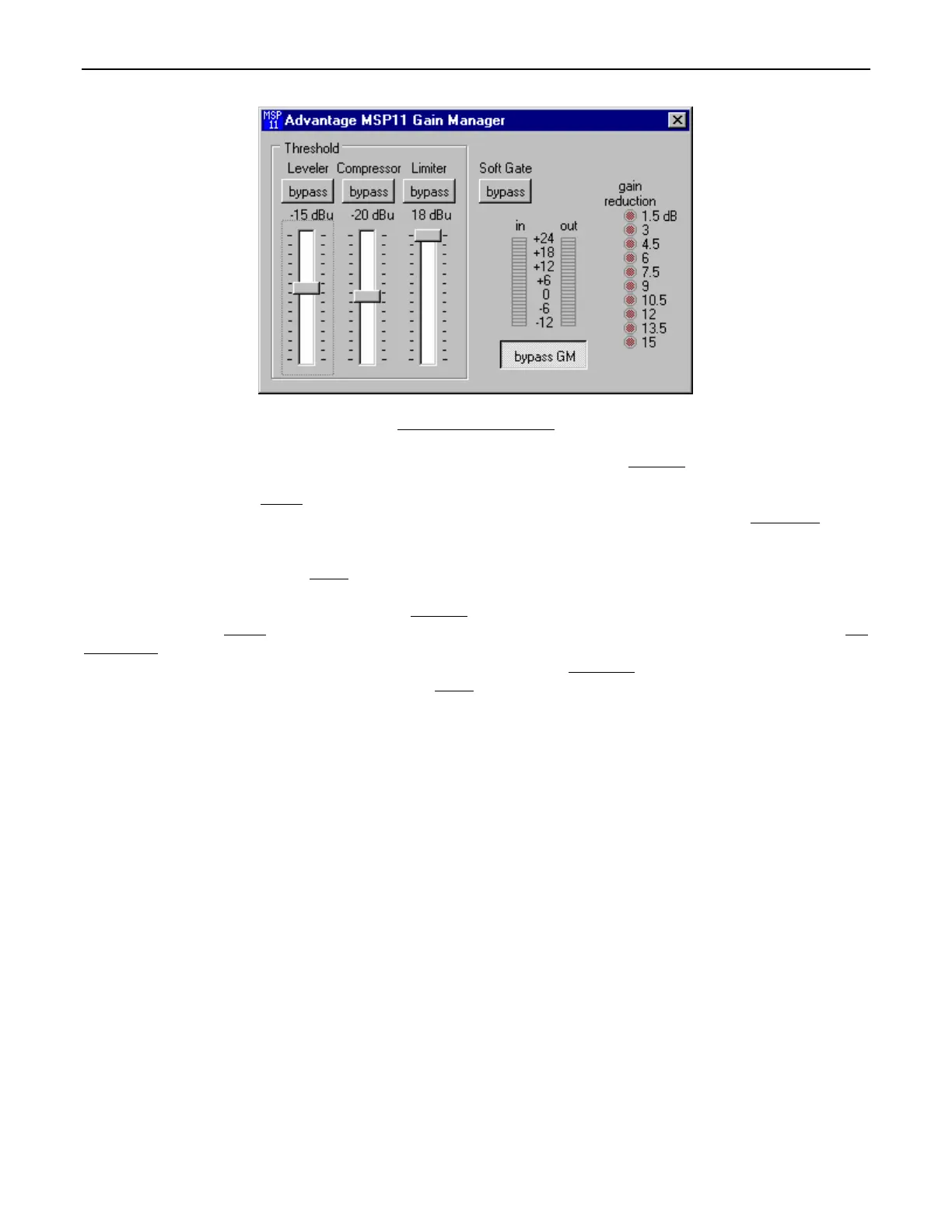
The Gain Manager screen is used to adjust Leveler, Compressor, Limiter & Soft Gate settings. Threshold
adjusts the signal level at which
the Leveler, Compressor, & Limiter functions are triggered. Therefore, these controls determine the amount and type of gain processing to
be applied to the signal. The Leveler
controls the long-term average signal level. If the average signal level increases, the Leveler will
reduce gain to compensate. If the average signal level decreases, the Leveler will increase gain to compensate. The Compressor
controls
short-term peaks in signal level by providing ‘soft-knee’ compression, which automatically varies in ratio from 1.1:1 on signals just slightly
above Threshold, to more than 10:1 at full compression. The Compressor responds to average & peak levels, working with the Leveler to
maintain a constant output level. The Limiter
controls short-term peaks in signal level by providing ‘hard’ limiting, which establishes an
absolute ceiling level. The Limiter provides protection against clipping distortion, and the chance of amplifier overload or speaker damage,
due to sudden transients. From the factory, the default Threshold
settings will provide approximately 6dB of gain reduction on an input
signal of nominal level. Bypass
defeats the individual Leveler, Compressor, or Limiter functions, without changing the actual settings. Soft
Gate Bypass defeats a downward expander circuit, which reduces gain 2dB for each 1dB that signal falls below threshold (-30dBu). The
Soft Gate gracefully attenuates background/ambient noise during periods of silence. Bypass GM
defeats all Leveler, Compressor, Limiter,
& Soft Gate functions, without changing the actual settings. ‘Meters
’ are provided to display input/output levels, as well as the amount of
gain reduction, at the Gain Manager section. NOTE: The Gain Manager provides gain reduction even on input signals of nominal level.
Therefore, all subsequent meters will indicate the resultant lower level. CAUTION: The Gain Manager can increase gain for lower level
signals. Therefore, after all system settings have been adjusted, temporarily bypass the Gain Manager as a test of system feedback
stability. If acoustic feedback occurs, reduce the system amplifier level or use the MSP11 parametric equalizer to eliminate feedback
nodes, before re-enabling the Gain Manager.


 To Next Page
 Loading...