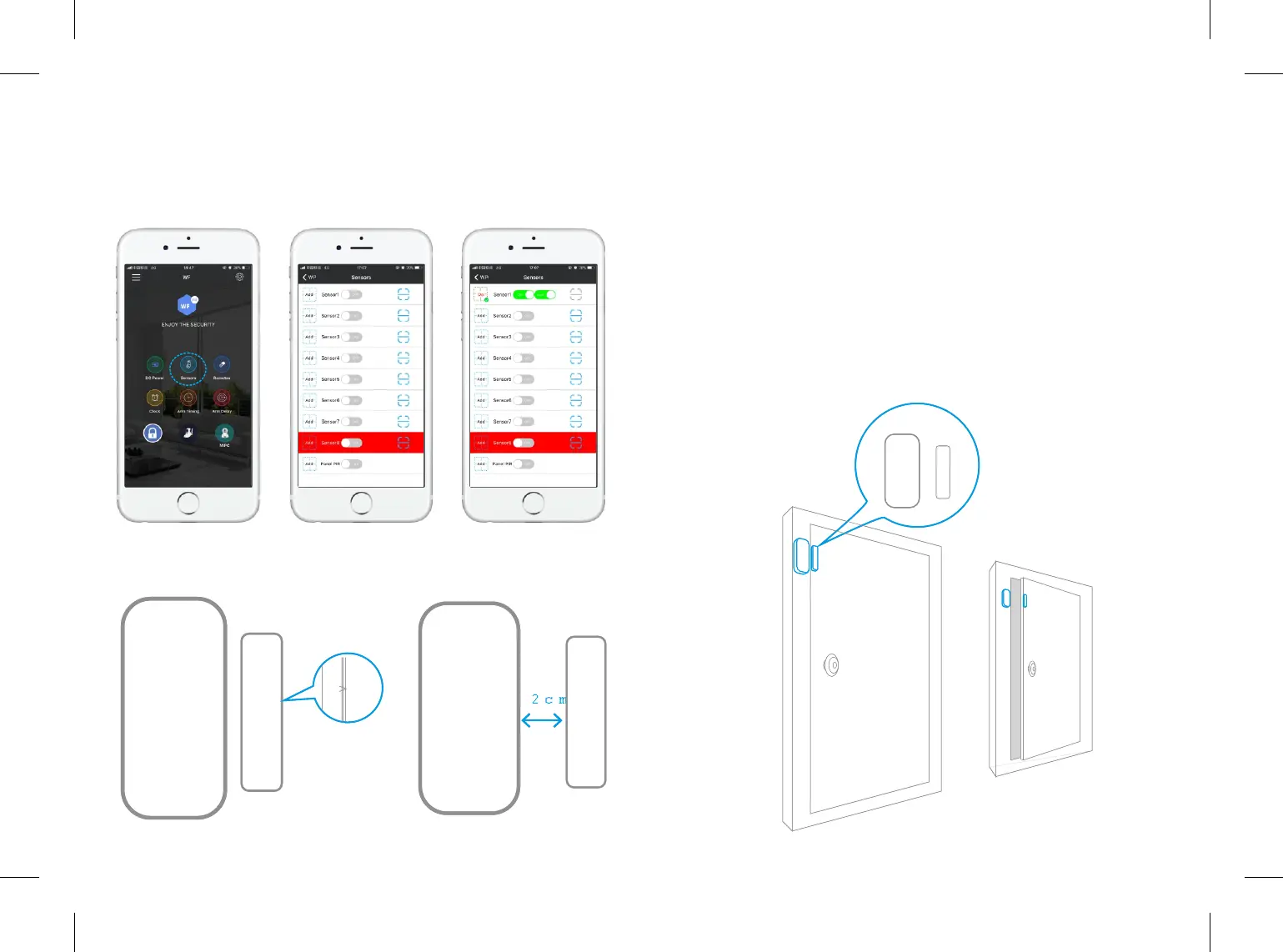
2.Tap "Sensors" to enter adding sensor page. Click “Add”, then the main panel
will BEEP ONCE, then separate the magnet from transmier around 2cm, LED
light in transmier will flash in Red. The main panel will BEEP Three Times
means successfully added. APP will change from ADD to DEL. Click “Del” to
delete sensors.
Important: Sensor 8 is our EMERGENCY SENSOR, when you added sensor into
sensor 8, it keeps working even under disarmed status. Customer should
separately turn off the buon on the APP if he/she don’t want to be disturbed.
The Panel PIR choice is for our main panel, if you turn on this secon, the main
panel can also use as a moon detector.
5.4.3 Door/window Sensor Installaon
Make sure the contact works properly before installing it. There are triangle
marks on the side of the transmier and magnet. Make sure the triangle marks
is close to each other. Once the transmier and magnet is separated around
2cm by intruder,the LED light in transmier will flash in Red. Alarm will be
acvated.
Paste the transmier and magnet on doors and windows or any other
open/close places with provided double-sided tapes.
13 14
7
7
7
7



 To Next Page