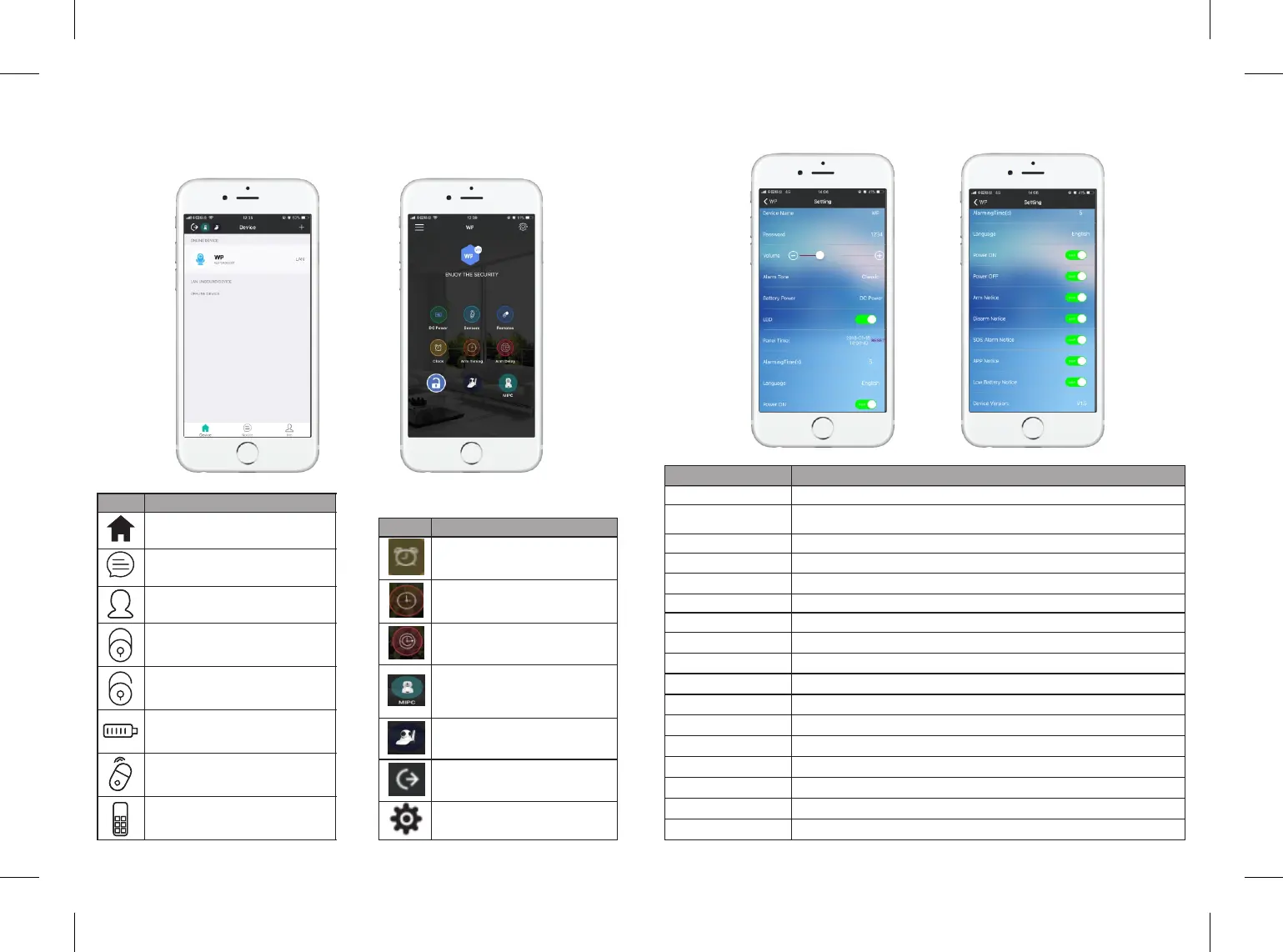
5. APP Funcon Introducon
5.1 Interface Overview
5.2 Seng Overview
Tap "Seng" into the alarm panel seng menu.
Tap “Device” icon, all
devices will displayed here.
Tap “Noce” icon, check all
your alarm record.
Tap “Me” icon, modify account
password or sign out.
Tap “Arm” icon, the sensors
synchronized with the alarm
panel will be armed.
Tap "Dis-arm" icon, the sensors
synchronized with alarm panel
will be disarmed.
Panel baery volume display.
Tap "Sensor" icon to add or
delete senors and set up zones.
Tap "Remote" icon to add or
delete remotes.
Tap “Clock” icon to set up
the alarm me.
Tap “Arm Timing” icon to
set up the auto Arm/
Disarm me.
Tap “Arm Delay” icon to set
up the delay me from 0-255
seconds.
Tap “MIPC” to download
MIP C APP and connect to
the camera, customer
should purchase MIPC first.
Not opened funcon
Tape“<”back to device menu.
Tape "Seng" for alarm
panel sengs
Icon
Descripon
Icon
Descripon
Device Name
Click to change your own device name
Icon
Descripon
Password
Volume
Alarm Tone
Baery Power
LED
Panel Time
Alarming Time(s)
Language
Power ON
Power OFF
Arm Noce
Disarm Noce
SOS Alarm Noce
APP Noce
Low Baery Noce
Device Version
Default password is 1234, click to change the new one. Share
the password to your family so that they can enter this system.
Change the volume from 0-120db
Click to change the alarm tone (5 opons)
DC Power/ Baery Powered Available
Click to turn on/off the LED indicator
Adjusted according to the network me
Adjustable from 0 to 300 seconds
Adjustable from English to Chinese
Click to receive power on noficaon
Click to receive power off noficaon
Click to receive arm noficaon
Click to receive disarm noficaon
Click to receive SOS noficaon
Click to receive APP noficaon
Click to receive low baery noficaon
Please update your APP version occasionally for more funcon
7 8
7
7
7
7
7
7


 To Next Page