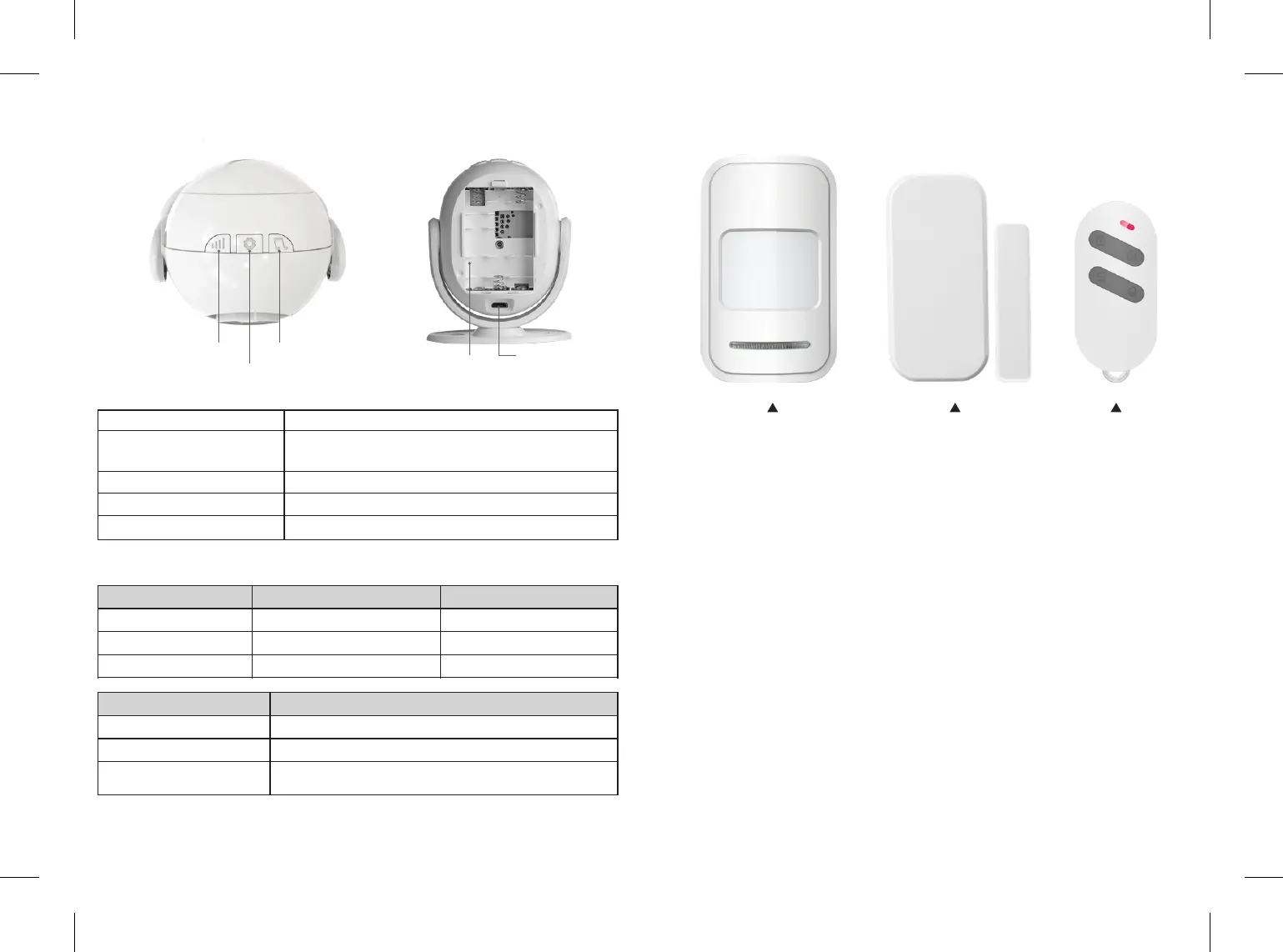
1. Overview of the Main Panel
Volume Buon
Arm/Disarm Buon
Music Buon
Baery Compartment
Micro U SB Jack
Short Press to Change the Volume (0-120db)
Short Press to Arm or Disarm
(Arm: Blue LED Flashes Once / Disarm:
Blue LED Flashes twice)
Short Press to Change the Ring Tones (5 Opons)
3 AAA Baeries Included for Back up
DC 5V/1A for Panel Power
LED Indication
Please Note: When under Wi-Fi disconnected armed status, the system will
alert when detecng moon, but no push noficaon to your phone.
Panel State
Arm
Disarm
Alarming Alert
WIF I Connected
Blue LED Flashes Once
Blue LED Flashes Twice
Blue LED Keep Flashing
WIF I Disconnected
Red LED Flashes Once
Red LED Flashes Twice
Red LED Keep Flashing
Status
Power On
WIF I Connecon
Restore Factory Defaults
LED Indicator
LED Flashes Purple
LED Flashes Red (Successfully Connected Flashes Blue)
Press and Hold Music Buon, then Power on the Main
Panel, Blue LED Flashes 10 Times then Release The Buon
1. Volume Buon
2. Arm/Disarm Buon
3. Music Buon
4. Baery
Compartment
5. Micro
USB Jack
2. Overview of the Accessories
Please Note: All these accessories can purchase in our store.
PIR Moon Detector
Door/ Window Sensor
Remote Controller
3.Before Installation
Wp7 Smart Security Alarm has paired to each sensor when out of box.
Customer can plug and use the alarm with no need to pair the sensor again. If
customer wants to add more sensor or the paired sensor doesn’t work, he can
follow step 5.4.2 Pairing your Sensor and Receiver to add or delete sensor.
Please Note: Please always keep the panel under in charge status, as low
baeries will effect noficaon receiving. Though the panel can power on by
backup baeries, we suggested our customer only use it on emergency.
4.APP Operation
4.1 Download App:
Search keyword“WP7”in App store or Google Play. Download and install the
App.
1 2


 To Next Page