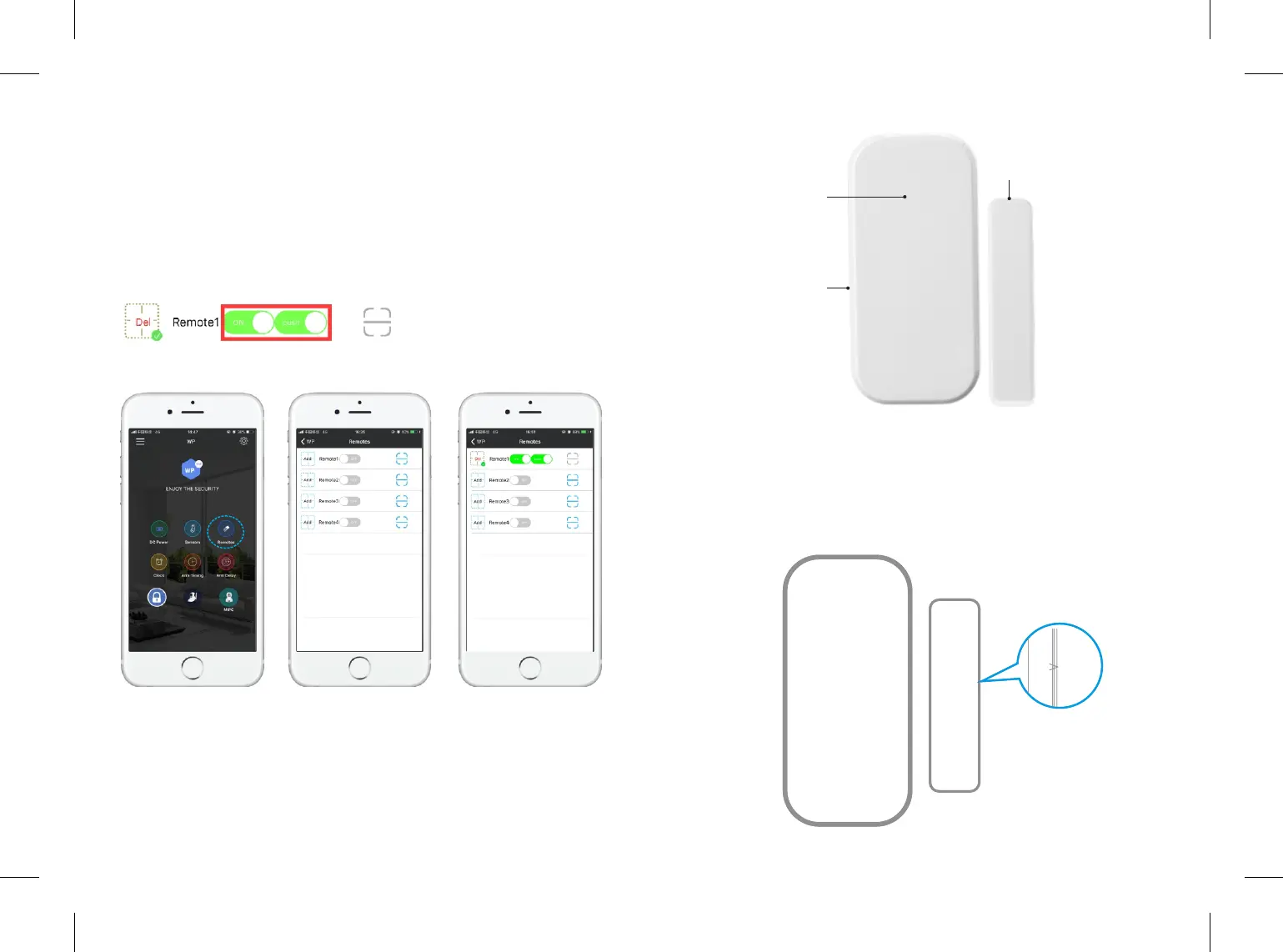
5.4.1 Add /Delete Remote
Tap "Remotes" to enter adding remote page. Click “Add”, then the main panel
will BEEP ONCE, then click any buon on the remote, the main panel will BEEP
Three Times means successfully added. The APP will change from ADD to DEL.
Click “Del” to delete remotes.
Please Note: ONLY AVAILABLE TO ADD UP 4 REMOTES. Customer can choose
to receive the noficaon of the remote by open/close the buon.
5.4.2 Operate Door/window Sensor
The contact sensor contains a transmier and a magnet,which can be mounted
on a door, window or any entry places can be opened or closed. When the
transmier and magnet are separated, the contact sensor will send a signal to
the control panel and the panel will trigger an alarm.
Add /Delete Door/window Sensor
1.There are triangle marks on the side of the transmier and magnet. Make
sure the triangle marks is close to each other at the first step.
11 12
Magnet
LED Indicator
Transmier
Overview
7
7
7
7


 To Next Page