EasyManua.ls Logo

bibox Firepen 3D - Printer Display and Controller Functions

bibox Firepen 3D
18 pages
Print Icon
To Next Page IconTo Next Page
To Previous Page IconTo Previous Page
Loading...
Evobi Automations Pvt Ltd www.firepen3d.bibox.in
17
Display and Controller(二)
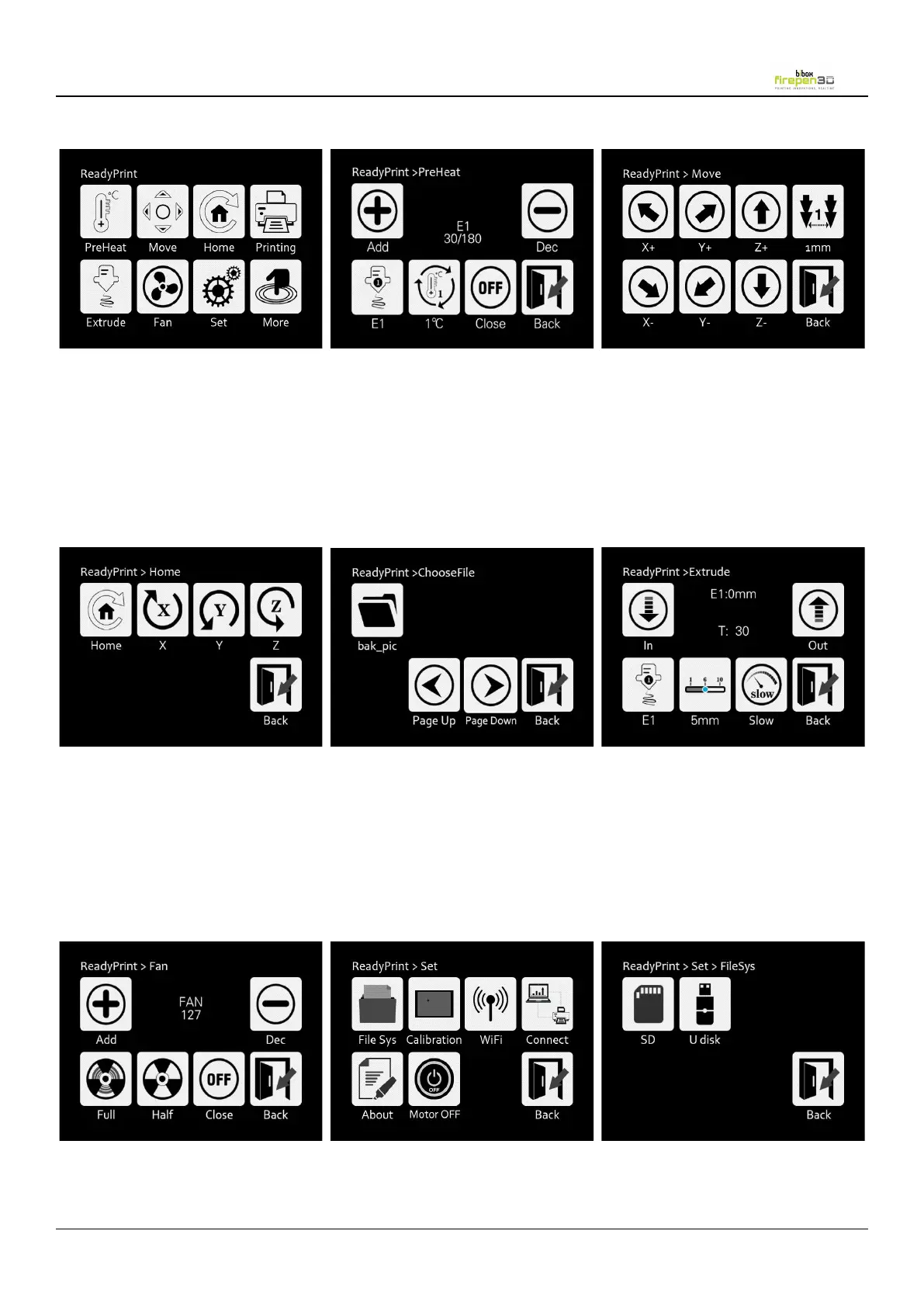
Main menu
Set
Preheat
1.
E1 Change the display from
nozzle temp
into heated bed
2.
1 Choose the increase rate
1/5/10 of
the nozzle or heated bed.
3.
OFF Turn off nozzle or heated
bed.
Extrude
1. E1 Change the display from
nozzle 1
into nozzle 2.(only works on
dual nozzle)
2. 1mm Choose the length of
extruded
filament 1/5/10mm
3. Slow Choose the speed of
load or unload filament.
Move
Move the extruder
1.
0.1mm Choose extruder move
distance
0.1/0.5/1mm
File Sys
Fan
Printing
1. model file will display in the print
options interface, when models
files too much,
click<Page Up>,<Page Down>to
search the file you need
Home
1.
<Home> X/Y/Z axis move
towards to limit switch
direction.
2.
<X> X axis moves left
3.
<Y> Y axis moves back
4. <Z> Z axis moves up