Evobi Automations Pvt Ltd www.firepen3d.bibox.in
2.Preheating the Extruder
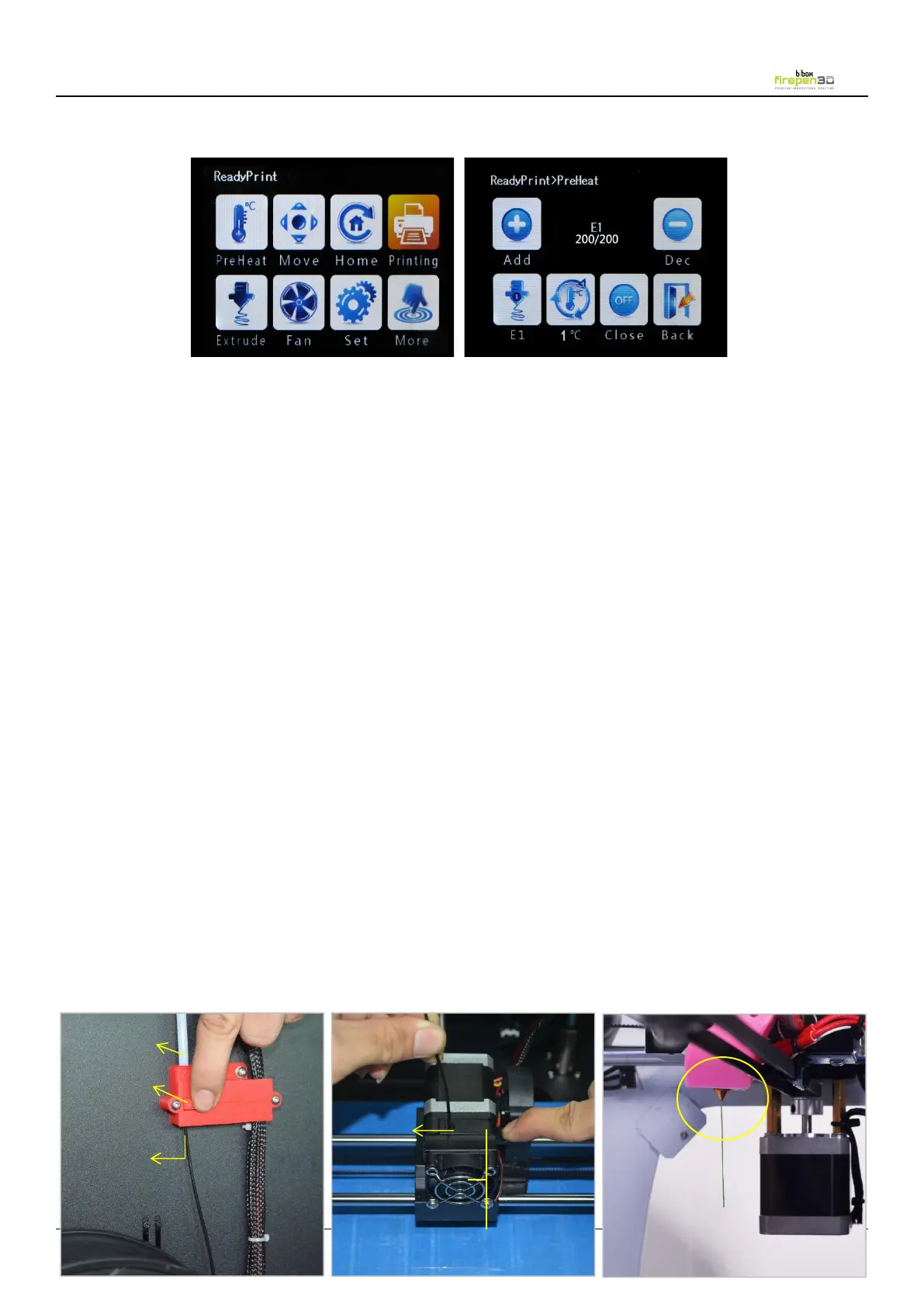
Go to the Touch screen panel and select Preheat > Add.
Add the extruder to 200℃. Wait for the extruder to heat to the set temperature.
Please press Add or Dec button to heat the extruder before start printing, or the
extruder won’t be heated.
( Nozzle 1 - 200/200 shows the current temperature and the set temperature of
nozzles. Press E1 button, the display will show for the temperature of heated bed.
Press 1 ℃ button to choose the increase rate 1℃/5℃/10℃ of heat temperature for
After the extruder reaches 200° C, press the knob on Filament Out Device to the
left, Take and straighten the end of the filament, insert it through the device into the
extruder. The machine will alarm all the time if the knob is not pressed to the left
while inserting the filament, in such a scenario, please load filament again.
Push down on the Extruder Arm, Continue to hold it down as you insert the free
end of the filament into the hole in the top of the extruder. Push the filament in as
far as it will go. You will see plastic start to emerge from the extruder nozzle.
Release the extruder arm.
4. Leveling the Build Platform


 To Next Page