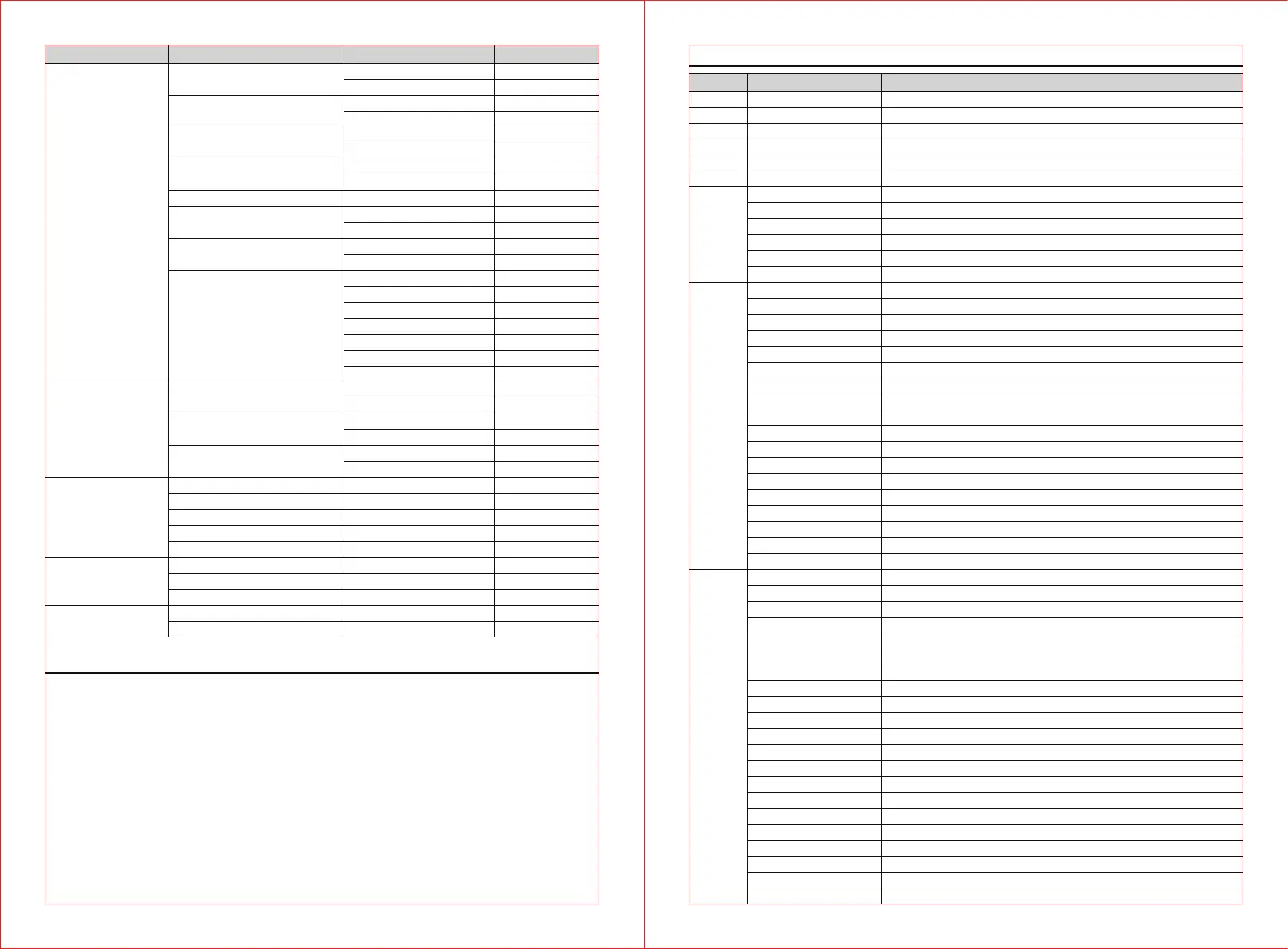
DMX Protocol
Channel Value Function
000-255
000-255
000-255
000-255
000-255
000-255
STROBE
000-010
011-207
208-212
213-251
252-255
COLOR WHEEL
000-010
011-015
016-020
021-025
026-030
031-035
036-040
041-045
046-050
051-055
056-060
061-065
066-070
071-191
192-222
223-224
225-255
FIXED GOBO
000-010
011-015
016-020
021-025
026-030
031-035
036-040
041-045
046-050
051-055
056-060
061-065
066-070
071-075
076-080
081-087
088-094
095-101
102-108
109-115
PAN 0-540°
PAN FINE
TILT 0-270°
TILT FINE
PT Speed
DIMMER
STROBE
close
Strobe( Slow to fast)
open
Random Strobe( Slow to fast)
open
COLOR WHEEL
open
COLOR 1
COLOR 2
COLOR 3
COLOR 4
COLOR 5
COLOR 6
COLOR 7
COLOR 8
COLOR 9
COLOR 10
COLOR 11
open
COLOR WHEEL Index
Clockwise RAINBOW EFFECT(fast to slow)
STOP
Counter-Clockwise RAINBOW EFFECT Slow to Fast
FIXED GOBO
WHITE
GOBO 1
GOBO 2
GOBO 3
GOBO 4
GOBO 5
GOBO 6
GOBO 7
GOBO 8
GOBO 9
GOBO 10
GOBO 11
GOBO 12
GOBO 13
WHITE
GOBO 1 Shaking ( slow to fast)
GOBO 2 Shaking ( slow to fast)
GOBO 3 Shaking ( slow to fast)
GOBO 4 Shaking ( slow to fast)
GOBO 5 Shaking ( slow to fast)
CH1
CH2
CH3
CH4
CH5
CH6
CH7
CH8
CH9
Main menu Submenu Detail
Pan Invert
Tilt Invert
P/T Feedback
Data hold
Sound Sens
Lamp Switch
Lamp state
Motor Calib
(Password:
press the buttons
up-down-up-down in order)
Language
Screen Saver
Screen Reverse
motor info
Fixture Status
Version
Lamp time
Total time
Pan/Tilt
effect
All
Cancel
OK
Off
On
Off
On
Off
On
Off
On
0-100
Off
On
PowerON
Maunal
Pan
Tilt
Color
FixGobo
Storbe
Frost
Prism
Chinese
English
Off
MODE1
Off
On
Remarks
default
default
default
default
default
default
-127~+127
-127~+127
-127~+127
-127~+127
-127~+127
-127~+127
-127~+127
default
default
default
Setting
Display
Information
Reset
Factory Setting
— 5 —— 4 —
Control By Universal Dmx Controller
DMX512 connection
At last fixture, the DMX cable has to be terminated with a terminator. Solder a 120-ohm 1/4 W resistor between
pin 2(DMX-) and pin 3(DMX+) into a 3-pin XLR-plug and plug it in the DMX-output of the last unit.
Every lighting fixture needs to have a DMX address to receive the data by the controller. The address number is
between 1-512.
The end of the DMX 512 system should be terminated to reduce signal errors.
3 pin XLR connectors are more popular than 5 pins XLR.
3 pin XLR: Pin 1: GND, Pin 2: Negative signal (-), Pin 3: Positive signal (+)
5 pin XLR: Pin 1: GND, Pin 2: Negative signal (-), Pin 3: Positive signal (+), Pin4, Pin5 not used.
Address Setting
Use a universal DMX controller to control the fixtures, the signal indicator of control panel shows GREEN; you
can set DMX address from 1 to 512 so that they can receive correct DMX signal.
Press the LEFT button to enter mainmenu, select Address Functions, use the UP/DOWN button to adjust the
address from 001 to 512, press the CENTRE button to confirm,
use the UP/DOWN button to select Run Mode, choose the DMX512 submenu press the CENTRE button to store.
Press the LEFT button back to the last menu or let the unit idle 30 seconds to exit menu mode.


 To Next Page