2.4 Turning the Caddy On (Digital Version)
2.5 Operating the Caddy
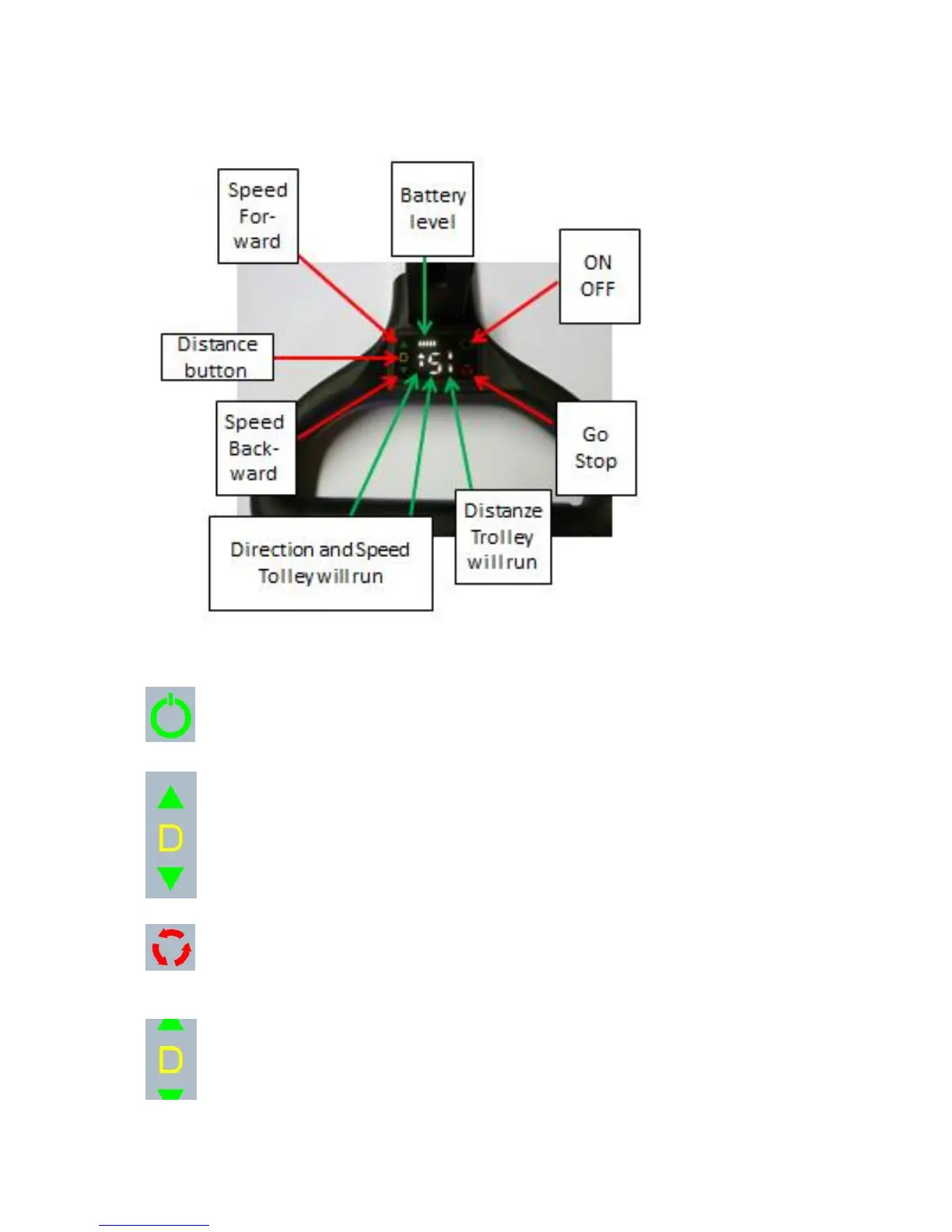
By pressing the Speed forward button the speed will be raised
By pressing the Speed backward button the speed will be reduced.
Note to run backwards press the Speed Backwards button so that the arrow
shows in backwards direction
To activate the trolley press the ON/OFF button. The display will show up the
Batterie gauge level and the selected speed. The arrow shows the dirction the
trolley will move
For let the trolley move press the GO / Stop button.
To Stop the Trolley press the GO/Stop button.
Note: The trolley will also stop if you press 2 buttons at the same time.
The distance button can only be activated when the trolley in not moving. By
pressing it once the distance is set to aprox. 5m by pressing it twice the distance
will be aprox 10m and by pressing it three times it will be aprox. 15m.
Note the trolley will move with the speed selected!



 To Next Page