II. Electric BigRep
II-E PC
* 2016-04-07
Overview
› Linux PC
› Pronterface and BigRep GUI preinstalled
› Operator can switch between Pronterface and GUI during the machine is
running.
› Pronterface recommended for maintenance
› Hard drive on-board – data/printing files can be saved at the machine.
› Preinstalled G-Codes for setup and maintenance
› Can be connected to the Internet via Ethernet cable (at the le side of the
control unit)
› Open the back-cover of the PC with 4 hex screws
Open the back-cover of the PC with 4 hex screws
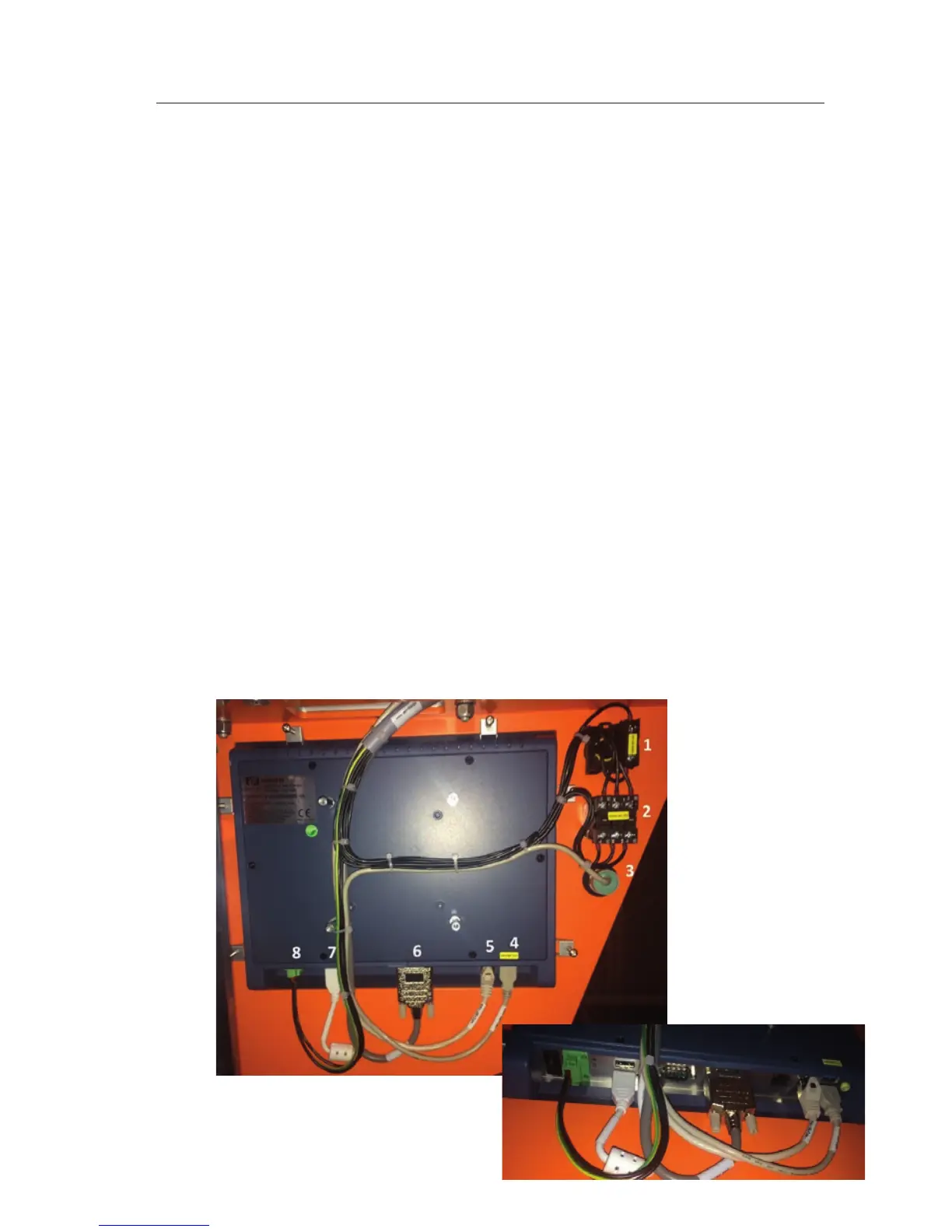
1 Emergency Stop 5 CAT Cable Ethernet Connection
2 Reset Button 6 Display Port
3 USB 7 Boogieboard Connector USB
4 Connector USB Port 8 Power supply
Important: USB cables have to be plugged in at the ports displayed:
II-E 1/1



 To Next Page