The BIGTREETECH TMC5160T Plus is a high-power stepper motor driver control module designed for 3D printers and similar applications. It features 8 high-power MOSFETs, capable of handling a maximum voltage of 60V and a maximum effective current (IRMS) of 10.6A, with a sine wave peak current of up to 15A. This broad voltage and current capability allows it to drive a wide range of stepper motors and offers greater adaptability for various setups.
Key Features and Technical Specifications:
- High-Power Design: Equipped with 8 high-power MOSFETs, the module supports up to 100V voltage resistance, 93A current resistance, and an equivalent resistance as low as 6mΩ, significantly enhancing the drive's performance and efficiency.
- Input Voltage (HVIN): 8V-60V, providing flexibility for different power supplies.
- Maximum Effective Current: 10.6A, with a sine wave peak current of 15A, ensuring robust motor control.
- Capacitor: 2 x 560uF, contributing to stable power delivery.
- Maximum Subdivision: 256, allowing for very smooth and precise motor movements.
- Operating Mode: Supports SPI and SD modes, offering versatile control options.
- Sampling Resistor: 22mΩ (0.022R), which is a critical component for current sensing and control.
- Advanced Driver Modes: Integrates StealthChop™ mode and SpreadCycle™ mode, which are selectable for standalone mode, UART mode, and SPI mode. StealthChop™ is known for silent operation, while SpreadCycle™ provides dynamic motor control for high-speed applications.
- Thermal Management: Generates significantly less heat compared to other drives with the same chip model, outperforming others on the market. It also features an integrated heat sink design, providing high heat dissipation while enhancing structural integrity and aesthetics. A heat sink pre-designed with fan mounting holes allows for DIY fan installation, further improving cooling.
- Protection Features: Can prevent motor jitter and avoid losing steps, ensuring reliable operation. It includes ESD protection on the drive power, logic power, etc., to prevent damage due to power fluctuations and static electricity.
- On-Board Functionality: An on-board 24V always-on fan interface facilitates active cooling.
- Encoder Interface: An encoder interface is reserved for DIY usage, offering potential for closed-loop control or other custom applications.
- Connectivity: Supplied with adapters and wires for both standard drives and EZ drive, making it user-friendly for various motherboard connections.
Dimensions:
- TMC5160T Plus: 64 x 56 x 32.55mm
- TMC5160T Plus (W/o case): 58 x 50 x 28mm
- Drive Chip: TMC5160-TA
Usage Features and Installation:
The TMC5160T Plus can be connected to common motherboards (e.g., SKR3) using the supplied TMC Driver Adaptor and cables. For EZ series motherboards (e.g., Octopus MAX EZ), the supplied EZ Driver Adaptor and cables are used. The manual provides diagrams illustrating these connection methods.
Firmware Settings (Marlin Firmware):
For Marlin firmware, specific configurations are required to enable and optimize the TMC5160T Plus.
- Locate and Open
Configuration.h: Find the line #define MOTHERBOARD XXXXXX and replace XXXXXX with the model of your motherboard.
- Locate and Open
pins_XXXX.h: In the Marlin\src\pins directory, find the pins_XXXX.h file corresponding to your motherboard. Locate and define the following variables within this file:
X_CS_PINY_CS_PINZ_CS_PINE0_CS_PINE1_CS_PIN (if applicable)
- Locate and Open
Configuration_adv.h:
- SPI Settings: Find the lines
#define TMC_SW_MOSI XXX, #define TMC_SW_MISO XXX, and #define TMC_SW_SCK XXX. Change XXX to the pins you want to use.
- Enable SPI: Find and open
Configuration_adv.h, then locate #define TMC_USE_SW_SPI and uncomment the line.
- Current and Microsteps: In
Configuration_adv.h, find #define X_MICROSTEPS, and #define X_RSENSE. Modify the parameters that follow for each axis being used. The RSENSE value for each used axis should be changed to 0.022.
- Driver Type: Set the corresponding axis drive type to
"TMC5160" in the Configuration.h file.
Firmware Settings (Klipper Firmware):
For Klipper firmware, the following settings are typically used in the configuration file:
[tmc5160 stepper_x]
cs_pin: P1.17
spi_software_miso_pin: P0.5
spi_software_mosi_pin: P4.28
spi_software_sclk_pin: P0.4
sense_resistor: 0.022
#diag1_pin: P1.29
run_current: 0.800
stealthchop_threshold: 999999
Note: The default sense_resistor in Klipper is 0.075; it needs to be set to 0.022 for the TMC5160T Plus.
Maintenance Features and Safety Instructions:
Proper installation and handling are crucial for the longevity and safe operation of the TMC5160T Plus.
- Power Off: Always turn off the power before installing the driver to prevent damage.
- Plug/Unplug: Do not plug or unplug the driver module with power on to avoid damage.
- Polarity: Be cautious of polarity when connecting; reversing can cause the driver to burn out.
- Heat Dissipation: The factory-installed heat sink should not be removed, as doing so will decrease heat dissipation in the absence of thermal interface material. For large currents (greater than 3A), active cooling is required for normal operation.
- Sampling Resistor: This product uses a 0.022R sampling resistor, so the maximum effective driving current is 10.6A.
- Power Sequence: Pay attention to the power sequence; ensure the driver power is turned on before the logic power. That is, turn on the driver power first, then power on the motherboard.
- Voltage Delivery: Regardless of whether the driver uses high or low voltage power delivery, the output voltage from the main control board to the drive must not exceed 24V; exceeding this will damage the driver.
For further resources, support, or feedback, users are encouraged to visit the BIGTREETECH GitHub page or contact their after-sales support.

 Need help?
 General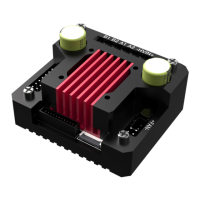

 To Next Page