BIGTREETECH TMC5160T Plus V1.0 User Manual
8
Firmware Settings
Marlin Firmware Settings
Important Note: Currently, only Marlin 2.0 and later firmware versions support
TMC5160's SPI mode.
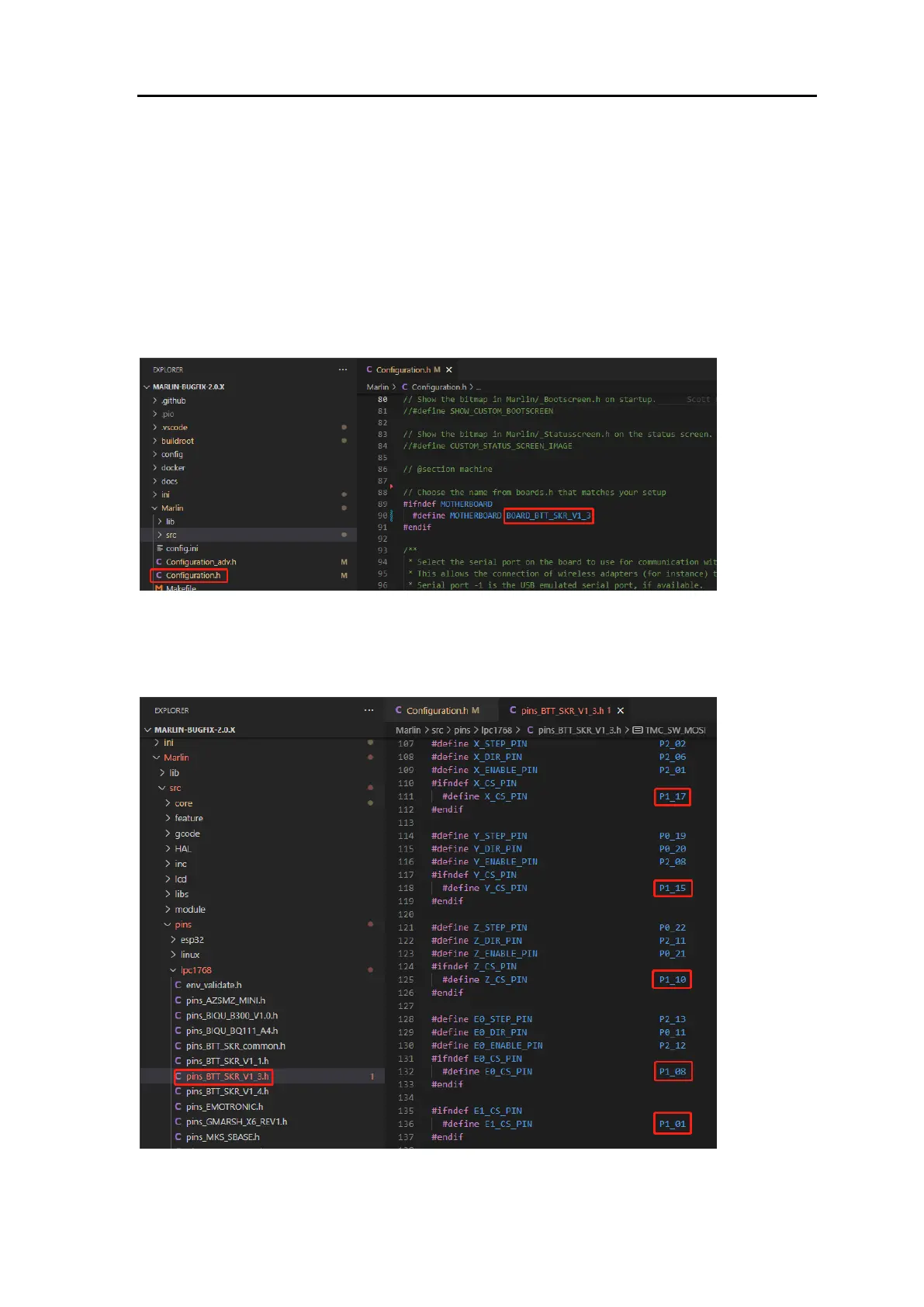
Step 1: In the Marlin 2.0 firmware, locate and open the "Configuration.h" file,
then find the line "#define MOTHERBOARD XXXXXX". "XXXXXX" represents
the model of the board being used. Confirm the motherboard you are using.
Step 2: In the Marlin\src\pins directory, find the "pins_xxxxxx.h" file
corresponding to your board (xxxxxx represents the board model), and then
locate "X_CS_PIN", "Y_CS_PIN", "Z_CS_PIN", and "EO_CS_PIN" within the file.
Modify the pin names following these variables to the pins you are using.


 To Next Page