Fixed Wireless/Wired IP Camera
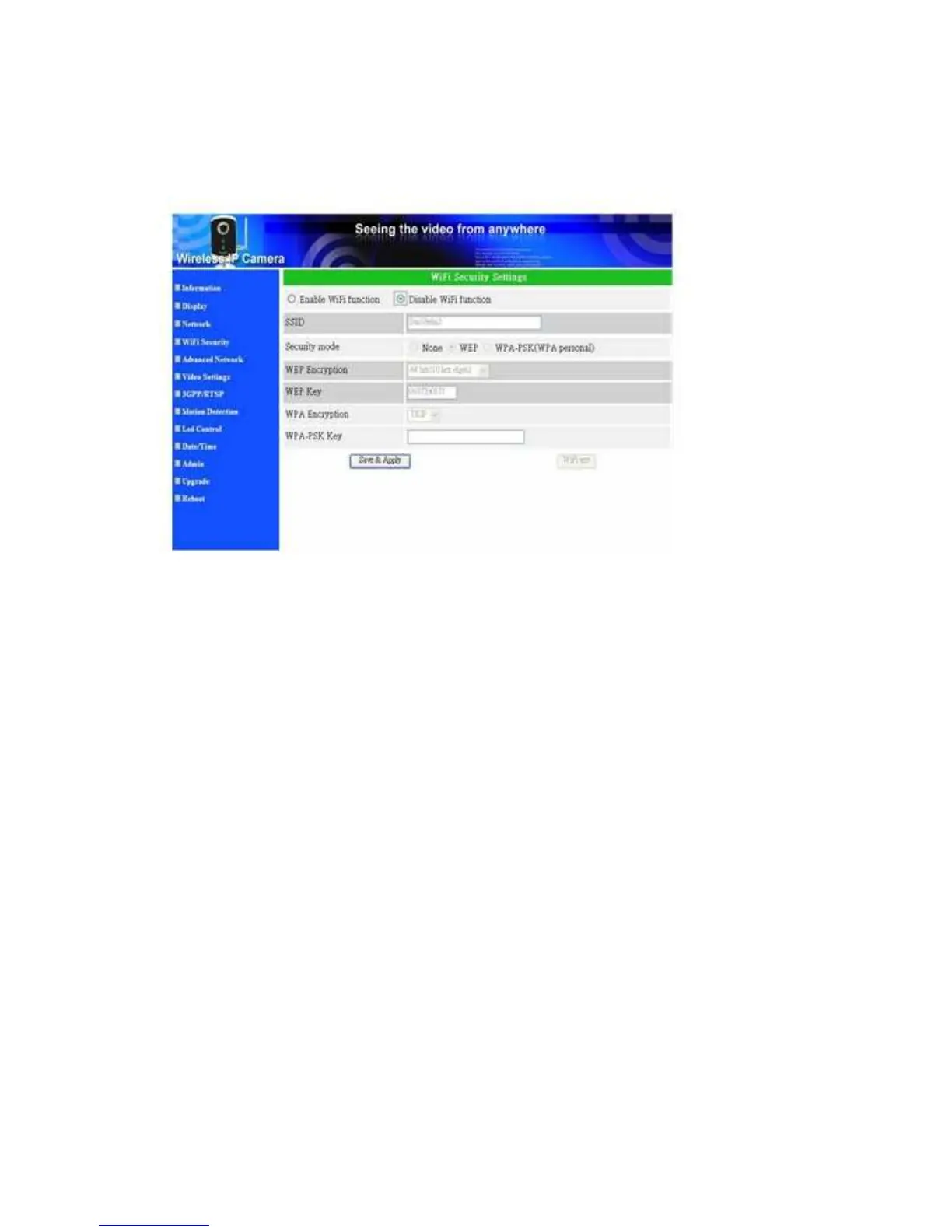
3.4. WiFi security (For IP Cam(w))
You can use the wireless to connect the IP CAM to the network. If your network
environment has a 802.11 b/g router or AP running, you can check the “Enable WiFi
function” button to use the wireless.
Figure 3-7: WiFi security disabled page
In order to use the wireless network, you need to fill the following fields:
1. SSID - this is the ID of the wireless router or AP of your wireless network
environment, must be set correctly.
2. Security mode - this is the security mode used in the wireless router or AP. Need
to choose one of the three modes - None, WEP and WPA-PSK.
WEP : Wireless Encryption Protocol.
WPA : WiFi Protected Access.
PSK : Pre-Shared Key.
TKIP : Temporal Key Integrity Protocol.
AES : Advanced Encryption Standard.
3. WEP mode - when the WEP mode is chosen, you need also choose between
64-bit(5 char), 64-bit(10 hex), 128-bit(13 char) and 128-bit(26 hex) encryption
mode, and then fill the WEP key correctly.
4. WPA-PSK mode - when the WPA-PSK mode is chosen, you need also choose
between TKIP and AES encryption mode, and then fill the WPA-PSK key
correctly.
All the fields in this page must be filled correctly with the same settings the
wireless router or AP using.
19


 To Next Page