
 Need help?
Do you have a question about the Binary 260 Series and is the answer not in the manual?
Details the core functionalities and capabilities of the B-260-HDMI-CTRL device, including video resolution and audio output.
Highlights the advantages and value propositions of using the B-260-HDMI-CTRL, such as automatic control and signal compensation.
Lists all the items included in the B-260-HDMI-CTRL package, such as the controller, power adapter, and connectors.
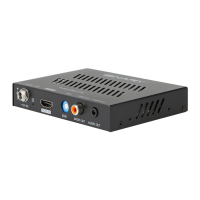
Describes the ports and indicators located on the front panel of the B-260-HDMI-CTRL, including HDMI IN and audio outputs.
Details the connections available on the rear panel of the B-260-HDMI-CTRL, such as HDMI OUT, RS232, and relay control ports.
Step-by-step instructions for physically mounting and securing the B-260-HDMI-CTRL unit in its intended location.
Provides guidance on connecting various sources, displays, and control devices to the B-260-HDMI-CTRL.
The Binary 260 Series 4K HDR In-Line Controller (B-260-HDMI-CTRL) is a versatile device designed to manage and enhance HDMI signals, offering advanced control and audio de-embedding capabilities. It supports high-resolution video up to 4K@60Hz with 4:4:4 8-bit chroma sub-sampling and is compatible with HDCP 2.2.
The B-260-HDMI-CTRL acts as an in-line controller for HDMI signals. Its primary functions include:
 General
| Brand | Binary |
|---|---|
| Model | 260 Series |
| Category | Controller |
| Language | English |

 To Next Page