11
5. TO SET THE PRESSURE OF EACH CHAMBER IN YOUR GARMENT
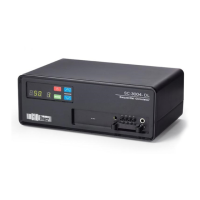
5.1 With the pump o, press the “Power” On/O buon.
5.2 The pump will display the hours of usage for 5 seconds. While the hour meter is
being displayed (rst 5 seconds) Press and hold the “Up” and “Down” buon at
the same me and hold them down for 5 more seconds.
5.3 The next set of numbers will show the current pressure seng in the “LED
Readout” and the chamber associated with that pressure in the “Chamber Num-
ber LED”.
5.4 Change the pressure seng using the “Up” or “Down” buon unl you get to
your desired pressure.
5.5 Press the “Mode” buon to move to the next chamber and repeat the steps
above.
5.6 Aer you have set the pressure in all 4 chambers, press the “Power On/O”
buon and your pump will start to operate.
6. PROGRAMMING YOUR PUMP TO OPERATE IN DIFFERENT MODES
“The SC-3004-DL can be run in two dierent modes - 1 hour shuto or connu-
ous. To set the mode:”
6.1 With the Pump o, press the “Power” On/O buon.
6.2 The pump will display the hours of usage for 5 seconds. While the hour meter is
being displayed (rst 5 seconds) Press and hold the “Mode” buon 5 more sec-
onds.
6.3 Aer 5 seconds, you will see “1Hr.” in the “LED Readout”. This indicates that
you are in the 1 Hour shuto mode. In this mode, the pump will operate for
one hour and then automacally turn o. The pump comes preset to this mode
so there is no reason to go through these steps if you wish to run your pump in
the 1 Hour Mode. If you are seng the mode, and want to proceed with this
seng, simply press the “Power” On/O buon and your pump will begin its
cycle.
6.4 If you want to operate in a dierent mode, aer “1Hr.” shows press the “Mode”
buon again and you will see “COn” which indicates you are in connuous
mode. In this mode, the pump will not shut o unl you manually turn it o by
pressing the “Power” On/O buon. Once you see “COn”, if you want to pro-
ceed with this seng, press the “Power” On/O buon and your pump will
begin its cycle.


 To Next Page