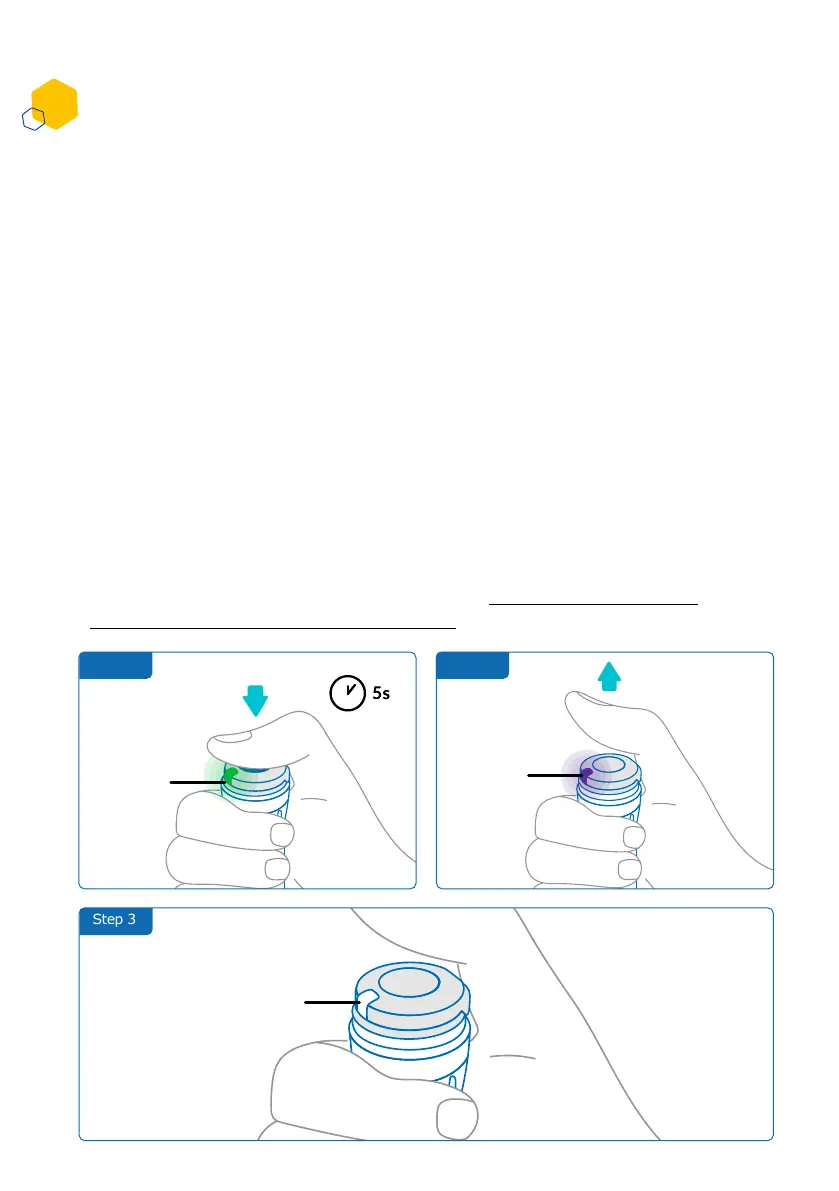
Step 2Step 1
Step 3
How do I deactivate and remove the smartdot™ transmitter?
1. Press smartdot™ transmitter for 5 seconds until the green light turns
to purple.
2. Release the button as soon as you see the purple light.
3. The light will turn off. The transmitter is now deactivated, and
injections will no longer be recorded.
You can now remove the transmitter from the pen.
To reactivate smartdot™ transmitter, see ‘Part 5: Preparing <E.
Activating your smartdot™ transmitter’.
• Wiping the internal surfaces of smartdot™ transmitter or your pen
injector
• Charging smartdot™ when the room temperature is above 25°C.
• Moving smartdot™ to a new pen injector
The smartdot™ transmitter must be deactivated before you can remove
it from the pen injector. This will prevent data being recorded in error.
You need to deactivate the transmitter before carrying out the following
actions:
Green
light
Purple
Light
No light
Part 8: Frequently asked questions
C
18



 To Next Page