Step 2a
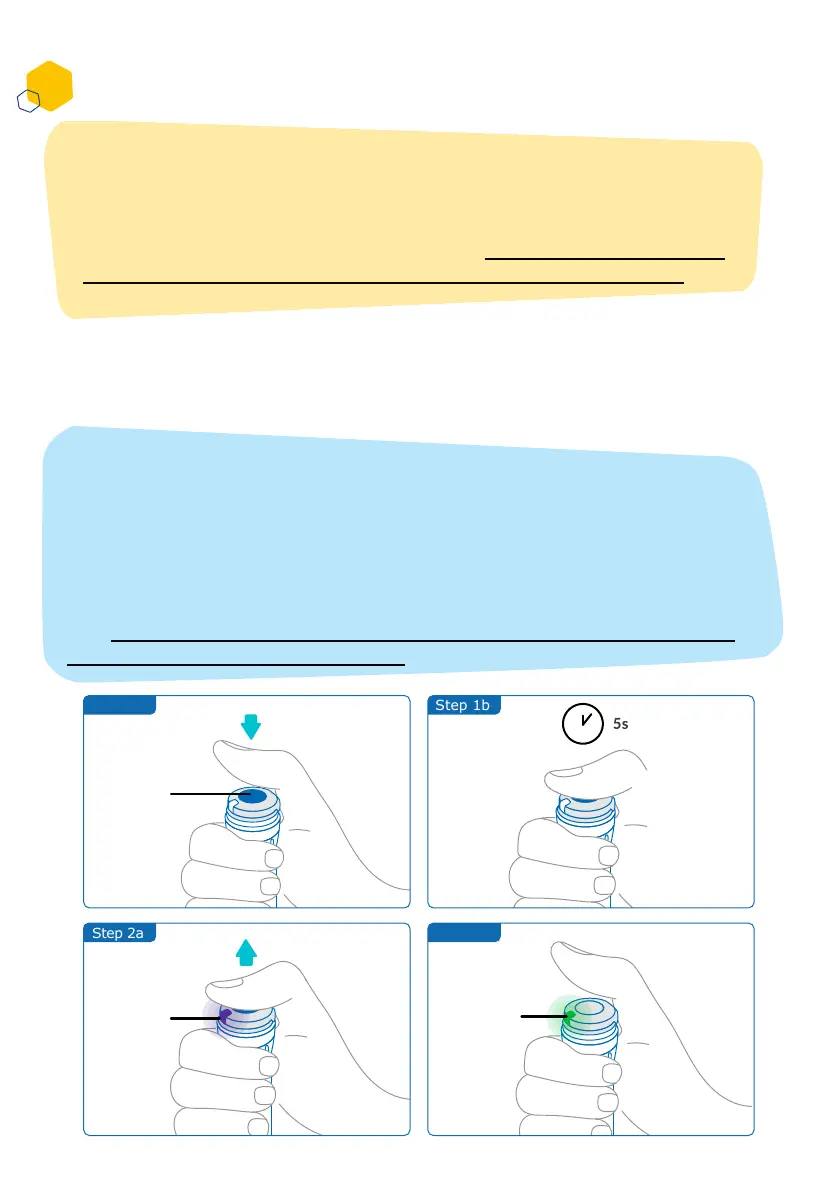
Step 1a Step 1b
Activating your smartdot™ transmitter
1. Press the smartdot™ injection button, until you see a purple light.
2. Now release the button. The transmitter will show a green light, it
means the smartdot™ transmitter has been successfully activated.
Note:
You need to activate smartdot™ transmitter to use it. This will allow
your transmitter to record injection data when you perform your
injection.
Learn more about data transmission, see ‘Part 8: Frequently asked
questions <F. How does smartdot™ transfer the injection data?’
Middle
of the
button
Purple
Light
Step 2b
Green
Light
Part 5: Preparing
E
12
IMPORTANT:
If you do not see a green light when you release the injection button or
when you press the button after the activation steps, the activation was
not successful. Repeat the steps 1 and 2 and try again.
Do not repeat the activation steps if you see the green light. Repeating
the same steps, if the smartdot™ transmitter has been activated, will de-
activate it. For more information on when to de-activate the transmitter,
see ‘Part 8: Frequently asked questions, <C. How do I deactivate and
remove the smardot™ transmitter?’.



 To Next Page