14 Biodex Medical Systems, Inc. © 2018
Changing the Tablet Shelf to a WIN CE Display Shelf:
1. Place the arm assembly into a comfortable position for removing/attaching the various parts
to switch out the shelves (e.g., turn the arm assembly upside down for easy access to the
screws).
2. Using a 7/16” wrench, remove the shelf tube clamp from underneath the support tube
fastening the Tablet Shelf to the arm assembly and place the acorn nuts on the side to be
reused with the Display shelf.
3. Remove the Tablet Shelf from the arm assembly and place to one side.
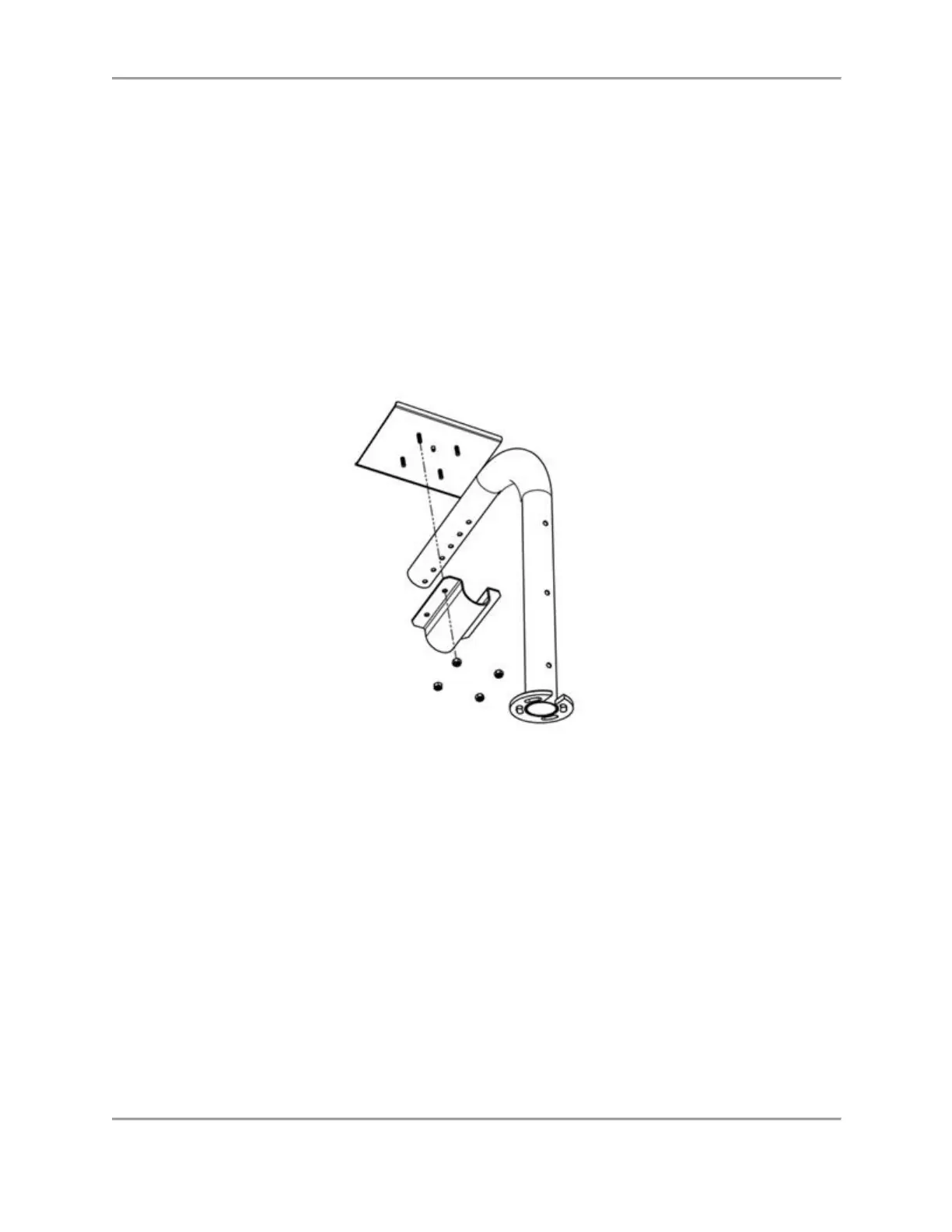
4. Place the Display Shelf on the arm assembly with the shelf tube clamp positioned on the
other side of the support tube lining up the screw holes with the screw holes in the Atomlab
Display shelf. Put the nuts onto the posts and tighten them (see Figure 2.8).
Figure 2.8. Lining up Mounting Screws with Openings in Atomlab Tube Clamp.
Changing the WIN CE Display Shelf to a Tablet Shelf:
1. Place the arm assembly into a comfortable position for removing/attaching the various parts
to switch out the shelves (e.g., turn the arm assembly upside down for easy access to the
screws).
2. Remove the shelf tube clamp (see Figure 2.9) keeping the nuts on hand to install the
appropriate shelf. Remove the Display Shelf from the support tube and place it to one side.



 To Next Page