8 9
STEP 2: CHANGING BATTERY PACKS
Eachday,preferablyatthesametimetoensuretreatment
is continued without interruption, patients should do
thefollowing:
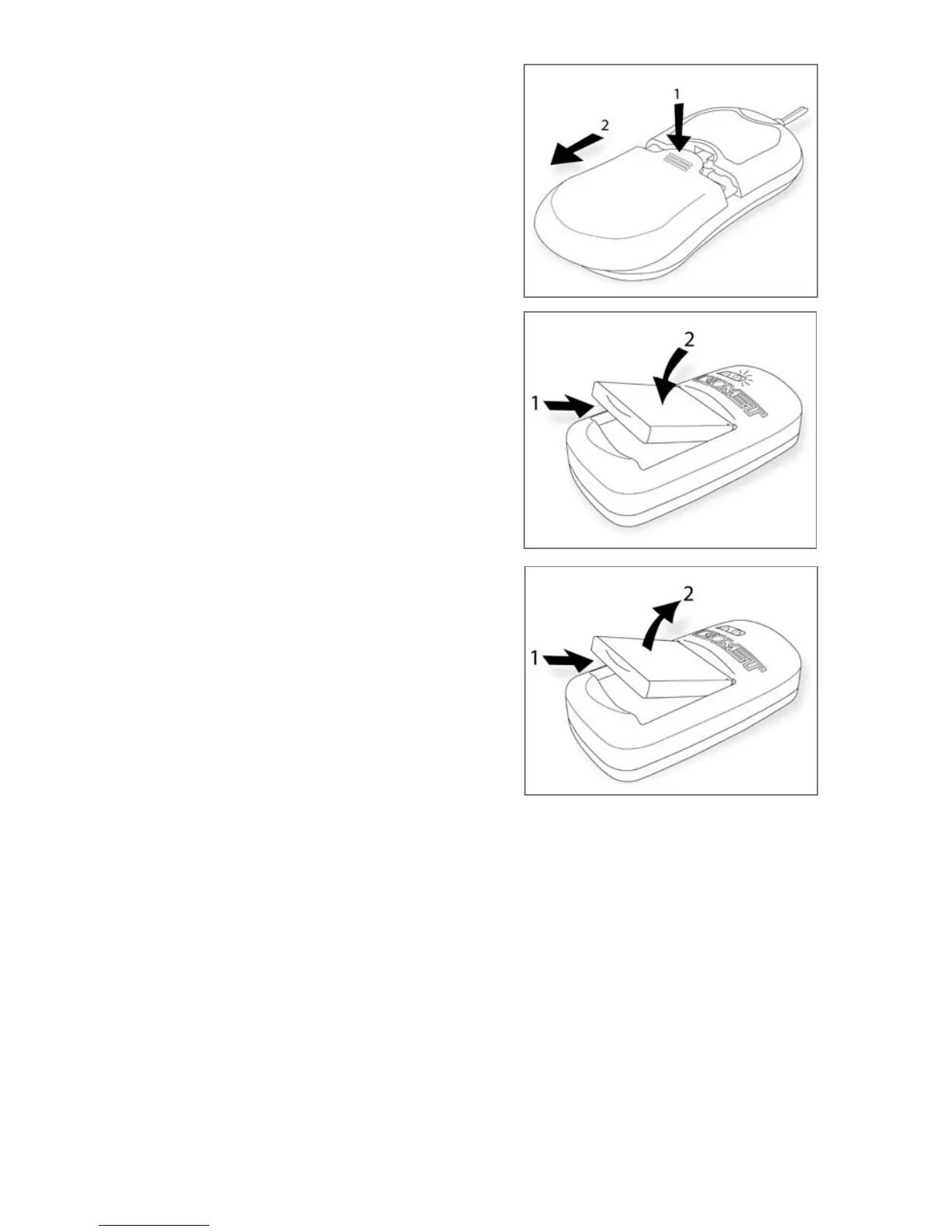
A. Depressthelatch(1)onthebatterydoorandslide
downthebatterydooronthebackofthestimulator
(2)andremovethedepletedbatterypack(Figure7).
B. Followingthearrows,placethedepletedbatterypack
into the battery charger cradle (1, 2) for charging
(Figure8).Asolidorangelightonthechargercradle
willilluminate,indicatingthe battery ischarging.If
nolight appearsonthechargingcradle anerroris
indicated. If this occurs, try removing the battery
packfromthechargercradleandreinsertingit.Ifthe
orangelightdoesnotappearcontactBiomet.
C. Once the charger cradle’s orange light turns off
and a solid green light appears, the battery pack
is fully charged. Remove the battery pack (1, 2)
from the battery charger cradle with a gentle lift
on the battery tab (Figure 9) and place the fully
charged battery pack into the Biomet
®
SpinalPak
®
Non-invasive Spine Fusion Stimulator System in
order to commence treatment.
D. Thereshouldalwaysbeonebatterypackinthecharger
andonebatterypackinstalledinthestimulatoratall
times,ensuringafullychargedbatterypackevery24
hoursasrecommended.
NOTE: Do not be concerned if the battery packs are inadvertently charged more than once or kept on
the charger cradle for a long period of time. The battery packs cannot be overcharged. If the battery
pack is in the battery pack charger and the battery pack is fully charged, the charger will terminate
the recharging process. The charger cradle will indicate termination of charging when the orange
light is not illuminated. Additional replacement battery packs are available by contacting Biomet.
Figure 7
Figure 8
Figure 9


 To Next Page