Project Type
Instructions
Date: March 27 2020
Customer: Thermor Ltd
Job Number: TH1011
Item Number: 3AL1-3E
Designer: Alex Vranjesevic
Revision: B
Artwork is not to be amended or scaled. If any changes
are required please send through Thermor oce with
instructions, and we will amend here and resend artwork
through. PLEASE RETURN WITH SIGNATURE
Contact: Graphic’s Department
graphics@thermor-ins.com
Colour Breakdown
Reason For Project:
New Item:
New Branding: X
Design Update:
N/A:
UPC (For Reference Only)
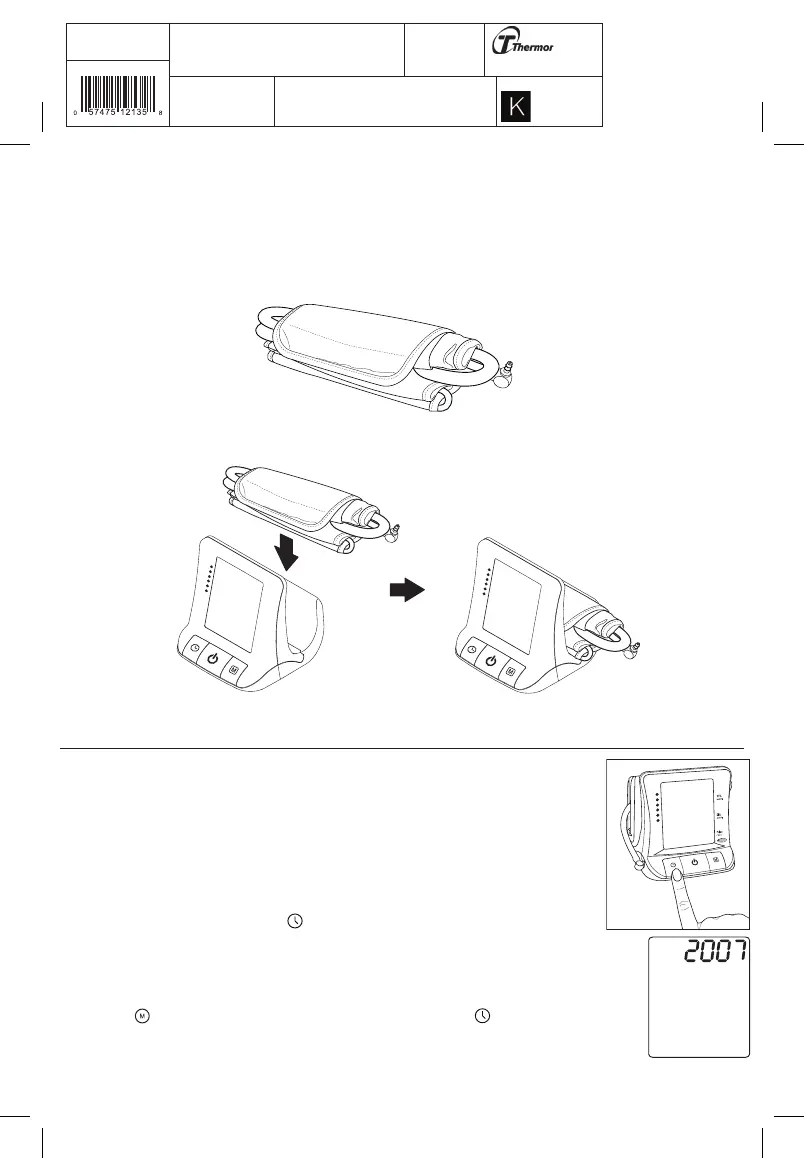
2.5 Storing the Cuff
The cuff used for measuring blood pressure is a delicate component of the device and should be stored carefully
when not in use. The 3AL1-3E is designed such that the cuff can be stored along with the blood pressure
monitor. Follow these steps to store the blood pressure cuff.
1. Roll up the upper arm cuff along with the inflating tube.
2. Push the folded cuff in the compartment at the back of the 3AL1-3E to store it safely.
3. Using the Device
This section describes how to get the maximum benefit from your 3AL1-3E blood pressure
monitor. Follow the instructions carefully to get an accurate measurement of your blood
pressure and pulse rate.
3.1 Setting the Time, Date and Year
When you insert the batteries for the first time (see “Inserting the batteries”), the 3AL1-3E
prompts you to set the current date and time. You can also adjust the date and time at any
time by pressing and holding down the button for over 3 seconds. Follow these steps to set
the date and time:
1. When you replace the batteries, the LCD screen starts flashing the current year setting.
Press the button repeatedly to adjust the year and then press the button to confirm
the setting.














 To Next Page