
 To Next Page
E
Emily BarnesAug 18, 2025
What to do if my BIOS WEATHER 261BC display shows dashes (--.-°F)?
- EErica AbbottAug 18, 2025
If your BIOS WEATHER Thermometer displays dashes (--.-°F), press the RESET button.

What to do if my BIOS WEATHER 261BC display shows dashes (--.-°F)?
If your BIOS WEATHER Thermometer displays dashes (--.-°F), press the RESET button.
Why is my BIOS WEATHER 261BC Thermometer not receiving outdoor temperature?
Several factors can prevent your BIOS WEATHER Thermometer from receiving the outdoor temperature: * The monitor or remote sensor may be too close (less than 0.9 to 1.2 meters or 3 to 4 feet) to interfering sources like computer monitors or TVs. * The monitor might be placed near metal window frames. * Other electrical products using the same 433MHz signal frequency, such as headphones or speakers, may cause interference. * Neighbors using devices on the 433MHz frequency can also interfere. * Signals from household devices like doorbells or security systems might temporarily disrupt reception. * Environmental factors and interference can limit the transmission range, which is a maximum of 30 meters (100 feet) in open space. * Obstacles may be blocking the direct line of sight...
Instructions for initial setup and signal searching for the thermometer.
Steps to get the thermometer operational after initial setup.
Guidance for resolving issues like no signal or display dashes.
How to view and clear recorded maximum and minimum temperatures.
Instructions on switching temperature units between Celsius and Fahrenheit.
Understanding the signal indicator icons for wireless reception.
Guidelines for maintaining and protecting the thermometer from damage.
Technical details including temperature range, interval, and power source.
Placement guidelines and splash-proof nature of the remote sensor.
Mounting and placement options for the main thermometer unit.
Details of the manufacturer's one-year warranty and repair process.
Regulatory compliance information and warnings regarding interference.
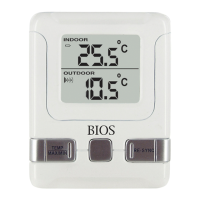
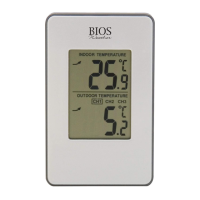
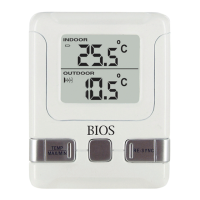
The BIOS Weather Indoor/Outdoor Wireless Thermometer is a device designed to provide accurate temperature readings both indoors and outdoors. It consists of two main components: a monitor and a remote sensor. The monitor displays the indoor temperature, outdoor temperature, battery icon, and a signal detection icon. The remote sensor transmits the outdoor temperature data to the monitor and features a transmission indication LED.
The primary function of this device is to measure and display temperature. It provides real-time indoor and outdoor temperature readings, allowing users to keep track of environmental conditions. The wireless design enables flexible placement of the remote sensor, making it convenient for monitoring outdoor temperatures without needing to run wires. The monitor also records maximum and minimum temperatures, offering a historical overview of temperature fluctuations.
To begin using the thermometer, first insert batteries into the monitor. Then, place the monitor as close as possible to the remote sensor and insert batteries into the remote sensor. Position both units within an effective transmission range, typically 20 to 30 meters (65 to 100 feet). The actual range can be influenced by building materials and the placement of the units, so experimenting with different locations may yield the best results. For accurate outdoor readings, the remote sensor should be placed in a shaded area.
Once the remote sensor is powered up or its RESET button is pressed, it immediately sends a transmission signal to the monitor. The monitor will then search for this signal for up to 3 minutes. Upon successful reception, the dashes (--.-°F) on the monitor's display will change to show the current outdoor temperature. If the outdoor temperature doesn't appear after 3 minutes, press the RE-SYNC button on the monitor to initiate another 3-minute search for the signal.
The monitor displays both indoor and outdoor temperatures. The default temperature unit is Fahrenheit (°F). Users can toggle between Celsius (°C) and Fahrenheit (°F) by pressing the °C/°F button on the monitor.
To view the maximum and minimum temperatures recorded, press the MAX/MIN button. The first press will display the indoor maximum/minimum temperature, and a second press will show the outdoor maximum/minimum temperature. To clear these recorded values, press the CLEAR button while the max/min temperature is displayed for the respective field.
The monitor includes a signal indicator in the outdoor temperature window, which provides visual feedback on the signal status. Dashes (---) indicate "No Signal Detected." A blinking signal icon signifies "Signal Detected," and a solid signal icon means "Successful Reception."
If the display shows dashes (--.-°F) or if the outdoor temperature cannot be received, users should press the RESET button on the monitor. It's also important to ensure that the remote sensor is in direct line of sight with the monitor.
Several factors can interfere with signal reception:
The maximum transmission range is approximately 30 meters (100 feet) in open space. However, this range can vary depending on the surrounding environment and interference levels. The temperature signal travels in a straight line, so obstructions can block it. If reception issues persist despite checking these factors, a full reset of both units (refer to the setup procedure) may be necessary.
Both the monitor and the remote sensor can be mounted on a wall or placed on any flat surface, offering versatility in placement. The remote sensor is splash-proof, designed to withstand splashes but should not be immersed in water or exposed to heavy rain.
To ensure the longevity and accuracy of your thermometer, follow these care guidelines:
The monitor and remote sensor both require AA batteries. For the remote sensor, lithium batteries are recommended during winter months for optimal performance in cold temperatures. The battery life for both units is approximately 12 months. Regular battery replacement will ensure continuous and accurate operation.
The BIOS Weather Indoor/Outdoor Wireless Thermometer comes with a one-year warranty, covering manufacturing defects in materials and workmanship under normal use from the original owner's purchase date. If the product becomes inoperable due to a defect, it can be returned with all components and proof of purchase to the manufacturer's repair department. The warranty does not cover shipping/transport costs, nor does it apply to products subjected to misuse, neglect, rough handling, or damage.
The device complies with Part 15 of the FCC Rules and Industry Canada license-exempt RSS standard(s). Operation is subject to two conditions: (1) the device may not cause harmful interference, and (2) it must accept any interference received, including interference that may cause undesired operation. Users are warned that changes or modifications not expressly approved by the party responsible for compliance could void the user's authority to operate the equipment. The equipment has been tested and found to comply with limits for a Class B digital device, providing reasonable protection against harmful interference in a residential installation. If interference occurs, users are encouraged to try measures such as reorienting the receiving antenna, increasing separation between equipment and receiver, connecting the equipment to a different circuit, or consulting a radio/TV technician for assistance.
 General
| Type | Digital Thermometer |
|---|---|
| Fever Alarm | Yes |
| Memory | Last reading |
| Display | LCD |
| Power Source | 2 x AAA batteries |
| Temperature Range | 32.0°C to 42.9°C (89.6°F to 109.2°F) |
| Accuracy | ±0.2°C (±0.4°F) |