Diagnostics
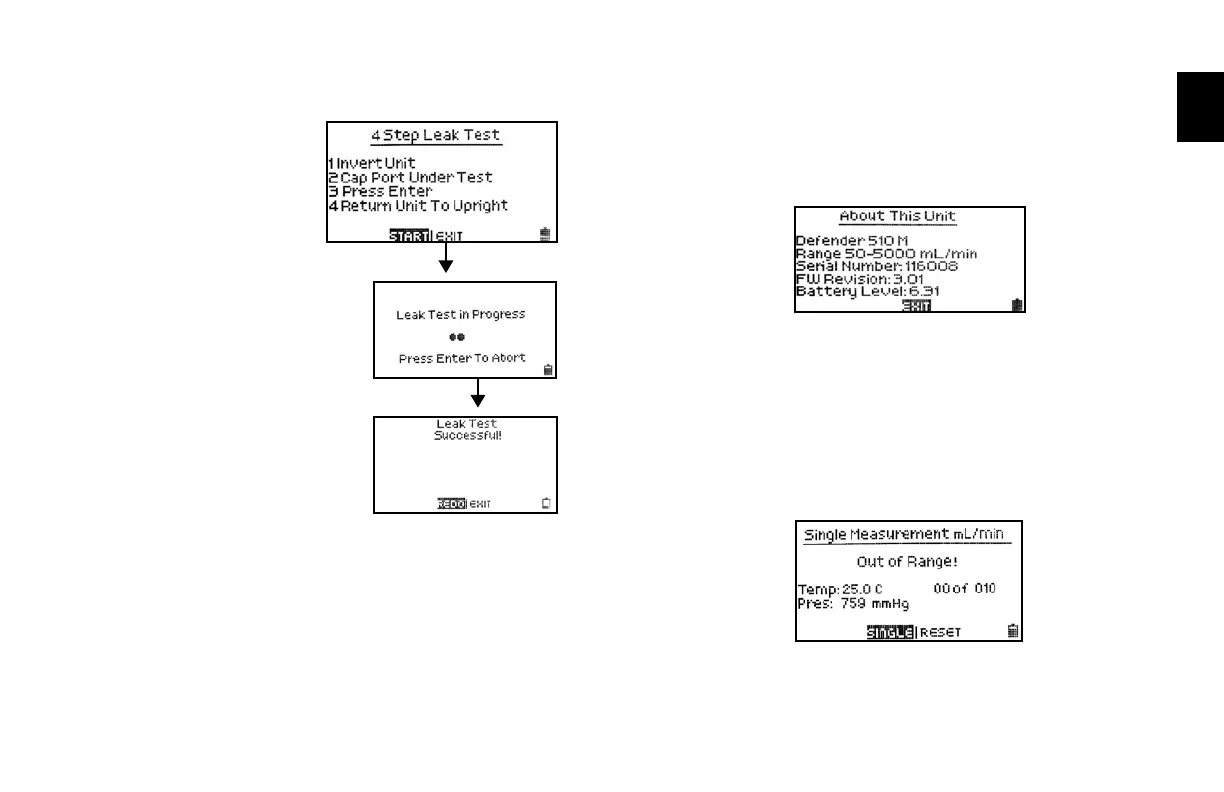
TheDefenderLeakTestisde-
signed only to verify the internal
integrity of the instrument and
alert you to an internal leak.
Werecommendperformingthe
LeakTestonlyasaninterme-
diate quality control check or
whenever the integrity of the
instrument is questioned due to
misuse or accidental damage.
Pleasenotethataleaktest
is not a substitute for a com-
prehensive examination of the
unit’soverallperformance
and it does not ensure that
your Defender is operating
accurately.
• InvertyourDefenderandallowthepistontotraveltothetop
• CaptheportundertestusingtheBiossuppliedleaktestcap.
Leavetheotherportuncapped.
• PressEnteronthecontrolpanelwhiletheunitisstillinverted
• Returntheunitupright.Theleaktestwillprogress
• IfDefenderleaktestisunsuccessful,gotosection
10 Troubleshooting.
• Whentestiscomplete,selectexittoreturntomainmenu.
About
This screen provides basic information about your Defender,
which may be an especially helpful reference when speaking to
a Bios technical support representative or your Bios distributor.
Out of Range
IftheowyouaremeasuringisoutsidetheDefender’sow
range, (see section 7 Defender Specifications for ranges),
the “Out of Range!” warning appears. Immediately lower or
disconnecttheow.Whentheowiswithintheproperrange,
selectRESETtoclearyourDefender’slastmeasurement
2.0



 To Next Page