30 | Chapter 3: UEFI BIOS & Soware
Vivid LED DJ
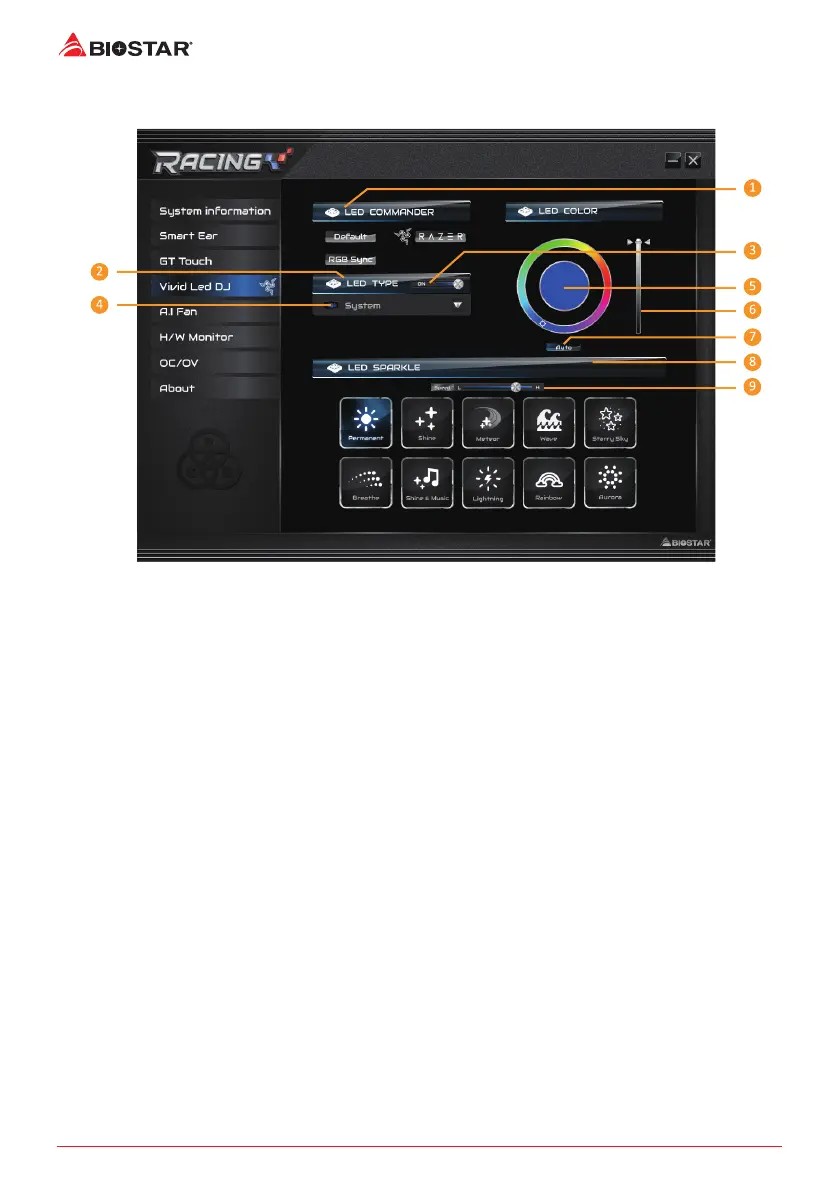
Vivid LED DJ can adjust your color scheme of ARMOR GEAR, RGB LED Device.
1. LED COMMANDER: Allows you to select the LED mode.
• Default : Default LED illuminaons. (Blue light)
• RAZER : Allows you to connect to the RAZER app to sync the motherboard lights.
»
WhenusingRAZERmode,turnoRACINGGTSowareandLEDilluminaonwillreturntothe
defaultstate.
»
RAZERmodeistoachieveLEDilluminaonsynchronizaonthroughtheconneconwithRAZER
soware.
»
RAZERsowaremustbeinstalledtouseRAZERmode.RAZERICONwillappearaerthesowareis
installed.
»
WhenusingRAZERmode,itmustbeusedwithRAZERrelateddevicesandperipheraldevices.
»
RAZERrelatedinformaonpleasegotoRAZERocialwebsitedownload.
• RGB Sync : Allows you to synchronize the LED Type item sengs.
2. LED Type: Select the LED lighng blocks.
• System : System LED illuminaons. (Racing ARMOR)
• 12V LED : The 12V LED illuminaon. (12V_LED Device)
• 5V LED : The 5V LED illuminaon. (5V_LED Device)
• Memory Sync : The RGB Audio LED illuminaon. (Memory LED)
3. ON/OFF: To enable or disable VIVID LED funcon.
4. ON/OFF: Allows you to enable or disable LED of a single item.
5. Color Palee: Allows to you choose specic color of the LEDs.
6. LED Brightness Bar: Allows you to adjust the LED brightness.
7. Auto: LEDs will Automacally change the Color Palee and LED Brightness.
»
IfyouselectAutomode,theColorPalleeandLEDBrightnessBarwilldisabled.




 To Next Page