Chapter 3: UEFI BIOS & Soware | 33
B650MP-E PRO
6. LED SPARKLE: Allows to you choose sparkle of the LEDs.
• Permanent: LEDs are constantly lit.
• Shine: LEDs ash at a specic frequency.
• Breath: LEDs gradually ash on and o.
• Shine & Music: LEDs will ash according the music played on your system.
»
»
Please make sure your speaker or earphone is properly connected to audio jack before using
SILVER LIGHTNING program.
• Meteor: LEDs slide at a specic frequency.
• Wave: LEDs are presented in a water wave rhythm.
• Starry sky: LEDs icker at a specic rhythm.
• Lightning: LEDs ash and slide at a specic frequency.
• Rainbow: LEDs lights to dazzling colorful rhythm.
• Aurora: LEDs shows so light and ickers lightly.
• Starry night: LEDs two-color ashing.
• Colourful Permanent: LEDs are constantly lit with colorful loop.
• Colourful Shine: LEDs ash at a specic frequency with colorful loop.
• Colourful Breathe: LEDs gradually ash on and o with colorful loop.
7. High/Low Speed Switch: Allows you to control the icker speed.
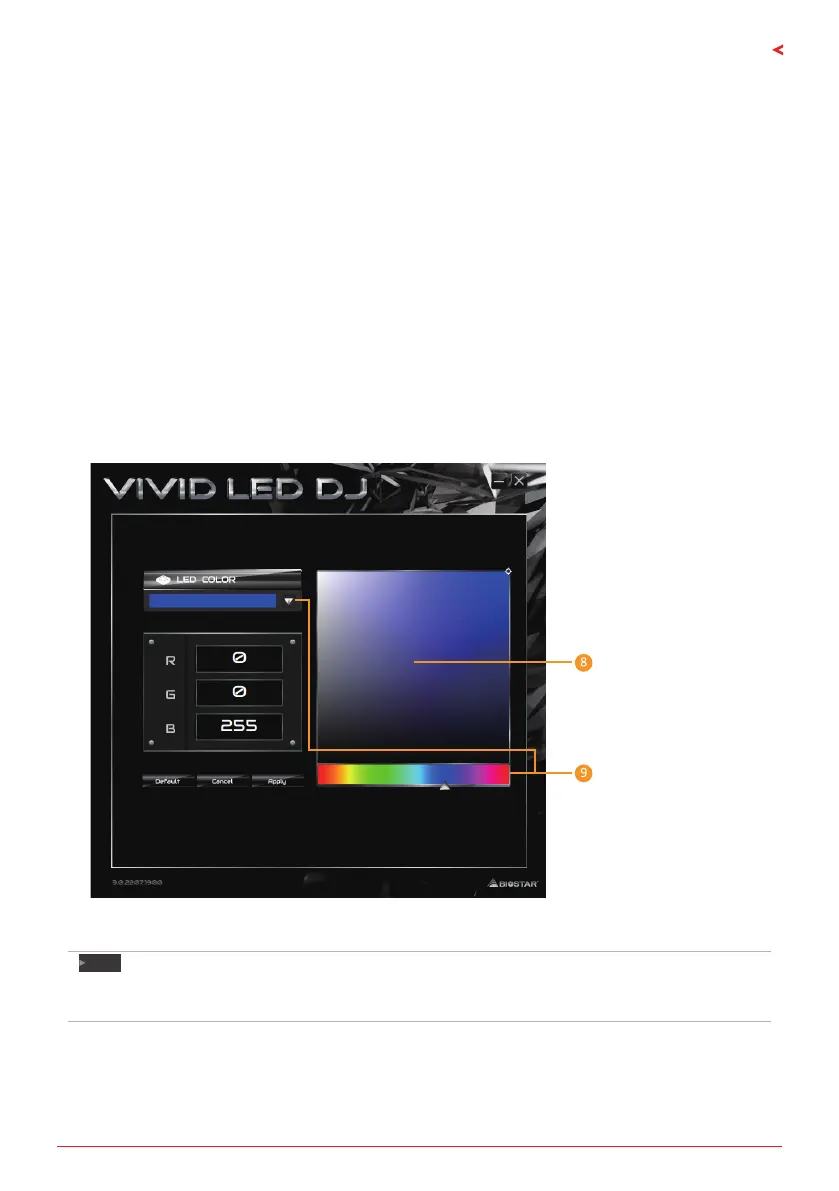
8. LED Brightness Bar: Allows you to adjust the LED brightness.
9. Color Palee: Allows to you choose specic color of the LEDs.
Note
»
»
With VIVID LED DJ users can control the four LED light zones independently with dierent ashing
modes (LED SPARKLE).


 To Next Page