TP55
23
Notices:
Not all types of Intel CPU perform above overclock setting ideally; the difference will be based on the
selected CPU model.
B. Memory Integration Test (M.I.T.)
This function is under “Overclocking Navigator Engine” item.
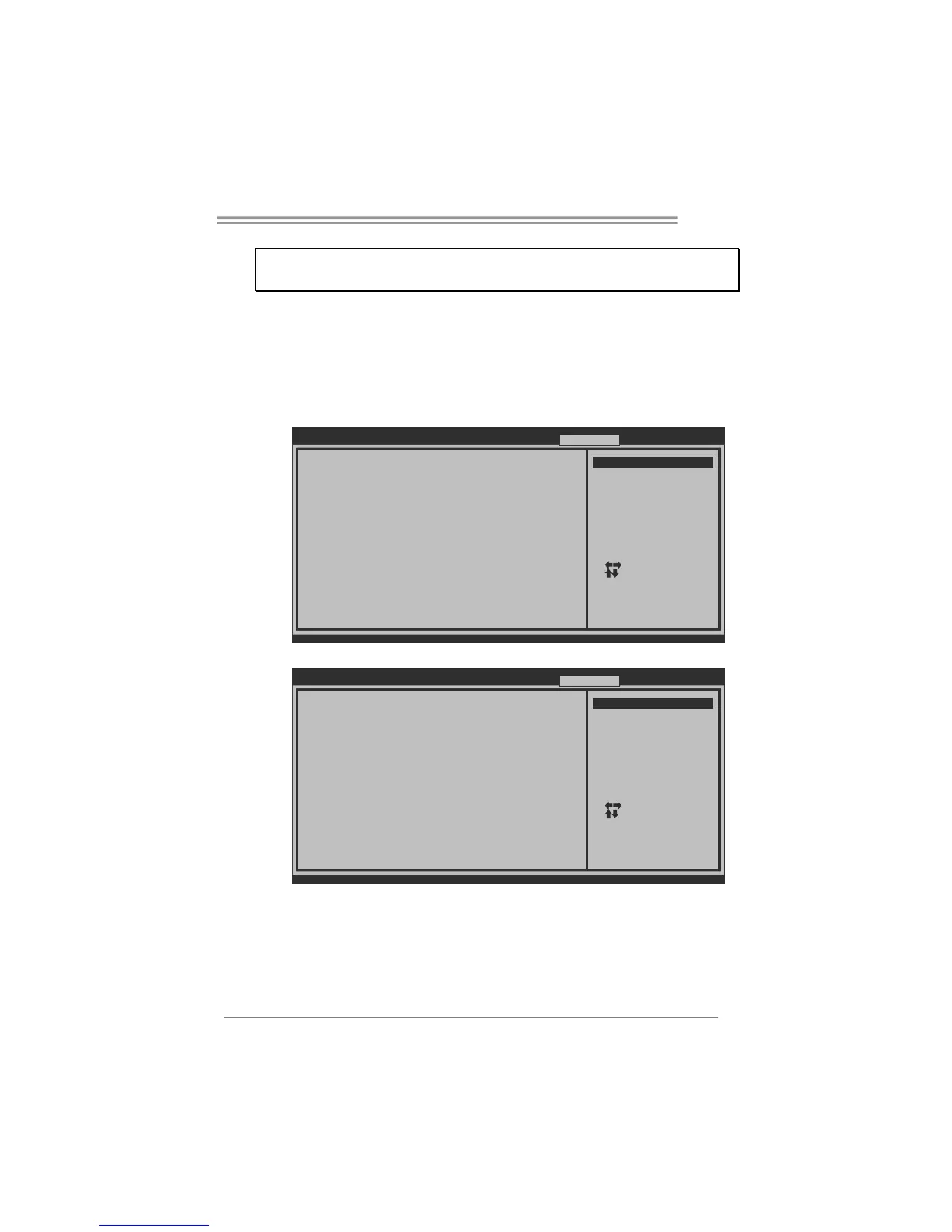
MIT allows users to test memory compatibilities, and no extra devices or
software are needed.
Step 1
The default setting under this item is “HotKey F11”; the condition parameter
should be changed to “Enable” to proceed this test.
BIOS SETUP UTILIT
Main Advanc ed PCIPnP Boot Chipset O.N.E
vxx.xx (C)Copyright 1985-200x, American Megatrends, Inc.
Select Screen
Select Item
Go to Sub Screen
General Help
Sav e an d Exit
Exit
Enter
F1
F10
ESC
after overclocking
=========== Automate OverClock System ===========
============ Manual OverClock System ============
Over-Clocking Navigator [Normal]
> BIOSTAR Memory Insight
> G.P.U Phase Control
Auto OverClock System [V6-Tech Engine]
Current CPU Frequency :
Current Memory Frequency :
Over Clock Retry Count [1]
Intel(R) SpeedStep(tm) tech [Enabled]
CPU Ratio Setting [ x21.0]
CPU Frequency Setting [133]
DRAM Frequency [Auto]
> D RAM Timing Conf ig uration
> Clock Gen Configuration
> Voltage Control
> Intel PPM Configuration
Integrated Memory Test [HotKey F11]
Exit
Options
HotK ey F11
Disa bl ed
Enab le d
↓
BIOS SETUP UTILIT
Main Advanc ed PCIPnP Boot Chipset O.N.E
vxx.xx (C)Copyright 1985-200x, American Megatrends, Inc.
Select Screen
Select Item
Go to Sub Screen
General Help
Sav e an d Exit
Exit
Enter
F1
F10
ESC
after overclocking
=========== Automate OverClock System ===========
============ Manual OverClock System ============
Over-Clocking Navigator [Normal]
> BIOSTAR Memory Insight
> G.P.U Phase Control
Auto OverClock System [V6-Tech Engine]
Current CPU Frequency :
Current Memory Frequency :
Over Clock Retry Count [1]
Intel(R) SpeedStep(tm) tech [Enabled]
CPU Ratio Setting [ x21.0]
CPU Frequency Setting [133]
DRAM Frequency [Auto]
> D RAM Timing Conf ig uration
> Clock Gen Configuration
> Voltage Control
> Intel PPM Configuration
Integrated Memory Test [Enabled]
Exit
Options
HotK ey F11
Disa bl ed
Enab le d
Step 2
Save and Exit from CMOS setup and reboot the system to activate this test.
Run this test for 5 minutes (minimum) to ensure the memory stability.
Step 3
When the process is done, change the setting back from “Enable” to “Disable”
to complete the test.






 To Next Page