EasyManua.ls Logo

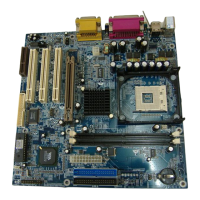
Biostar U8668-D - User Manual

Biostar U8668-D
71 pages
Print Icon
To Next Page IconTo Next Page
Loading...
U
UU
8
88
6
66
6
66
8
88
-
--
D
DD
i
FCC Information and Copyright
This equipment has been tested and found to comply with the limits of a
Class B digital device, pursuant to Part 15 of the FCC Rules . T hese limits
are designed to provide reasonable protection against harmful
interference in a residential installation. This equipment generates, uses
and can radiate radio frequency energy and, if not installed and used in
accordance with the instructions, may cause harmful interference to radio
communications. There is no guarantee that interference will not occur in
a partic ular installation.
The vendor makes no representations or warranties with respect to the
contents here of and specially disclaims any implied
warranties of
merchantability or fitness for any purpose. Further the vendor reserves
the right to revise this publication and to make changes to the contents
here of without obligation to notify any party beforehand.
Duplication of this publication, in part or in whole, is not allowed without
first obtaining the vendor’s approval in writing.
The content of this users manual is subject to be changed without notice
and we will not be responsible for any mistakes found in this user’s
manual. All the brand and product names are trademarks of their
respective companies.


Table of Contents

Questions and Answers

  • A
    Anne HernandezAug 15, 2025
    What to do if Biostar U8668-D Motherboard shows “Invalid Configuration” or “CMOS Failure”?
    • L
      Lisa DavisAug 15, 2025
      If your Biostar Motherboard displays an “Invalid Configuration” or “CMOS Failure” message, review your system's equipment and ensure the correct information is in the setup.
  • C
    crystalmorrisAug 18, 2025
    What to do if Biostar U8668-D Motherboard only boots from optical drive?
    • J
      James FloresAug 18, 2025
      If your Biostar Motherboard only boots from the optical drive, but the hard disk can be read and applications used, back up your data and application files, reformat the hard drive, and reinstall applications and data using backup disks.
  • H
    henrylewisAug 21, 2025
    How to fix Biostar Motherboard that cannot boot after installing second hard drive?
    • B
      Benjamin YangAug 21, 2025
      If you cannot boot your Biostar Motherboard system after installing a second hard drive, set the master/slave jumpers correctly. Then, run the SETUP program and select the correct drive types. For compatibility issues with other drives, contact the drive manufacturers.
  • M
    Marissa SotoAug 25, 2025
    How to fix Biostar U8668-D with no power?
    • S
      Sean NunezAug 25, 2025
      If there is no power to your Biostar Motherboard system, the power light doesn’t illuminate, and an inside power supply does not turn on, ensure the power cable is securely plugged in. If it is, try replacing the cable.
  • M
    Martin DanielsAug 27, 2025
    What to do if Biostar U8668-D Motherboard has no power at all?
    • J
      Jacqueline RichardsonAug 28, 2025
      If your Biostar motherboard has no power, and the power light doesn't illuminate, the fan inside the power supply doesn't turn on, and the indicator light on the keyboard doesn't turn on, ensure the power cable is securely plugged in. If that doesn't work, try replacing the power cable.
  • M
    morganlawrenceAug 30, 2025
    What to do if Biostar U8668-D system does not boot from hard disk drive?
    • I
      Ian WalkerAug 30, 2025
      If your Biostar motherboard system does not boot from the hard disk drive but can boot from the CD-ROM drive, check the cable running from the disk to the disk controller board, making sure both ends are securely plugged in. Also, check the drive type in the standard CMOS setup. Backing up the hard drive is extremely important, as all hard disks are capable of breaking down at any time.
  • A
    Alan MorrisSep 2, 2025
    Why Biostar Motherboard system is inoperative, but keyboard lights are on?
    • K
      Kim SinghSep 2, 2025
      If your Biostar motherboard system is inoperative but the keyboard lights are on, the power indicator lights are lit, and the hard drive is spinning, press down firmly on both ends of the DIMM until the module snaps into place, using even pressure.
  • B
    Benjamin PaulSep 5, 2025
    What to do if Biostar U8668-D Motherboard system only boots from CD-ROM?
    • N
      Nicholas PatelSep 5, 2025
      If your Biostar motherboard system only boots from CD-ROM, but the hard disk can be read and applications can be used, back up data and application files. Then, reformat the hard drive and re-install applications and data using backup disks.
  • M
    Matthew JeffersonSep 8, 2025
    What to do if after installing second hard drive Biostar U8668-D cannot boot?
    • M
      Mallory GonzalezSep 8, 2025
      If your Biostar motherboard cannot boot after installing a second hard drive, set master/slave jumpers correctly and run the SETUP program to select the correct drive types.
  • M
    Michael HerreraSep 12, 2025
    What to do if Biostar U8668-D Motherboard screen message says “Invalid Configuration” or “CMOS Failure.”?
    • M
      mcdaniellisaSep 12, 2025
      If your Biostar motherboard displays an “Invalid Configuration” or “CMOS Failure” message, review the system’s equipment and ensure the correct information is in the setup.

Summary

FCC Compliance Information

Motherboard Components and Features

Core Component Specifications

Details CPU, Chipset, Memory, Super I/O, and slot types supported.

Onboard Peripherals and Connectivity

Covers sound, LAN, IDE, floppy, USB, and other onboard devices.

Motherboard Layout and Connectors

Visual guide to component placement and back panel connectors.

System Installation and Configuration

CPU and Memory Installation

Step-by-step guide for installing CPU and DDR memory modules.

Internal and External Connectors

Describes IDE, floppy, PCI slots, USB, power, and audio headers.

Power Source and Jumper Settings

Details jumper settings for power source selection for KB/MS and USB.

Troubleshooting and Software Utilities

Common Hardware Troubleshooting

Solutions for power, boot, configuration, and drive installation issues.

WarpSpeeder Utility Guide

Installation, usage, and features of the WarpSpeeder performance utility.

BIOS Setup and Management

BIOS Introduction and Navigation

Overview of Award BIOS, its features, and how to navigate the setup utility.

Core System Configuration

Details CMOS settings, CPU features, Chipset controls, and Peripherals.

Advanced System Management

Covers Power Management, PnP/PCI, PC Health Status, and Frequency Control.

Biostar U8668-D Specifications

General IconGeneral
Form FactorATX
Socket TypeSocket 478
Maximum Memory2 GB
Memory TypeDDR SDRAM
USB Ports4 x USB 2.0
Memory Slots2 x DIMM
Onboard AudioAC'97
Onboard LAN10/100Mbps
Storage Interfaces2 x SATA, 2 x IDE

Related product manuals