10 | Chapter 2: Hardware installaon
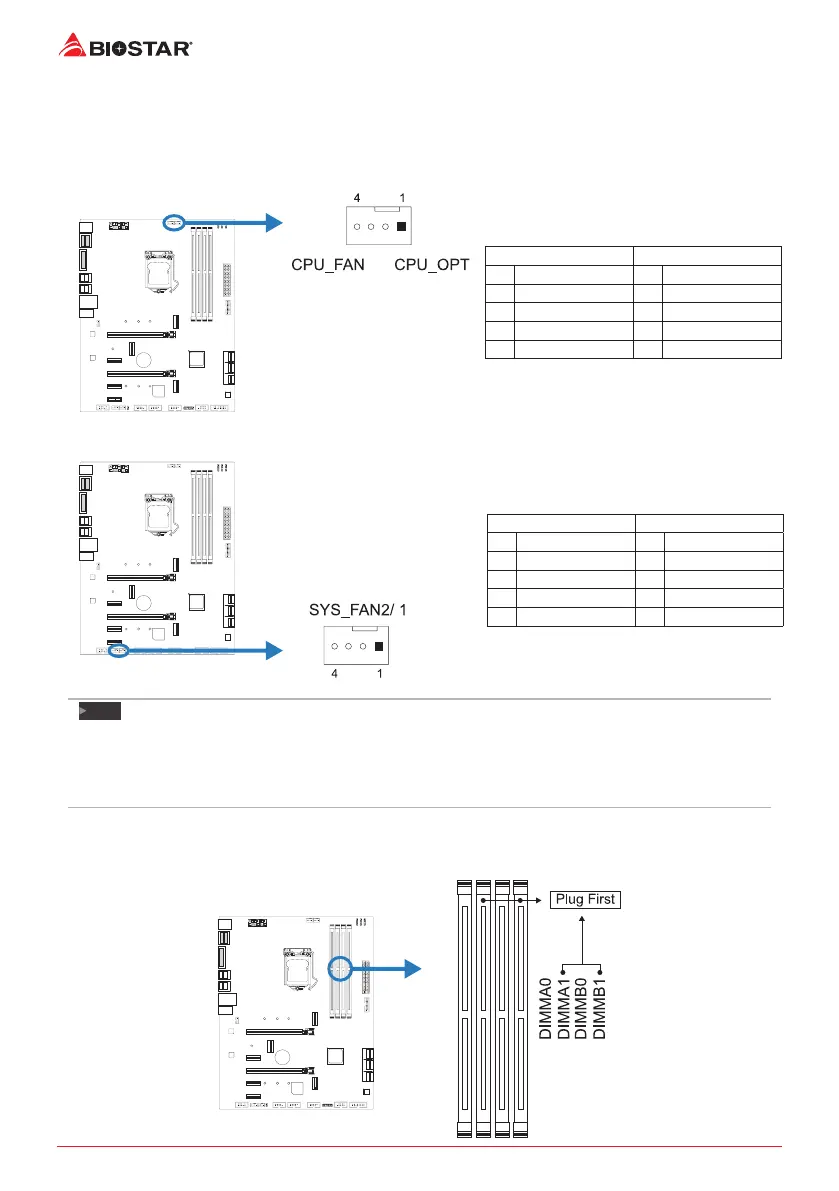
2.3 Connect Cooling Fans
These fan headers support cooling-fans built in the computer. The fan cable and connector
may be dierent according to the fan manufacturer.
CPU_FAN/ CPU_OPT: CPU Fan Header
PWM Mode DC Mode
Pin Assignment Pin Assignment
1 Ground 1 Ground
2 +12V 2 Voltage Control
3 Sense 3 Sense
4 Speed Control Signal 4 NC
SYS_FAN1/ SYS_FAN2: System Fan Header
PWM Mode DC Mode
Pin Assignment Pin Assignment
1 Ground 1 Ground
2 +12V 2 Voltage Control
3 Sense 3 Sense
4 Speed Control Signal 4 NC
Note
»
CPU_FAN,CPU_OPT,SYS_FAN1/2support4-pinand3-pinheadconnectors.Whenconnecngwith
wiresontoconnectors,pleasenotethattheredwireistheposiveandshouldbeconnectedto
pin#2,andtheblackwireisGroundandshouldbeconnectedtopin#1(GND).
»
CPUFanHeader(CPU_OPT):SupportwatercoolingfanandCPUfan.
2.4 Install System Memory
DDR4 Modules



 To Next Page