Chapter 3: UEFI BIOS & Soware | 33
Z490A-SILVER
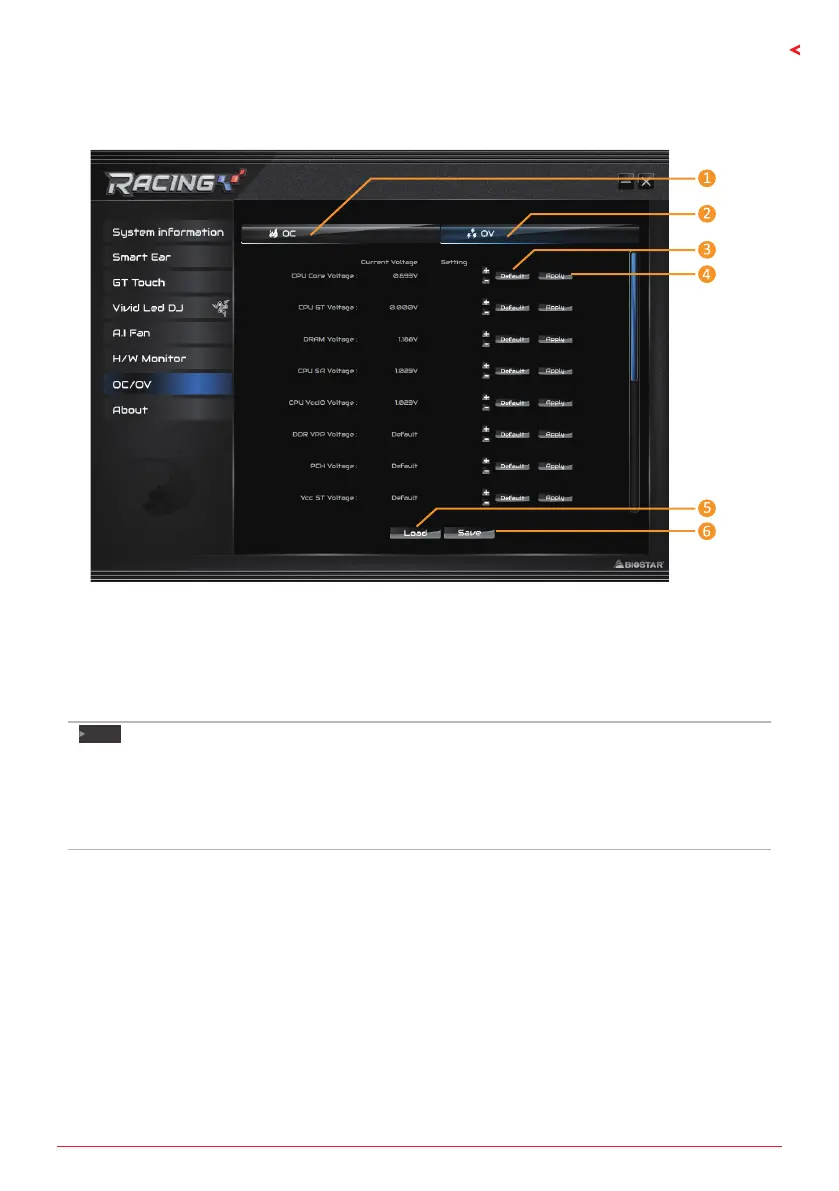
OC/OV
The OC/OV tab allows you to save or load the OC/OV seng proles, change system
frequency and voltage sengs.
1. OC: Allows you to adjust overclocking prole values.
2. OV: Allows you to adjust voltage prole values.
3. Default: Restore defaults your changes.
4. Apply: Apply your changes.
5. Load: Load the prole values from the le.
6. Save: Store the prole values for future use.
Note
»
NotalltypesofCPUperformaboveoverclocksengideally;thedierencewillbebasedonthe
selectedCPUmodel.
»
Overclockisanoponalprocess,butnota“must-do”process;itisnotrecommendedfor
inexperiencedusers.Therefore,wewillnotberesponsibleforanyhardwaredamagewhichmaybe
causedbyoverclocking.Wealsowouldnotguaranteeanyoverclockingperformance.



 To Next Page