15
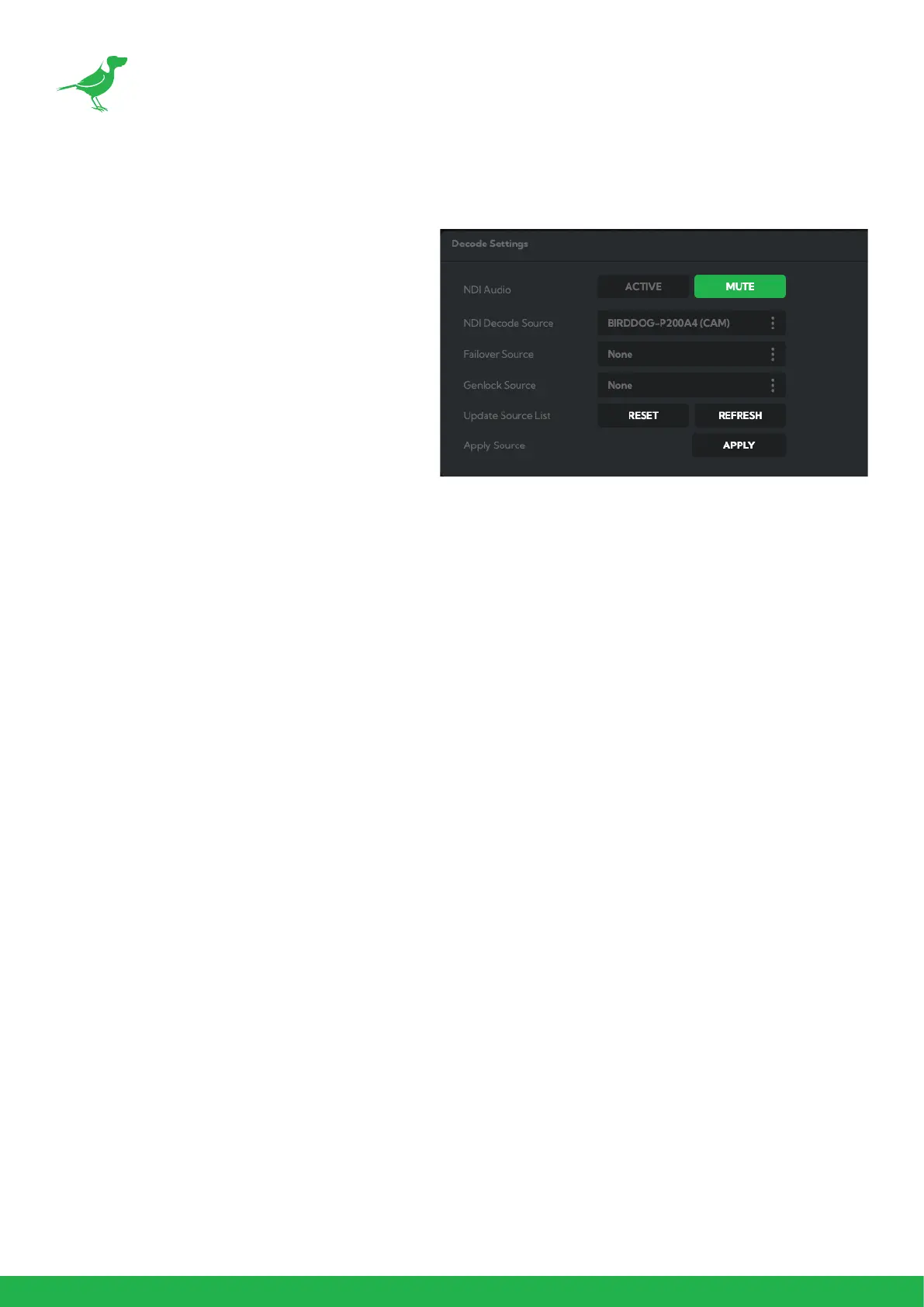
Decode Settings
NDI Audio
Click the Mute button to disable the incoming
NDI® stream audio.
NDI Decode Source
Select an available NDI® source from the Available
NDI Sources dropdown list and Click the Apply
button to apply the change. You can update this
list by clicking the Refresh button.
Failover Source
If the generated NDI® stream is interrupted for
any reason the receiver can automatically switch
to a nominated alternative NDI® stream. This is
particularly useful for live productions where there
can be no risk of black being broadcast should any
source no longer be available. Select an available
NDI® source for the failover function from the Available NDI Sources dropdown list. Click the Reset button to reset
this list to display only active streams, or click the Refresh button to add new streams to the current list.
Genlock Source
Click the dropdown to choose your genlock source.
Apply Source
Click the Apply button to save your changes.


 To Next Page