Getting Started / 05
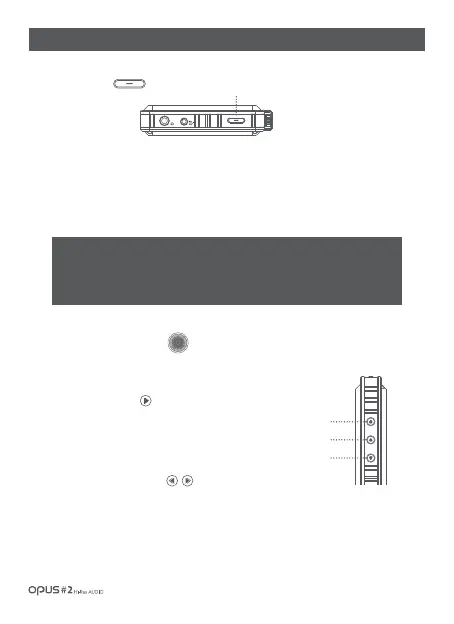
| Button operation and functioning
※ Caution! Read carefully. (Reset Function)
1. If the device shows signs of unexpected failure, freeze, press the power button for
more than 10 seconds to force a shutdown and reset the device.
2. Do not use this reset function an any other case besides the device failure and freeze.
Volume control (Wheel)
1. Volume may be adjusted within 0-150 steps by turning the Volume wheel.
Play/Pause button
1. Press the Play/Pause button to play a song. Press the Play/
Pause button to pause a song if being played.
1. Turning power On/Off :
Long press (over 2 secs.) the Power button to turn on the device.
While the device is on, long press the Power button (over 2 sec.) to turn off the device.
1. Short press Previous button to start a song from the beginning
and a short press Previous button (within 5 seconds) again to play
a previous song.
2. Press Next button to play next song.
Previous/Next buttons
Power
2. Turning the screen On/Off :
While the screen is on, press the Power button to turn off the screen.
Press the button again to turn off the screen.
Power
Previous
Next
Play/Pause



 To Next Page