Using the device
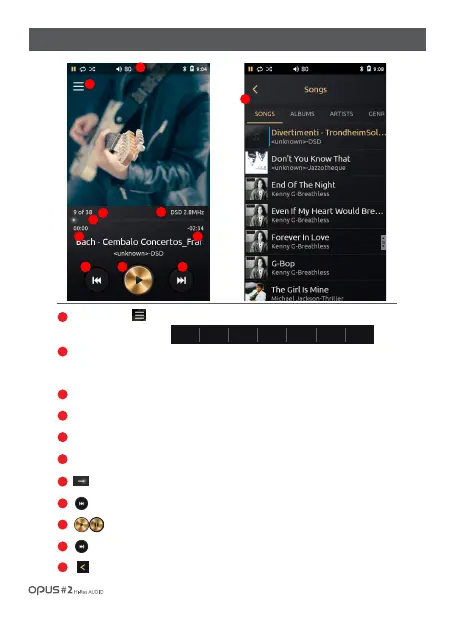
Press the icon [ ] to enter the music library (Songs, Albums, Artists, Genres, Folders,
Favorite, Playlists) menu.
‘Status Bar’ : Device settings and operation display.
Drag ‘Status Bar’ down to enter the Quick settings menu for Wi-Fi,
Bluetooth, line out, Equalizer, Repeat, Shuffle, Sleep settings.
Number of all songs and currently playing song.
File information.
Song progress time.
Song’s remaining time.
Progress bar. Drag the indicator to move to the desired time.
Press to play previous song.
Play or pause the current song.
Press to play next song.
Press the icon or select a desired song from the list to go back to the Playback screen.
/ 12
| Home screen and playback screen(1)
1
2
3
4
5
6
7
8
9
10
11
1
2
3
4
5
6
7
9
8
10
SONGS ALBUMS ARTISTS GENERS FOLDERS FAVORITES PLAYLISTS
11



 To Next Page