Using the device
/ 23
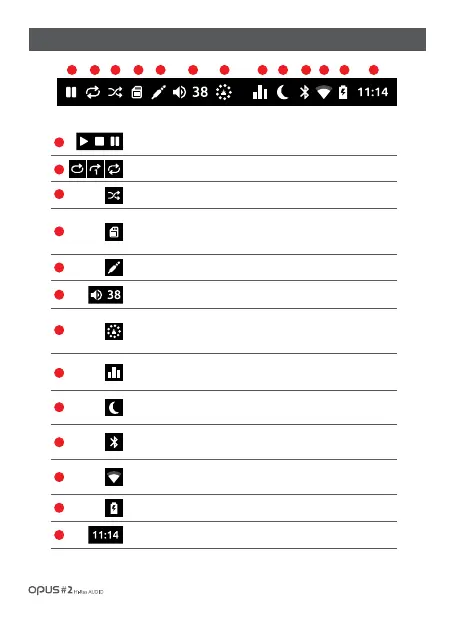
| Notification bar screen
Play or pause the current song. Sequential play, pause, stop.
Repeat mode.
Shuffle mode.
Displays the external memory card inserted.
(Icon is not shown if memory card is absent.)
Displays the Line out setting.
Displays the current volume from 0 to 150.
Displays the media scanning process (Micro SD card), database formation
and file loading. Scanning time may differ depending on media content capacity
and number of files.
Displays the Equalizer on (EQ) status. Refer to ‘System settings’ screen
for detailed steps.
Displays the Sleep mode. Refer to ‘System settings’ screen for detailed steps.
Bluetooth. Icon shows if Bluetooth is activated. Refer to ‘System settings screen’
for detailed information.
1
2
3
4
5
6
7
8
9
10
1 2 3 4 5 6 7 8 9 10 11 12 13
Wireless Network (Wi-Fi). Icon shows if Wi-Fi is activated. Refer to ‘System
settings screen’ for detailed information.
11
Displays the battery charging status.
Displays the current time.
12
13



 To Next Page