EasyManua.ls Logo

BITMAIN ANTMINER S19 Pro+ Hydro - User Manual

BITMAIN ANTMINER S19 Pro+ Hydro
17 pages
Print Icon
To Next Page IconTo Next Page
Loading...
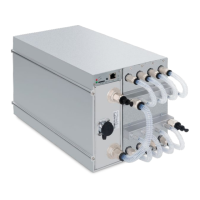
S19 Pro+ Hydro Server
Installation Guide
Document Version 1.0
Feb. 2022
© Copyright Bitmain Technologies Holding Company 2007 2022. All rights reserved.
Bitmain Cayman (hereinafter referred to as ‘Bitmain’) reserves the right to make corrections, modifications, enhancements,
improvements, and other changes to its products and services at any time and to discontinue any product or service without notice.
Customers should obtain the latest relevant information before placing orders and should verify that such information is current and
complete. All products are sold subject to Bitmain's terms and conditions of sale supplied at the time of order acknowledgment.
Bitmain warrants performance of its products to the specifications applicable at the time of sale in accordance with Bitmain's standard
warranty. Testing and other quality control techniques are used to the extent Bitmain deems necessary to support this warranty.
Except where mandated by government requirements, testing of all parameters of each product is not necessarily performed.
Bitmain assumes no liability for third-party applications assistance. Customers are responsible for their products and applications
using Bitmain components. To minimize the risks associated with customer products and applications, customers should provide
adequate design and operating safeguards.
Bitmain does not warrant or represent that any license, either express or implied, is granted under any Bitmain patent right, copyright
or other Bitmain intellectual property right relating to any combination, machine, or process in which Bitmain products or services
are used. Information published by Bitmain regarding third-party products or services does not constitute a license from Bitmain to
use such products or services or a warranty or endorsement thereof. Use of such information may require a license from a third party
under the patents or other intellectual property of the third party, or a license from Bitmain under the patents or other intellectual
property of Bitmain.
Resale of Bitmain products or services with statements different from or beyond the parameters stated by Bitmain for that product
or service voids all express and any implied warranties for the associated Bitmain product or service and is an unfair and deceptive
business practice. Bitmain is not responsible or liable for any such statements.
All company and brand products and service names are trademarks or registered trademarks of their respective holders.
Question and Answer IconNeed help?

Do you have a question about the BITMAIN ANTMINER S19 Pro+ Hydro and is the answer not in the manual?

Summary

Overview of S19 Pro+ Hydro Server

S19 Pro+ Hydro Server Components

Identifies and illustrates the main physical components of the S19 Pro+ Hydro server.

Specifications

Details the technical specifications, including performance, power, and environmental requirements.

Setting Up the Server

Configuring the Server

Setting up the Pool

Configures the mining pool details including address, worker ID, and password.

Monitoring Your Server

Administering Your Server

Checking Your Firmware Version

Verifies the current firmware version installed on the server.

Upgrading Your System

Provides instructions on how to update the server's firmware to the latest version.

Modifying Your Password

Guides users on how to change the login password for the server.

Restoring Initial Settings

Explains the process to reset the server back to its original factory settings.

Environmental Requirements

Climatic Conditions

Specifies optimal temperature, humidity, and altitude for server operation.

Site Requirements of the Server Running Room

Details site selection criteria, including pollution and proximity to water bodies.

Electromagnetic Environmental Conditions

Defines safe distances from electromagnetic interference sources.

Requirements of Mechanical Active Substances

Lists acceptable limits for airborne particles like sand and dust.

Requirements of Corrosive Gas

Specifies maximum allowable concentrations for various corrosive gases.

Regulations

FCC Notice

Details FCC compliance rules and operational conditions for the device.

EU WEEE Disposal

Provides guidance on the proper disposal of electronic waste in the EU.

Taiwan ROHS

Lists compliance with Taiwan's Restriction of Hazardous Substances regulations.

Overview

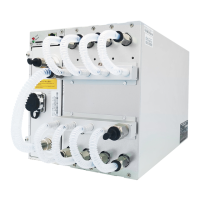
The S19 Pro+ Hydro Server is a high-performance mining device manufactured by Bitmain, designed for cryptocurrency mining, specifically for SHA256/BTC/BCH algorithms. It is part of the 19 hydro server series, indicating its reliance on a liquid cooling system for optimal operation. The server is designed for ease of setup, as all units are tested and configured prior to shipping.

Function Description

The primary function of the S19 Pro+ Hydro Server is to perform cryptocurrency mining operations using the SHA256 algorithm. This involves solving complex computational problems to verify transactions on a blockchain, for which miners are rewarded with cryptocurrency. The "Hydro" designation signifies its advanced liquid cooling system, which is crucial for maintaining stable operating temperatures and maximizing efficiency, especially given the high power consumption and heat generation typical of such devices. The server operates in conjunction with the ANTSPACE HK3, a dedicated cooling solution, for effective thermal management.

Important Technical Specifications

The S19 Pro+ Hydro Server comes in several versions, offering varying hashrates and power efficiencies.

  • Model: j0-10
  • Crypto Algorithm/Coins: SHA256/BTC/BCH
  • Hashrate (TH/s): Ranges from 170 ± 3% to 198 ± 3%, depending on the specific version.
  • Power on wall @Tj65°C (Watt): Ranges from 4675 ± 5% to 5445 ± 5%.
  • Power efficiency on wall @Tj65°C (J/TH): Consistently 27.5 ± 5% across all versions.

Power Supply (APW11):

The server integrates the APW11 power supply, which is specifically designed for this unit.

  • AC Input Voltage: 342~418 Volt
  • AC Input Frequency Range: 47~63 Hz
  • AC Input Current: 30 Amp (three-phase AC input, 10A per wire)

Hardware Configuration:

  • Network Connection Mode: RJ45 Ethernet 10/100M
  • Server Size (LengthWidthHeight, w/o package): 410196209 mm
  • Server Size (LengthWidthHeight, with package): 570316430 mm
  • Net Weight: 15.2 kg
  • Gross Weight: 17.5 kg

Environmental Requirements:

The server has specific environmental requirements to ensure optimal performance and longevity.

  • Operation Temperature: 0~40°C
  • Inlet Water Temperature: 20-40°C
  • Water Flow: 8 ± 10% L/min
  • Water Pressure: ≤ 3.5 bar
  • Storage Temperature: -20~70°C
  • Operation Humidity (non-condensing): 10~90% RH
  • Operation Altitude: Recommended below 2000m

Environmental Site Requirements:

  • Pollution Sources: Keep away from industrial pollution sources (e.g., smelters, coal mines, chemical industries, rubber/electroplating, food factories, leather processing). Specific distances are recommended: >5km for heavy pollution, >3.7km for moderate, >2km for light. If unavoidable, choose a perennial upwind direction.
  • Seaside/Salt Lake: Do not set location within 3.7km from seaside or salt lake. If unavoidable, build as airtight as possible with air conditioning.
  • Electromagnetic Conditions: Keep away from transformers, high-voltage cables, transmission lines, and high-current equipment. No high-power AC transformers (>10KA) within 20 meters, no high-voltage power lines within 50 meters, and no high-power radio transmitters (>1500W) within 100 meters.
  • Dust: The running room must be free of explosive, conductive, magnetically conductive, and corrosive dust. Specific limits for mechanical active substances: Sand <= 30mg/m³, suspended dust <= 0.2mg/m³, deposited dust <= 1.5mg/m²h.
  • Corrosive Gas Limits (ppb): H2S < 3, SO2 < 10, Cl2 < 1, NO2 < 50, HF < 1, NH3 < 500, O3 < 2.

Usage Features

  • Easy Setup: The server is pre-configured and tested, simplifying the initial setup process.
  • IP Reporting Tool: Bitmain provides an IPReporter.zip tool for Microsoft Windows to easily discover the server's IP address on the network. This tool allows users to identify the server's location (shelf, step, position) in a farm environment or use a default setting for home use.
  • Web-based Management Interface: The server features a web-based interface for configuration and monitoring. Users can access this interface by entering the server's IP address in a web browser.
  • Mining Pool Configuration: Users can configure up to three mining pools with decreasing priority. The server will automatically switch to lower-priority pools if higher-priority ones become offline. This ensures continuous mining operation.
  • Static IP Assignment: The management interface allows users to assign a static IP address, subnet mask, gateway, and DNS server for network stability.
  • Firmware Management: The system provides options to check the current firmware version and upgrade it through the web interface.
  • Password Modification: Users can change the login password for the server's management interface.
  • Initial Settings Restoration: A physical reset button on the control panel allows users to restore the server to its default settings.

Maintenance Features

  • Monitoring Dashboard: The web-based dashboard provides real-time monitoring of the server's operating status, including:
    • Number of chips detected in the chain.
    • ASIC frequency setting (fixed at 505 MHz for S19 Pro+ Hydro).
    • Real-time Hashrate of each hash board (GH/s).
    • Inlet and Outlet Water Temperatures (°C).
    • Chip state (indicated by green for normal, red for abnormal).
  • Error Handling: The firmware is designed to stop running if the PCB temperature reaches 75°C or if the water temperature is outside the 20-45°C range, displaying a "Fatal Error: Temperature is too high!" message in the Kernel log. This protective measure prevents damage to the hardware.
  • Firmware Upgrade: The ability to upgrade firmware through the web interface allows for performance improvements, bug fixes, and security updates. It is crucial to ensure uninterrupted power during this process to avoid bricking the device.
  • Reset Functionality: The physical reset button provides a way to revert to default settings, which can be useful for troubleshooting or reconfiguring the device. A successful reset is indicated by the red LED flashing once every 15 seconds.
  • Liquid Cooling System: The integrated liquid cooling system is a key maintenance feature, as it efficiently dissipates heat, reducing the risk of overheating and extending the lifespan of the components. Proper monitoring of inlet water temperature and water flow is essential for its effectiveness.
  • Regulatory Compliance: The device complies with FCC Rules (Part 15) and EU WEEE directives, ensuring responsible disposal and environmental protection. It also adheres to Taiwan RoHS requirements regarding hazardous substances.

BITMAIN ANTMINER S19 Pro+ Hydro Specifications

General IconGeneral
BrandBITMAIN
ModelANTMINER S19 Pro+ Hydro
CategoryServer
LanguageEnglish

Related product manuals